

 kwanghoon
How to run on windows 7
Hello there is no real or easy explanation about how to run this on windows i have Java installed and i see some jar files , i can run Blockly editor via browser ..but what i need to run to get examples in editor ? I download whole packet 130mb ?

@aurelVZ There is a quick start guide: https://github.com/kwanghoon/MySmallBasic/wiki/Quick-Start-Guide Please run the batch file: run.bat. If it does not work, you may have to look at a java path set up problem.
Anyway, I should admit that it is necessary to have a better way to install and to run it.

hello kwang Yes .it is not possibile to run MySmallBasic with run.bat ...is that mean that file must be on C disk or something? I don't see how java path might be problem because other jar files anywhere on computer work well.
by the way you are welcome to my forum Basic4All http://basic4all.info8-hosting.info/index.php
@aurelVZ
Oh, I am sorry for the inconvenience.
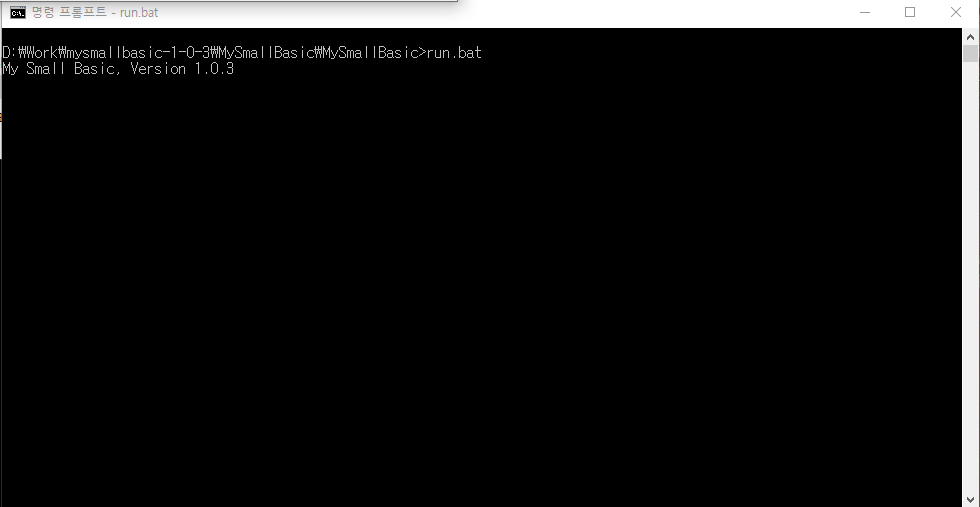
This is a bit strange. I tried today, and I have no problem as the screenshot shows.

Would you please try to run it by command in a Dos terminal instead of mouse -clicking in the GUI? This would shows some error messages. Please let me know the error messages.
There should have no error message as the following screenshot shows:
hello ..i posted on forum too... i will try to run from cmd ...but i am too stupid for consolas programs
@aurelVZ
Let me write down more precise steps to run it for console programs.
Step1. Please download mysmallbasic-1-0-3.zip in C:\MyDir.
(I assume there is a directory C:\MyDir.)
Step2. Unzip the zip file onto C:\MyDir.
(You now have a new directory C:\MyDir\mysmallbasic-1-0-3\MySmallBasic)
Step3. Launch a Dos command console.
Step4. cd C:\MyDir\mysmallbasic-1-0-3\MySmallBasic
Step5. run.bat
Please try this procedure again. If it still does not work, please try to find any error messages in the Dos command console, and let me know them.
Hope this will help you.
Kwanghoon
@aurelVZ Oh, it was on Windows 7. Actually, I haven't tested on it. I just assumed Windows 10. Would this be the reason for your problem, though I don't have a big difference from the perspective of MySmallBasic, a Java program.