

 kubevirt
stuck trying to compile a simple java souce code in kubevirt vm
What happened:
I have a cluster, which do not support hardware emulation, so use software emulation ,it like this,
 then run a vm(centos7) in cluster, like this,
 after a while, vm in running, but when i use javac to compile a very simple java code, it stuck forever,
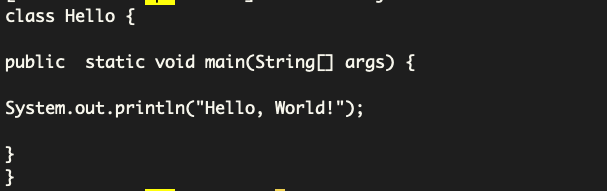

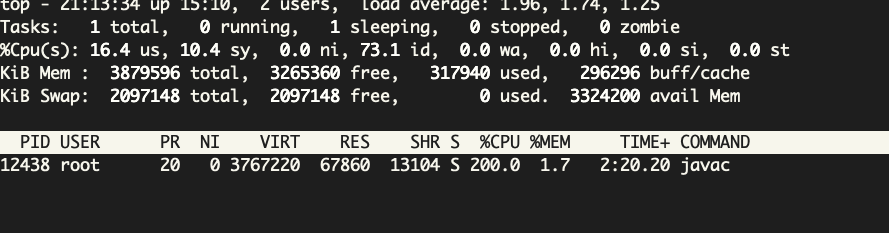
why ? Does this have anything to do with software simulation?
What you expected to happen: javac can compile the java source code without stucking
How to reproduce it (as minimally and precisely as possible): Steps to reproduce the behavior.
Additional context: Add any other context about the problem here.
Environment:
- KubeVirt version (use
virtctl version): Client Version: version.Info{GitVersion:"v0.39.0", GitCommit:"6493f7130788fc2242f0ebbda2ace06dc12a4ad0", GitTreeState:"clean", BuildDate:"2021-03-10T15:29:59Z", GoVersion:"go1.13.14", Compiler:"gc", Platform:"linux/amd64"} Server Version: version.Info{GitVersion:"v0.37.1-dirty", GitCommit:"f270b5befe16c20a11c34f22efecf2407f9591bc", GitTreeState:"dirty", BuildDate:"2021-01-21T20:13:15Z", GoVersion:"go1.13.14", Compiler:"gc", Platform:"linux/amd64"} - Kubernetes version (use
kubectl version): Client Version: version.Info{Major:"1", Minor:"19", GitVersion:"v1.19.9", GitCommit:"9dd794e454ac32d97cde41ae10be801ae98f75df", GitTreeState:"clean", BuildDate:"2021-03-18T01:09:28Z", GoVersion:"go1.15.8", Compiler:"gc", Platform:"linux/amd64"} Server Version: version.Info{Major:"1", Minor:"19", GitVersion:"v1.19.9", GitCommit:"9dd794e454ac32d97cde41ae10be801ae98f75df", GitTreeState:"clean", BuildDate:"2021-03-18T01:00:06Z", GoVersion:"go1.15.8", Compiler:"gc", Platform:"linux/amd64"} - VM or VMI specifications: apiVersion: kubevirt.io/v1alpha3 kind: VirtualMachine metadata: name: centos7-cpu-test namespace: bom-vir spec: running: false template: metadata: annotations: descheduler.alpha.kubernetes.io/evict: "true" labels: kubevirt.io/domain: u18 special: key11 spec: domain: cpu: cores: 2 devices: inputs: - bus: usb type: tablet name: tablet1 disks: - bootOrder: 1 disk: bus: sata name: pvcdisk - bootOrder: 2 cdrom: bus: sata name: cdromiso #- disk: {} #name: app-config-disk # serial: CVLY623300HK240D machine: type: q35 resources: requests: memory: 4Gi volumes: - name: cdromiso persistentVolumeClaim: claimName: iso-linux - name: pvcdisk persistentVolumeClaim: claimName: centos7-cpu-test
- Cloud provider or hardware configuration: N/A
- OS (e.g. from /etc/os-release): NAME="CentOS Linux" VERSION="7 (Core)" ID="centos" ID_LIKE="rhel fedora" VERSION_ID="7" PRETTY_NAME="CentOS Linux 7 (Core)" ANSI_COLOR="0;31" CPE_NAME="cpe:/o:centos:centos:7" HOME_URL="https://www.centos.org/" BUG_REPORT_URL="https://bugs.centos.org/"
CENTOS_MANTISBT_PROJECT="CentOS-7" CENTOS_MANTISBT_PROJECT_VERSION="7" REDHAT_SUPPORT_PRODUCT="centos" REDHAT_SUPPORT_PRODUCT_VERSION="7"
- Kernel (e.g.
uname -a): Linux ceph0 5.4.125-1.el7.elrepo.x86_64 #1 SMP Wed Jun 9 15:53:21 EDT 2021 x86_64 x86_64 x86_64 GNU/Linux - Install tools: N/A
- Others: in vm
NAME="CentOS Linux" VERSION="7 (Core)" ID="centos" ID_LIKE="rhel fedora" VERSION_ID="7" PRETTY_NAME="CentOS Linux 7 (Core)" ANSI_COLOR="0;31" CPE_NAME="cpe:/o:centos:centos:7" HOME_URL="https://www.centos.org/" BUG_REPORT_URL="https://bugs.centos.org/" CENTOS_MANTISBT_PROJECT="CentOS-7" CENTOS_MANTISBT_PROJECT_VERSION="7" REDHAT_SUPPORT_PRODUCT="centos" REDHAT_SUPPORT_PRODUCT_VERSION="7" 2.Kernel Linux centos7-cpu-test 3.10.0-1160.el7.x86_64 #1 SMP Mon Oct 19 16:18:59 UTC 2020 x86_64 x86_64 x86_64 GNU/Linux 3.jdk openjdk version "1.8.0_322" OpenJDK Runtime Environment (build 1.8.0_322-b06) OpenJDK 64-Bit Server VM (build 25.322-b06, mixed mode)

Emulation commonly causes edge cases like this. Can you perhaps re-test in a plain non-kubevirt qemu emulated VM to see if the behavior is the same or different from what you are seeing in Kubevirt?
Thank you

Yes, software emulation is slow but it should not get stuck while compiling a hello world. Would it be possible to fetch the kubevirt's logs to when the VM get's stuck?

Issues go stale after 90d of inactivity.
Mark the issue as fresh with /remove-lifecycle stale.
Stale issues rot after an additional 30d of inactivity and eventually close.
If this issue is safe to close now please do so with /close.
/lifecycle stale

Stale issues rot after 30d of inactivity.
Mark the issue as fresh with /remove-lifecycle rotten.
Rotten issues close after an additional 30d of inactivity.
If this issue is safe to close now please do so with /close.
/lifecycle rotten
yes, the problem still exists when i try with qemu which does not use hardware virtualization
Rotten issues close after 30d of inactivity.
Reopen the issue with /reopen.
Mark the issue as fresh with /remove-lifecycle rotten.
/close
@kubevirt-bot: Closing this issue.
In response to this:
Rotten issues close after 30d of inactivity. Reopen the issue with
/reopen. Mark the issue as fresh with/remove-lifecycle rotten./close
Instructions for interacting with me using PR comments are available here. If you have questions or suggestions related to my behavior, please file an issue against the kubernetes/test-infra repository.