
ingress-nginx
 ingress-nginx copied to clipboard
 kubernetes
Unable to start nginx-ingress-controller Readiness and Liveness probes failed
I have installed using instructions at this link for the Install NGINX using NodePort option.
When I do ks logs -f ingress-nginx-controller-7f48b8-s7pg4 -n ingress-nginx I get :
I0304 07:06:50.556061 7 flags.go:211] "Watching for Ingress" class="nginx" W0304 07:06:50.556501 7 flags.go:216] Ingresses with an empty class will also be processed by this Ingress controller W0304 07:06:50.558607 7 client_config.go:614] Neither --kubeconfig nor --master was specified. Using the inClusterConfig. This might not work. I0304 07:06:50.558968 7 main.go:241] "Creating API client" host="https://10.96.0.1:443" I0304 07:06:50.571828 7 main.go:285] "Running in Kubernetes cluster" major="1" minor="23" git="v1.23.1+k0s" state="clean" commit="b230d3e4b9d6bf4b731d96116a6643786e16ac3f" platform="linux/amd64" I0304 07:06:50.779090 7 main.go:105] "SSL fake certificate created" file="/etc/ingress-controller/ssl/default-fake-certificate.pem" I0304 07:06:50.781480 7 main.go:115] "Enabling new Ingress features available since Kubernetes v1.18" W0304 07:06:50.783934 7 main.go:127] No IngressClass resource with name nginx found. Only annotation will be used. I0304 07:06:50.805150 7 ssl.go:532] "loading tls certificate" path="/usr/local/certificates/cert" key="/usr/local/certificates/key" I0304 07:06:50.841623 7 nginx.go:254] "Starting NGINX Ingress controller" I0304 07:06:50.866912 7 event.go:282] Event(v1.ObjectReference{Kind:"ConfigMap", Namespace:"ingress-nginx", Name:"ingress-nginx-controller", UID:"1a4482d2-86cb-44f3-8ebb-d6342561892f", APIVersion:"v1", ResourceVersion:"987560", FieldPath:""}): type: 'Normal' reason: 'CREATE' ConfigMap ingress-nginx/ingress-nginx-controller E0304 07:06:51.955039 7 reflector.go:138] k8s.io/[email protected]/tools/cache/reflector.go:167: Failed to watch *v1beta1.Ingress: failed to list *v1beta1.Ingress: the server could not find the requested resource E0304 07:06:53.225980 7 reflector.go:138] k8s.io/[email protected]/tools/cache/reflector.go:167: Failed to watch *v1beta1.Ingress: failed to list *v1beta1.Ingress: the server could not find the requested resource E0304 07:06:54.949957 7 reflector.go:138] k8s.io/[email protected]/tools/cache/reflector.go:167: Failed to watch *v1beta1.Ingress: failed to list *v1beta1.Ingress: the server could not find the requested resource E0304 07:07:01.112487 7 reflector.go:138] k8s.io/[email protected]/tools/cache/reflector.go:167: Failed to watch *v1beta1.Ingress: failed to list *v1beta1.Ingress: the server could not find the requested resource E0304 07:07:09.024083 7 reflector.go:138] k8s.io/[email protected]/tools/cache/reflector.go:167: Failed to watch *v1beta1.Ingress: failed to list *v1beta1.Ingress: the server could not find the requested resource E0304 07:07:32.554259 7 reflector.go:138] k8s.io/[email protected]/tools/cache/reflector.go:167: Failed to watch *v1beta1.Ingress: failed to list *v1beta1.Ingress: the server could not find the requested resource I0304 07:07:49.219580 7 main.go:187] "Received SIGTERM, shutting down" I0304 07:07:49.219619 7 nginx.go:372] "Shutting down controller queues" E0304 07:07:49.220242 7 store.go:178] timed out waiting for caches to sync I0304 07:07:49.220294 7 nginx.go:296] "Starting NGINX process" I0304 07:07:49.220716 7 nginx.go:316] "Starting validation webhook" address=":8443" certPath="/usr/local/certificates/cert" keyPath="/usr/local/certificates/key" I0304 07:07:49.221000 7 leaderelection.go:243] attempting to acquire leader lease ingress-nginx/ingress-controller-leader-nginx... I0304 07:07:49.240596 7 status.go:204] "POD is not ready" pod="ingress-nginx/ingress-nginx-controller-7f48b8-s7pg4" node="fbcdcesdn02" I0304 07:07:49.247150 7 leaderelection.go:253] successfully acquired lease ingress-nginx/ingress-controller-leader-nginx I0304 07:07:49.247478 7 queue.go:78] "queue has been shutdown, failed to enqueue" key="&ObjectMeta{Name:sync status,GenerateName:,Namespace:,SelfLink:,UID:,ResourceVersion:,Generation:0,CreationTimestamp:0001-01-01 00:00:00 +0000 UTC,DeletionTimestamp:<nil>,DeletionGracePeriodSeconds:nil,Labels:map[string]string{},Annotations:map[string]string{},OwnerReferences:[]OwnerReference{},Finalizers:[],ClusterName:,ManagedFields:[]ManagedFieldsEntry{},}" I0304 07:07:49.247528 7 status.go:84] "New leader elected" identity="ingress-nginx-controller-7f48b8-s7pg4" I0304 07:07:49.253914 7 status.go:132] "removing value from ingress status" address=[] I0304 07:07:49.253965 7 nginx.go:380] "Stopping admission controller" I0304 07:07:49.254016 7 nginx.go:388] "Stopping NGINX process" E0304 07:07:49.254275 7 nginx.go:319] "Error listening for TLS connections" err="http: Server closed" 2022/03/04 07:07:49 [notice] 43#43: signal process started I0304 07:07:50.260098 7 nginx.go:401] "NGINX process has stopped" I0304 07:07:50.260125 7 main.go:195] "Handled quit, awaiting Pod deletion" I0304 07:08:00.260277 7 main.go:198] "Exiting" code=0
When I do ks describe pod ingress-nginx-controller-7f48b8-s7pg4 -n ingress-nginx I get :
`Name: ingress-nginx-controller-7f48b8-s7pg4
Namespace: ingress-nginx
Priority: 0
Node: fbcdcesdn02/10.170.8.204
Start Time: Fri, 04 Mar 2022 08:12:57 +0200
Labels: app.kubernetes.io/component=controller
app.kubernetes.io/instance=ingress-nginx
app.kubernetes.io/name=ingress-nginx
pod-template-hash=7f48b8
Annotations: kubernetes.io/psp: 00-k0s-privileged
Status: Running
IP: 10.244.0.119
IPs:
IP: 10.244.0.119
Controlled By: ReplicaSet/ingress-nginx-controller-7f48b8
Containers:
controller:
Container ID: containerd://036ccfcce96564a677b5cd6fb00d81961ca3254d9d3e7b9d88a5279e17d6b895
Image: k8s.gcr.io/ingress-nginx/controller:v0.48.1@sha256:e9fb216ace49dfa4a5983b183067e97496e7a8b307d2093f4278cd550c303899
Image ID: k8s.gcr.io/ingress-nginx/controller@sha256:e9fb216ace49dfa4a5983b183067e97496e7a8b307d2093f4278cd550c303899
Ports: 80/TCP, 443/TCP, 8443/TCP
Host Ports: 0/TCP, 0/TCP, 0/TCP
Args:
/nginx-ingress-controller
--election-id=ingress-controller-leader
--ingress-class=nginx
--configmap=$(POD_NAMESPACE)/ingress-nginx-controller
--validating-webhook=:8443
--validating-webhook-certificate=/usr/local/certificates/cert
--validating-webhook-key=/usr/local/certificates/key
State: Waiting
Reason: CrashLoopBackOff
Last State: Terminated
Reason: Completed
Exit Code: 0
Started: Fri, 04 Mar 2022 10:34:40 +0200
Finished: Fri, 04 Mar 2022 10:35:50 +0200
Ready: False
Restart Count: 45
Requests:
cpu: 100m
memory: 90Mi
Liveness: http-get http://:10254/healthz delay=10s timeout=1s period=10s #success=1 #failure=5
Readiness: http-get http://:10254/healthz delay=10s timeout=1s period=10s #success=1 #failure=3
Environment:
POD_NAME: ingress-nginx-controller-7f48b8-s7pg4 (v1:metadata.name)
POD_NAMESPACE: ingress-nginx (v1:metadata.namespace)
LD_PRELOAD: /usr/local/lib/libmimalloc.so
Mounts:
/usr/local/certificates/ from webhook-cert (ro)
/var/run/secrets/kubernetes.io/serviceaccount from kube-api-access-zvcnr (ro)
Conditions:
Type Status
Initialized True
Ready False
ContainersReady False
PodScheduled True
Volumes:
webhook-cert:
Type: Secret (a volume populated by a Secret)
SecretName: ingress-nginx-admission
Optional: false
kube-api-access-zvcnr:
Type: Projected (a volume that contains injected data from multiple sources)
TokenExpirationSeconds: 3607
ConfigMapName: kube-root-ca.crt
ConfigMapOptional:
Normal Pulled 56m (x21 over 121m) kubelet Container image "k8s.gcr.io/ingress-nginx/controller:v0.48.1@sha256:e9fb216ace49dfa4a5983b183067e97496e7a8b307d2093f4278cd550c303899" already present on machine Warning Unhealthy 11m (x229 over 121m) kubelet Readiness probe failed: HTTP probe failed with statuscode: 500 Warning BackOff 91s (x385 over 117m) kubelet Back-off restarting failed container `
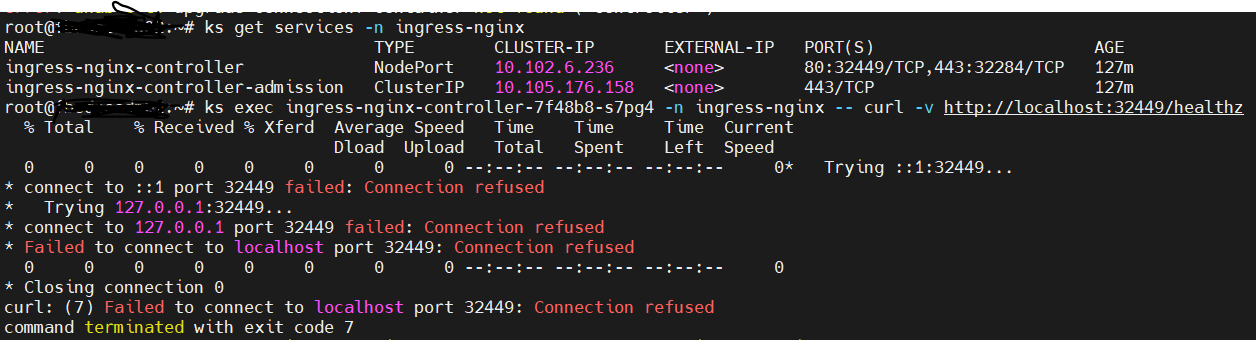
When I try to curl the health endpoints I get Connection refused :
Additional output :
ks get pods -n ingress-nginx NAME READY STATUS RESTARTS AGE ingress-nginx-admission-create-4hzzk 0/1 Completed 0 178m ingress-nginx-controller-7f48b8-s7pg4 0/1 Running 55 (6s ago) 178m
I am running a bare-metal (Debian 10 Buster ) for k0s.
What am I missing?

@Ed87: This issue is currently awaiting triage.
If Ingress contributors determines this is a relevant issue, they will accept it by applying the triage/accepted label and provide further guidance.
The triage/accepted label can be added by org members by writing /triage accepted in a comment.
Instructions for interacting with me using PR comments are available here. If you have questions or suggestions related to my behavior, please file an issue against the kubernetes/test-infra repository.

The Kubernetes project currently lacks enough contributors to adequately respond to all issues and PRs.
This bot triages issues and PRs according to the following rules:
- After 90d of inactivity,
lifecycle/staleis applied - After 30d of inactivity since
lifecycle/stalewas applied,lifecycle/rottenis applied - After 30d of inactivity since
lifecycle/rottenwas applied, the issue is closed
You can:
- Mark this issue or PR as fresh with
/remove-lifecycle stale - Mark this issue or PR as rotten with
/lifecycle rotten - Close this issue or PR with
/close - Offer to help out with Issue Triage
Please send feedback to sig-contributor-experience at kubernetes/community.
/lifecycle stale


I am having the same issue in AWS EKS. Anyone managed to figure out whats wrong? Asked the same question in stack overflow as well here

2 pieces of info can be commented on ;
- This link posted by the creator of this issue is not from this project's documentation https://docs.k0sproject.io/v1.22.2+k0s.1/examples/nginx-ingress/ and there is not enough resources to take care of docs from other projects
- The information posted in this issue is not enough in terms of problem description, state of the installed objects, logs of the related pods and cluster events etc etc. And there is no output of kubectl describe etc to know the specs configured.
There are more users and experts on the K8S slack so better to discuss there and locate the bug/problem related data and then come back here to post the bug/problem related data.
