

 kubernetes
Authorization using preconfigured Bearer token in ingress-nginx not working
What happened?
I'm trying to configure the kubernetes-dashboard to use predefined Bearer token to allow me to skip the "token login screen".
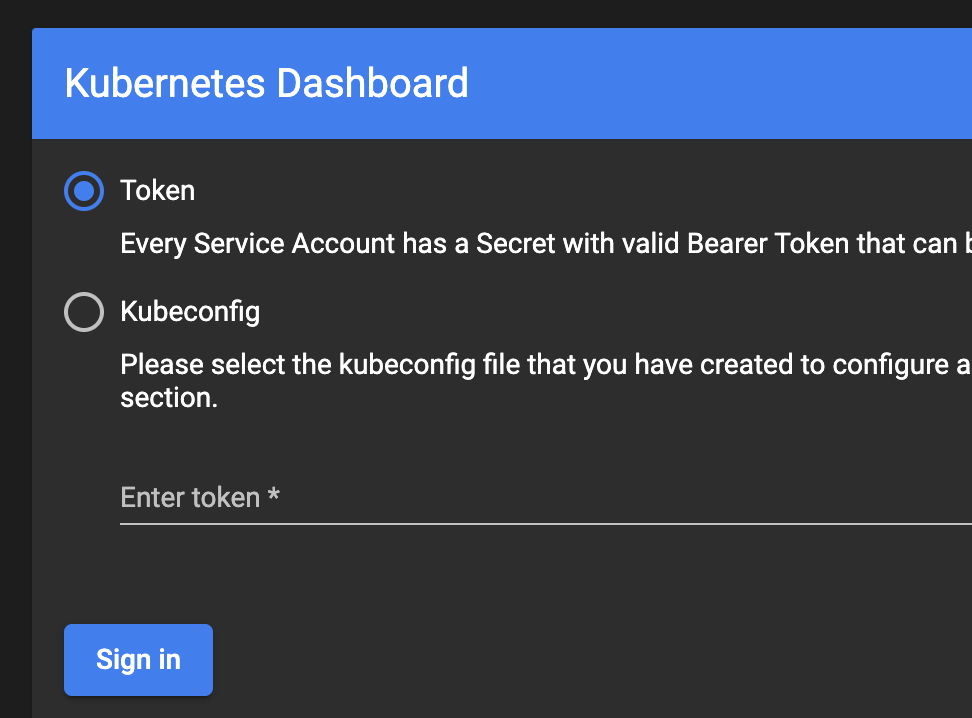
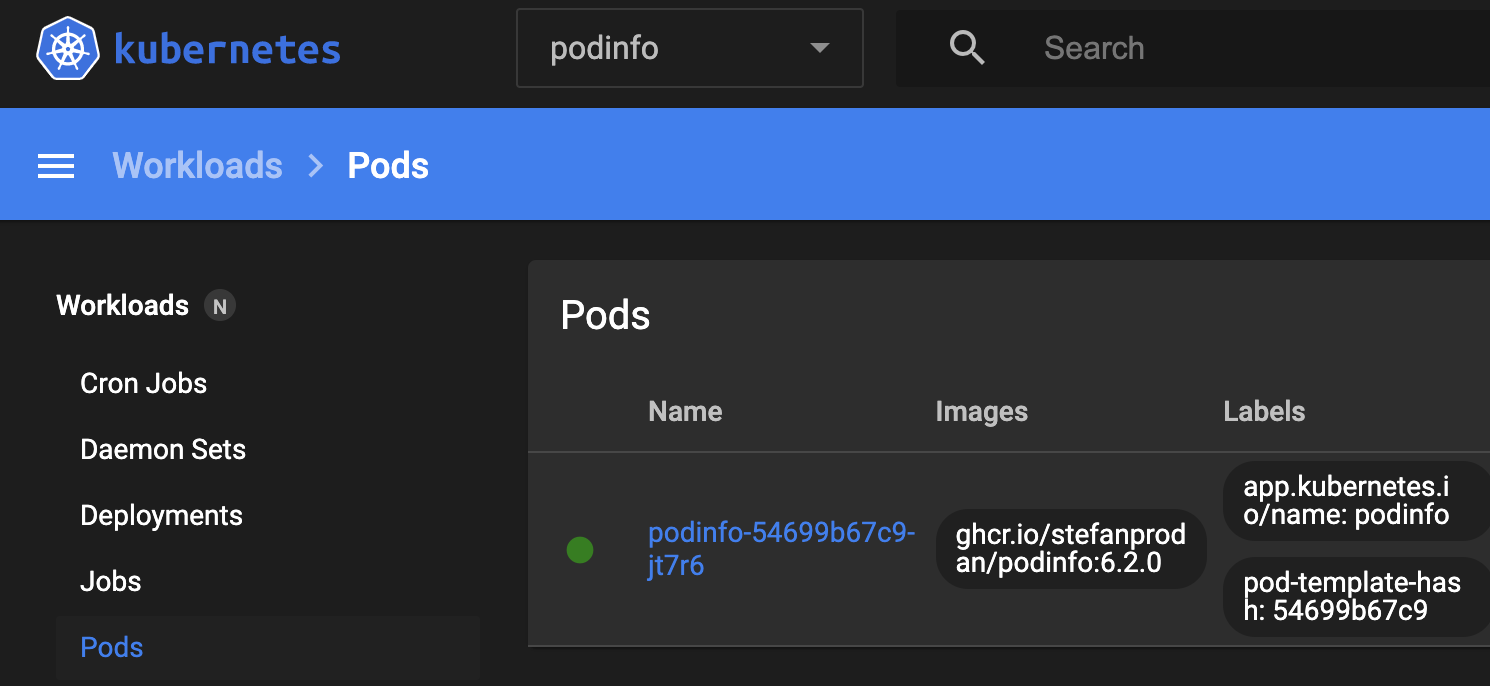
The goal is to see pods in the the kubernetes-dashboard in podinfo namespace without entering Token / Kubeconfig.
What did you expect to happen?
I expect that entering Kubernetes dashboard url to web browser will get me directly to the kubernetes-dashboard into podinfo namespace without entering Token / Kubeconfig:
How can we reproduce it (as minimally and precisely as possible)?
I installed test app podinfo into podinfo namespace:
helm repo add podinfo https://stefanprodan.github.io/podinfo
helm upgrade --install --version 6.2.0 --namespace podinfo --create-namespace podinfo podinfo/podinfo
Then I configured the Role, RoleBinding and ServiceAccount:
kubectl apply -f - << EOF
apiVersion: rbac.authorization.k8s.io/v1
kind: Role
metadata:
  name: kubernetes-dashboard-podinfo-read-only
  namespace: podinfo
rules:
  - apiGroups:
      - ""
      - extensions
      - apps
    resources:
      - deployments
      - namespaces
      - pods
      - replicasets
      - services
    verbs:
      - describe
      - get
      - list
      - watch
---
apiVersion: rbac.authorization.k8s.io/v1
kind: RoleBinding
metadata:
  name: kubernetes-dashboard-podinfo-read-only
  namespace: podinfo
  labels:
    app: kubernetes-dashboard
roleRef:
  apiGroup: rbac.authorization.k8s.io
  kind: Role
  name: kubernetes-dashboard-podinfo-read-only
subjects:
  - kind: ServiceAccount
    name: kubernetes-dashboard-podinfo-read-only
    namespace: podinfo
---
apiVersion: v1
kind: ServiceAccount
metadata:
  name: kubernetes-dashboard-podinfo-read-only
  namespace: podinfo
EOF
Get the token from Secret which is used by ServiceAccount:
KUBERNETES_DASHBOARD_TOKEN=$(kubectl get secret -n podinfo kubernetes-dashboard-podinfo-read-only-token-2pnph -o yaml -o go-template="{{.data.token}}" | base64 -d)
CLUSTER_FQDN="mgmt01.k8s.use1.dev.proj.aws.mylabs.dev"
Install kubernetes-dashboard:
helm repo add kubernetes-dashboard https://kubernetes.github.io/dashboard/
helm upgrade --install --version 5.10.0 --namespace kubernetes-dashboard --values - --create-namespace kubernetes-dashboard kubernetes-dashboard/kubernetes-dashboard << EOF
extraArgs:
  - --enable-insecure-login
protocolHttp: true
ingress:
  enabled: true
  annotations:
    nginx.ingress.kubernetes.io/auth-snippet: |
      proxy_set_header Authorization "Bearer ${KUBERNETES_DASHBOARD_TOKEN}";
      proxy_pass_header Authorization;
  className: nginx
  hosts:
    - kubernetes-dashboard.${CLUSTER_FQDN}
  tls:
    - hosts:
        - kubernetes-dashboard.${CLUSTER_FQDN}
EOF
When I access the https://kubernetes-dashboard.${CLUSTER_FQDN} I got the "login screen".
Looks like Bearer token is not honored.
There is nothing in the logs:
❯ k logs -n kubernetes-dashboard kubernetes-dashboard-66868cd876-9v76r -f
2022/09/11 06:56:47 Starting overwatch
2022/09/11 06:56:47 Using namespace: kubernetes-dashboard
2022/09/11 06:56:47 Using in-cluster config to connect to apiserver
2022/09/11 06:56:47 Using secret token for csrf signing
2022/09/11 06:56:47 Initializing csrf token from kubernetes-dashboard-csrf secret
2022/09/11 06:56:47 Successful initial request to the apiserver, version: v1.23.7-eks-4721010
2022/09/11 06:56:47 Generating JWE encryption key
2022/09/11 06:56:47 New synchronizer has been registered: kubernetes-dashboard-key-holder-kubernetes-dashboard. Starting
2022/09/11 06:56:47 Starting secret synchronizer for kubernetes-dashboard-key-holder in namespace kubernetes-dashboard
2022/09/11 06:56:47 Initializing JWE encryption key from synchronized object
2022/09/11 06:56:47 no metrics provider selected, will not check metrics.
2022/09/11 06:56:47 Serving insecurely on HTTP port: 9090
2022/09/11 06:57:05 Getting application global configuration
2022/09/11 06:57:05 Application configuration {"serverTime":1662879425879}
2022/09/11 06:57:05 [2022-09-11T06:57:05Z] Incoming HTTP/1.1 GET /api/v1/settings/global request from 10.0.2.118:
2022/09/11 06:57:05 [2022-09-11T06:57:05Z] Incoming HTTP/1.1 GET /api/v1/plugin/config request from 10.0.2.118:
2022/09/11 06:57:05 [2022-09-11T06:57:05Z] Outcoming response to 10.0.2.118 with 200 status code
2022/09/11 06:57:05 [2022-09-11T06:57:05Z] Outcoming response to 10.0.2.118 with 200 status code
2022/09/11 06:57:05 [2022-09-11T06:57:05Z] Incoming HTTP/1.1 GET /api/v1/settings/pinner request from 10.0.2.118:
2022/09/11 06:57:05 [2022-09-11T06:57:05Z] Outcoming response to 10.0.2.118 with 200 status code
2022/09/11 06:57:05 [2022-09-11T06:57:05Z] Incoming HTTP/1.1 GET /api/v1/settings/global request from 10.0.2.118:
2022/09/11 06:57:05 [2022-09-11T06:57:05Z] Outcoming response to 10.0.2.118 with 200 status code
2022/09/11 06:57:05 [2022-09-11T06:57:05Z] Incoming HTTP/1.1 GET /api/v1/login/status request from 10.0.2.118:
2022/09/11 06:57:05 [2022-09-11T06:57:05Z] Outcoming response to 10.0.2.118 with 200 status code
2022/09/11 06:57:05 [2022-09-11T06:57:05Z] Incoming HTTP/1.1 GET /api/v1/login/status request from 10.0.2.118:
2022/09/11 06:57:05 [2022-09-11T06:57:05Z] Outcoming response to 10.0.2.118 with 200 status code
2022/09/11 06:57:05 [2022-09-11T06:57:05Z] Incoming HTTP/1.1 GET /api/v1/login/status request from 10.0.2.118:
2022/09/11 06:57:05 [2022-09-11T06:57:05Z] Outcoming response to 10.0.2.118 with 200 status code
2022/09/11 06:57:06 [2022-09-11T06:57:06Z] Incoming HTTP/1.1 GET /api/v1/login/modes request from 10.0.2.118:
2022/09/11 06:57:06 [2022-09-11T06:57:06Z] Incoming HTTP/1.1 GET /api/v1/login/skippable request from 10.0.2.118:
2022/09/11 06:57:06 [2022-09-11T06:57:06Z] Outcoming response to 10.0.2.118 with 200 status code
2022/09/11 06:57:06 [2022-09-11T06:57:06Z] Outcoming response to 10.0.2.118 with 200 status code
When I enter the token (KUBERNETES_DASHBOARD_TOKEN) into the Token field in kubernetes-dashboard login screen - I can see the kuberntes-dashboard and the details about the podinfo namespace.
I do not know how to do it without entering "anything" there...
Anything else we need to know?
I'm using: Amazon EKS 1.23
What browsers are you seeing the problem on?
Google Chrome and Firefox
Kubernetes Dashboard version
2.6.1
Kubernetes version
❯ kubectl version
Client Version: version.Info{Major:"1", Minor:"25", GitVersion:"v1.25.0", GitCommit:"a866cbe2e5bbaa01cfd5e969aa3e033f3282a8a2", GitTreeState:"clean", BuildDate:"2022-08-23T17:36:43Z", GoVersion:"go1.19", Compiler:"gc", Platform:"darwin/amd64"}
Kustomize Version: v4.5.7
Server Version: version.Info{Major:"1", Minor:"23+", GitVersion:"v1.23.7-eks-4721010", GitCommit:"b77d9473a02fbfa834afa67d677fd12d690b195f", GitTreeState:"clean", BuildDate:"2022-06-27T22:19:07Z", GoVersion:"go1.17.10", Compiler:"gc", Platform:"linux/amd64"}
