

 ktechlab
windows installer
Dear
Could you make a windows installer? I'm very interested but I'm not on linux.

Or maybe you can add the project here to make windows version
https://binary-factory.kde.org/
KTechLab compiles and runs in Windows, just someone needs to create an installer. Compiling can be done with KDE Craft, see comment here:
https://invent.kde.org/sdk/ktechlab/-/issues/2#note_156990
Related to binary-factory: yes, having builds generated there would be really nice. Just somebody has to make it happen.
I'm cross-linking discussions on the topic of windows build / installer :
https://github.com/ktechlab/ktechlab/issues/9
https://invent.kde.org/sdk/ktechlab/-/issues/2
Edit: request about packaging at Chocolately:
https://github.com/chocolatey-community/chocolatey-package-requests/issues/544
Edit 2: Related issue on KDE bugzilla:
https://bugs.kde.org/show_bug.cgi?id=449399

Hi
Thanks for the first windows version test: https://www.mediafire.com/folder/6nh5g5tri9qsn/2022.02.02-kechlab-package
Here are the issues I found (windows 10):
-
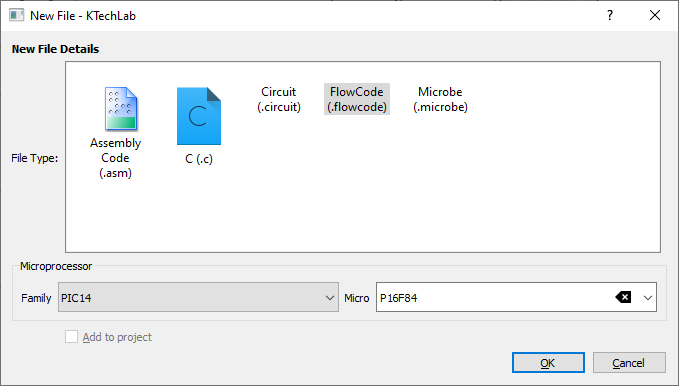
if you create a new file, some of the choices has no icon.
-
the EXE file has no icon and also no icon in the program window itself

-
the language is only english (in the window for language setting)
-
it seems run/pause with F10 works the other way! so when running, you pause it, but then the menu item says "run" instead of "pause" (and the other way) but the circuit runs, just the menu is wrong for run/pause
-
it could be usefull to make a nullsoft installer https://sourceforge.net/projects/nsis/ after removing uneeded files, checked by https://www.dependencywalker.com/
-
settings -> general has no icon
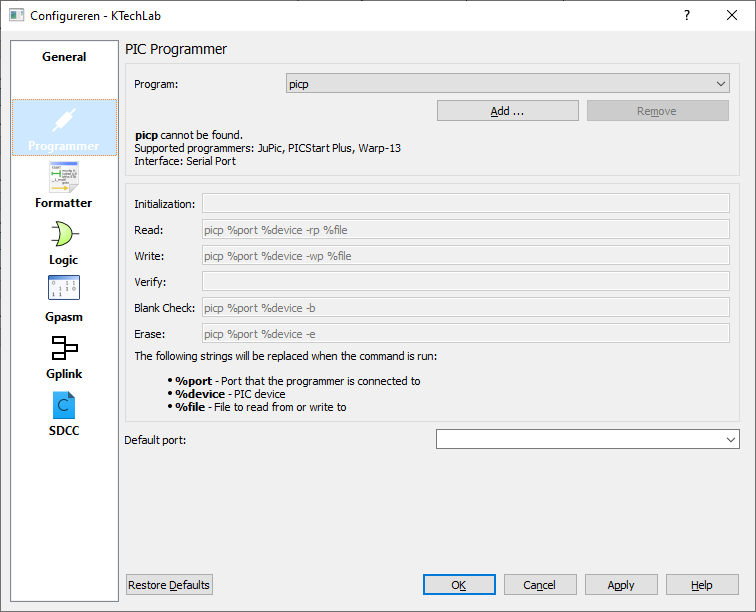
I also have a question (if it's already possible on windows) on how to install a PIC programmer. See screenshot above. I can't find it in the PDF manual. I'm a complete beginner.
thx
Thanks for the testing.
I have never used a PIC programmer. But I'm sure you need hardware if you want to use it.
The names mentioned there are other projects, I do not have experience with them.