

 kortina
Bibtex citation autocomplete and highlighting not working
Before filing a new issue, please see TROUBLESHOOTING-FAQ.md for common issues / workarounds, and follow the Troubleshooting Checklist to try to further diagnose the problem.
Describe the bug Syntax highlighting and autocomplete for citations don't seem to be working. GoTo and peek Def do work, shows the respective raw text from the bib file.
my settings.json has "vscodeMarkdownNotes.bibtexFilePath": "bibliography.bib",
To Reproduce
Expected behavior
When I type @ I expect Intellisense to show me options from the *.bib file like in the demo animated gif. It only shows my github username.
I've tried pulling this report and opening the /test folder. It's the same behavior. When I type @ it shows your username @kortina.
Versions
- OS: macOS 10.15.7
- Extension Version: v0.0.24
- VS Code Version: 1.55.0 Version: 1.55.0 Commit: c185983a683d14c396952dd432459097bc7f757f Date: 2021-03-30T16:01:05.981Z Electron: 11.3.0 Chrome: 87.0.4280.141 Node.js: 12.18.3 V8: 8.7.220.31-electron.0 OS: Darwin x64 19.6.0


@daniel-vera-g to clarify, you saying it doesn't work for you either?
Exactly
Gotcha, maybe @Anderas could take a look at this? He originally implemented bibtex.
@Anderas have you encountered this bug yourself?

Hey @janaka , could you pls confirm whether the other autocomplete features (tags, links) work correctly on the test folder, based on the steps described in the checklist? Having checked both macOS and Ubuntu I could not find any obvious issues. Would you be able to share your settings file?

@Anderas the checklist seems to work as expected against the test repo.
@ doesn't work in the test repo either.
guess an extension is clashing.
settings.json in my repo
{
  "editor.minimap.enabled": false,
  "editor.wrappingIndent": "indent",
  "editor.overviewRulerBorder": false,
  "editor.lineHeight": 24,
  "[markdown]": {
    "editor.quickSuggestions": true
  },
  "files.defaultLanguage": "markdown",
  "files.exclude": {
    "**/node_modules": true
  },
  "files.watcherExclude": {
    "**/node_modules": true
  },
  "foam.edit.linkReferenceDefinitions": "withExtensions",
  "foam.openDailyNote.directory": "journal",
  "foam.openDailyNote.titleFormat": "fullDate",
  "git.enableSmartCommit": true,
  "git.postCommitCommand": "sync",
  "markdown.preview.breaks": true,
  "pasteImage.path": "${projectRoot}/attachments",
  "pasteImage.showFilePathConfirmInputBox": true,
  "prettier.singleQuote": false,
  "spellright.notificationClass": "warning",
  "vscodeMarkdownNotes.noteCompletionConvention": "noExtension",
  "vscodeMarkdownNotes.slugifyMethod": "github-slugger",
  "gitdoc.enabled": true,
  "gitdoc.autoPullDelay": 60000,
  "gitdoc.autoPushDelay": 60000,
  "spellright.language": [],
  "spellright.groupDictionaries": false,
  "spellright.documentTypes": [
    "markdown",
    "latex",
    "plaintext",
    "jsonc"
  ],
  "files.autoSave": "afterDelay",
  "explorer.sortOrder": "modified",
  "workbench.editor.enablePreview": false,
  "workbench.editor.revealIfOpen": true,
  "vscodeMarkdownNotes.bibtexFilePath": "library.bib",
  "foam.decorations.links.enable": true,
}
This extension was capturing @

and doing this

I disabled the extension. @ still doesn't show any autocompletion. @t doesn't either. @ or @t + ^space does show the expected autocomplete options.
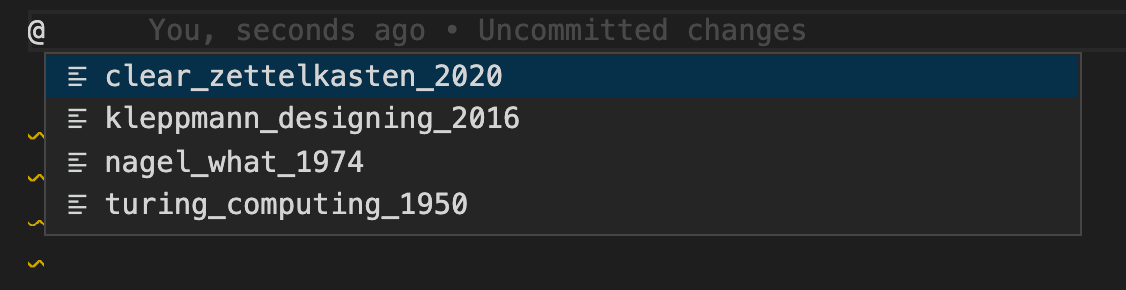
all within the test repo
There doesn't appear to be any rich preview of the citation. Rendered MD doesn't link to anything. If that's right and Im not missing something then I don't find this functionality useful fwiw. I don't mean to waste your time or offend anyone. pls let me know if I'm missing something.
So if I understand correctly, disabling the clashing extension + manually triggering the autocompletion does show relevant entries? I don't know much about resolving collisions but will look into whether we can do anything about that on our part.
As for the previews, this is an unrelated functionality (ie editing vs rendering) that can be achieved in more advanced MD previewers. See for instance my use of Markdown Preview Enhanced
Hi,
I'm having the same issue.
Autocompletion never triggers, GoToDefinition works as expected, and @ followed by <C-space> does bring up the completion menu but the suggested completions are only from my bibtex file when either:
@is the first character of the line, or@is not the first character but I've started writing the citation key (e.g.@m); then it shows me the citation keys starting withm, as expected.
