

 koreader
[Android 13]: device with cutout shifting content below bottom of screen
- KOReader version: 2022.07 (fdroid)
- Device: Google Pixel 6a
- Operating System: Android 13
Issue
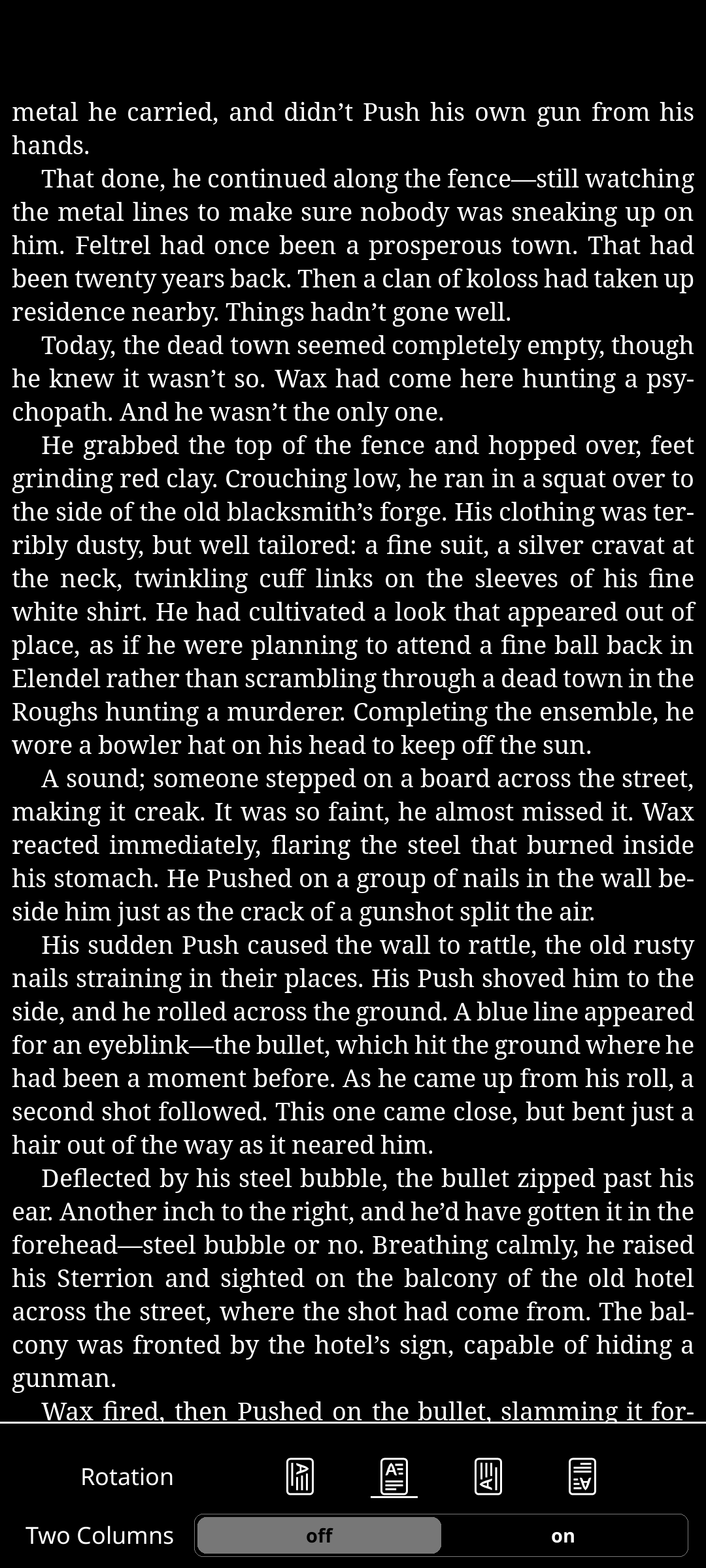
The Pixel 6a has a hole-punch camera, while my previous phone did not. After I upgraded to the 6a, I noticed that KOReader was not laying out content beneath the hole punch, but seemed to be laying content out below the bottom of the screen. This does also occur when the screen is rotated - if the camera is on the left, the text is cut off on the right.
After searching the issues, it looks like the problem is similar to #4769 and should have been fixed by koreader/android-luajit-launcher#150. The type of log you had nvvslm do is here.
After looking at the log and doing some digging in the code, it looks like getScreenHeight in android-luajit-launcher would probably correctly detect the notch, while screen:getRawSize() in device.lua is still returning the full screen height. I'd think this would move some content below the screen, although I'm not experienced with Lua.
Steps to reproduce
- Have an Android device with a display cutout. If not, you can go to Developer Options, scroll down to the Drawing section, and select Display cutout (or Simulate a display with a cutout).
- Open KOReader.
- See that content is laid out below the bottom of the screen and not under the display cutout.
Thanks for the great reader app!

Could you attach a picture?
Hopefully it is an android 13 bug and it gets fixed automagically. It could be the case of a platform change affecting all targetSdk but I don't remember google/android breaking backwards compatibility without a very big warning on dev documentation.
Anyhow, I'm self-assigning for the long run (a year or so), because emulators now don't support the x86 ABI (what a shit movement!)
adb install koreader-android-x86-v2022.07.apk
Performing Streamed Install
adb: failed to install koreader-android-x86-v2022.07.apk: Failure [INSTALL_FAILED_NO_MATCHING_ABIS: Failed to extract native libraries, res=-113]
In the mean time both repro steps for supported platforms other than android 13 (from 9 onwards) and links to relevant documentation about API changes are very welcome.

I'm on Android 13 and it's under the cutout but definitely not below the bottom of the screen. That's all as it should be, isn't it?
Edit: d'oh, it's 12.

I tried reproducing it on Android 12 on a Pixel 3a and couldn't, even with the simulated punch hole cutout. Log here: sargo-log.txt. On the 6a, if I use the "Hide" or "Render apps below cutout area" setting, it will work fine, but it won't detect any other cutout setting. Log here: bluejay-log.txt. I wonder if WindowInsetsCompat would work any better?
Wanted to include my pictures below tags so it wouldn't take forever to scroll past them.
-
Pixel 6a in vertical orientation - no changes to cutouts.

-
Pixel 6a in horizontal orientation - no changes to cutouts.

-
Pixel 6a in hide cutout mode. This is what it should look like (well, minus the navigation bar).

Wanted to include my pictures below tags so it wouldn't take forever to scroll past them.
It's a bit hacky but here on GH I like to use <img src="from upload" width=45%> (or 32%) to stick multiple next to each other.
I wonder if WindowInsetsCompat would work any better?
It shouldn't. We're doing exactly the same in https://github.com/koreader/android-luajit-launcher/blob/master/app/src/main/java/org/koreader/launcher/MainActivity.kt#L173-L183
What compat methods provide is a way to do the call without guarding it by api level.
If you enable verbose logs in KO FM -> tools -> more tools -> developer options you should see a message: "top x pixels are not available, reason: window inset"
If you don't see the message then safeInsetTop returned 0. That doesn't make much sense for devices with a top cutout. I have no idea what happens if the report is wrong or the pixels are cutted elsewhere (ie: as safeInsetBottom)
Took a look at the verbose logs and found onAttachedToWindow() but no top x pixels not available. Log attached from startup to beginning of rendering the main page: bluejay-verbose-log.txt
A couple things that stuck out to me:
device.needsViewwas false, so it used the native content implementation.surfaceChangedlogged the correct width and height (width: 1080, height: 2282).- KOReader still initializes at a resolution of 1080 by 2400.
- KOReader later refreshes the UI
for region 0 0 1080 2400
Hi,
I'm running Koreader on a Pixel 6 and I recently updated to Android 13 which is when the issue described here occured: bottom part of the screen is cut out
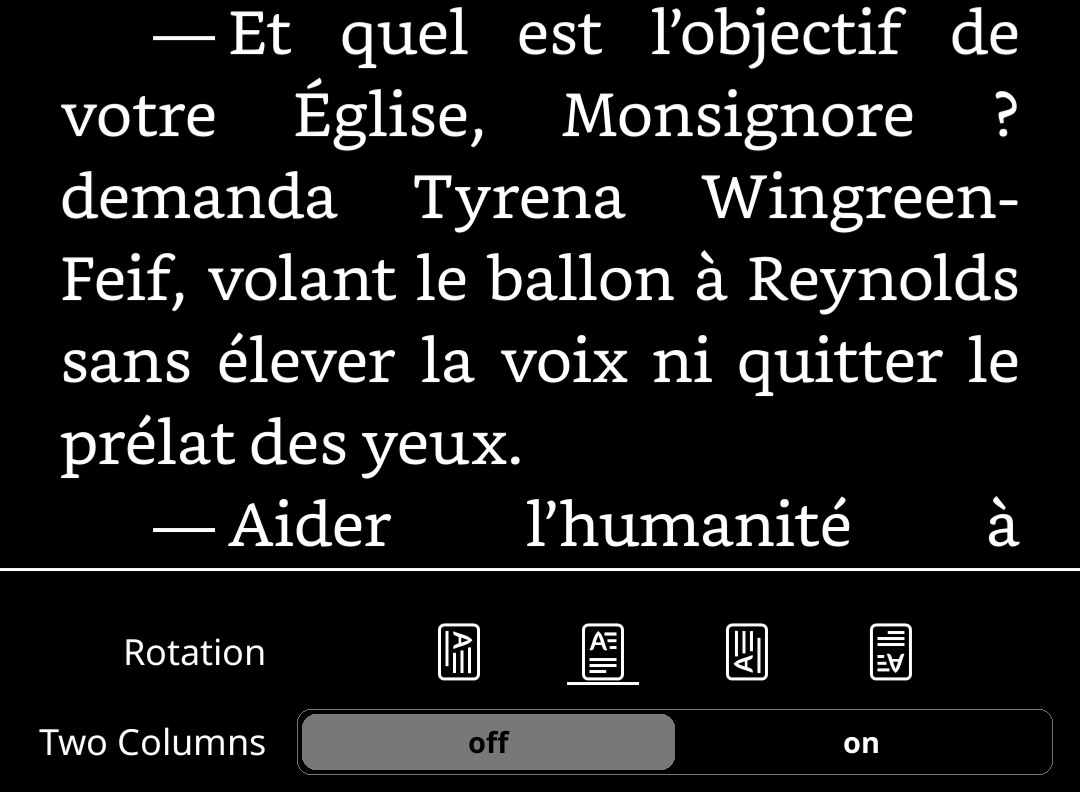 So no bottom status bar, half of bottom settings are not displayed and said settings cannot be navigated as a result.
There was no issue whatsoever when on Android 12. I'm running the latest stable build v2022.07. I hope this helps narrowing down the root cause but if someone has a suggestion to bypass the problem while waiting for a fix (playing with margins or dpi perhaps), I'm open to suggestions.
Cheers

@awbooze
Took a look at the verbose logs and found onAttachedToWindow() but no top x pixels not available
Thanks for the feedback!
That's the issue. Until now all android devices reported the cutout pixels when the activity is attached to a window. The rest of the code relies on that premise being true.
surfaceChanged logged the correct width and height (width: 1080, height: 2282). KOReader still initializes at a resolution of 1080 by 2400.
Yup. Both the initial size and further resizes are expecting proper cutout pixels because topInsetHeight
is only updated on init. So even when we receive a resize event we use old values These functions return on portrait height = height - cutout on landscape width = width - cutout, but that again relies on proper cutout values to begin with.
@Frugipon
if someone has a suggestion to bypass the problem while waiting for a fix (playing with margins or dpi perhaps), I'm open to suggestions.
I'm afraid there's no workaround available. There was one a few years ago (hardcoding height with a lua patch) but that doesn't work now since we added native rotation & buffer resizes.
While a solution shouldn't be too hard to implement relying on remote feedback for testing changes makes everything messier. I'm going to flash an A13 GSI image on my old tablet and see if I can reproduce the issue there.
I'm going to flash an A13 GSI image on my old tablet and see if I can reproduce the issue there.
Nah. Google GSI doesn't even boot on my samsung A7 :(
Same issue (unsurprisingly) on a Pixel 6 Pro having updated to Android 13.

As a small comment, if you are okay with only reading books on the front page of KOReader, it is possible to increase the bottom margin of your books until this is fixed. You could also play with hiding the display cutout in developer settings,, which solves the problem completely, but that applies to all of your apps.
If I have time this weekend, I'll also see if I can build android-luajit-launcher.
@awbooze cheers! "hiding" the display cutout in developer settings didn't help, but changing it to "render apps below cutout area" does, and restores functionality to KOReader (i. e. makes it useable ).
@awbooze cheers! "hiding" the display cutout in developer settings didn't help, but changing it to "render apps below cutout area" does, and restores functionality to KOReader (i. e. makes it useable ).
"render apps below cutout area" is also works to me. thx!

Thanks for the workaround, @emacsomancer.
Here is a patch against luajit-launcher master, if somebody wants to try
diff --git a/app/src/main/java/org/koreader/launcher/MainActivity.kt b/app/src/main/java/org/koreader/launcher/MainActivity.kt
index d5b24bb..97b006b 100644
--- a/app/src/main/java/org/koreader/launcher/MainActivity.kt
+++ b/app/src/main/java/org/koreader/launcher/MainActivity.kt
@@ -44,7 +44,7 @@ class MainActivity : NativeActivity(), LuaInterface,
     // Path of last file imported
     private var lastImportedPath: String? = null

-    // Device cutout - only used on API 28+
+    // Device cutout - It might be > 0 on API28+
     private var topInsetHeight: Int = 0

     // Fullscreen - only used on API levels 16-18
@@ -159,9 +159,10 @@ class MainActivity : NativeActivity(), LuaInterface,
     }

     override fun surfaceChanged(holder: SurfaceHolder, format: Int, width: Int, height: Int) {
+        topInsetHeight = cutoutPixels
         Log.v(TAG_SURFACE, String.format(Locale.US,
-            "surface changed {\n  width:  %d\n  height: %d\n format: %s\n}",
-            width, height, pixelFormatName(format))
+            "surface changed {\n  width:  %d\n  height: %d\n format: %s\n cutout: %dpx}",
+            width, height, pixelFormatName(format), topInsetHeight)
         )
         super.surfaceChanged(holder, format, width, height)
         drawSplashScreen(holder)
@@ -170,17 +171,7 @@ class MainActivity : NativeActivity(), LuaInterface,
     override fun onAttachedToWindow() {
         Log.d(TAG_SURFACE, "onAttachedToWindow()")
         super.onAttachedToWindow()
-        if (Build.VERSION.SDK_INT >= Build.VERSION_CODES.P) {
-            val cut: DisplayCutout? = window.decorView.rootWindowInsets.displayCutout
-            if (cut != null) {
-                val cutPixels = cut.safeInsetTop
-                if (topInsetHeight != cutPixels) {
-                    Log.v(TAG_SURFACE,
-                        "top $cutPixels pixels are not available, reason: window inset")
-                    topInsetHeight = cutPixels
-                }
-            }
-        }
+        topInsetHeight = cutoutPixels
     }

     /* Called just before the activity is resumed by an intent */
@@ -436,15 +427,11 @@ class MainActivity : NativeActivity(), LuaInterface,
     }

     override fun getScreenHeight(): Int {
-        return if (Build.VERSION.SDK_INT >= Build.VERSION_CODES.P) {
-            // We need to handle the notch in Portrait
-            // NOTE: getScreenAvailableHeight does it automatically, but it also excludes the nav bar, when there's one :/
-            if (getOrientationCompat(screenIsLandscape).and(1) == 0) {
-                // getScreenOrientation returns LinuxFB rotation constants, Portrait rotations are always even
-                getHeight() - topInsetHeight
-            } else {
-                getHeight()
-            }
+        // We need to handle the notch in Portrait
+        // NOTE: getScreenAvailableHeight does it automatically, but it also excludes the nav bar, when there's one :/
+        return if (getOrientationCompat(screenIsLandscape).and(1) == 0) {
+            // getScreenOrientation returns LinuxFB rotation constants, Portrait rotations are always even
+            getHeight() - topInsetHeight
         } else {
             getHeight()
         }
@@ -475,15 +462,11 @@ class MainActivity : NativeActivity(), LuaInterface,
     }

     override fun getScreenWidth(): Int {
-        return if (Build.VERSION.SDK_INT >= Build.VERSION_CODES.P) {
-            // We need to handle the notch in Landscape
-            // NOTE: getScreenAvailableWidth does it automatically, but it also excludes the nav bar, when there's one :/
-            if (getOrientationCompat(screenIsLandscape).and(1) == 1) {
-                // getScreenOrientation returns LinuxFB rotation constants, Landscape rotations are always odd
-                getWidth() - topInsetHeight
-            } else {
-                getWidth()
-            }
+        // We need to handle the notch in Landscape
+        // NOTE: getScreenAvailableWidth does it automatically, but it also excludes the nav bar, when there's one :/
+        return if (getOrientationCompat(screenIsLandscape).and(1) == 1) {
+            // getScreenOrientation returns LinuxFB rotation constants, Landscape rotations are always odd
+            getWidth() - topInsetHeight
         } else {
             getWidth()
         }
diff --git a/app/src/main/java/org/koreader/launcher/extensions/ActivityExtensions.kt b/app/src/main/java/org/koreader/launcher/extensions/ActivityExtensions.kt
index f651c5d..19db075 100644
--- a/app/src/main/java/org/koreader/launcher/extensions/ActivityExtensions.kt
+++ b/app/src/main/java/org/koreader/launcher/extensions/ActivityExtensions.kt
@@ -14,6 +14,7 @@ import android.os.Build
 import android.os.Environment
 import android.provider.Settings
 import android.util.DisplayMetrics
+import android.view.DisplayCutout
 import android.view.Surface
 import android.view.View
 import android.view.WindowManager
@@ -31,6 +32,14 @@ val Activity.platform: String
     } else {
         "android"
     }
+
+val Activity.cutoutPixels: Int
+    get() = if (Build.VERSION.SDK_INT >= Build.VERSION_CODES.P) {
+        window.decorView.rootWindowInsets.displayCutout?.let {
+            it.safeInsetTop
+        } ?: 0
+    } else 0
+
 /* Haptic feedback */
 fun Activity.hapticFeedback(constant: Int, force: Boolean, view: View) {
     runOnUiThread {
@pazos Thank you! I’d like to test your patch with my Pixel 4a but I don’t manage to build KOReader (See #9480). If you send me an apk I could test it, too.

Pixel 6a, Android 13, same issue.
As a workaround I'm using GitHub release version with the following patch:
/storage/emulated/0/koreader/patches/10-screen-offset.lua
local screen = require("android").screen
screen.height = screen.height - 120

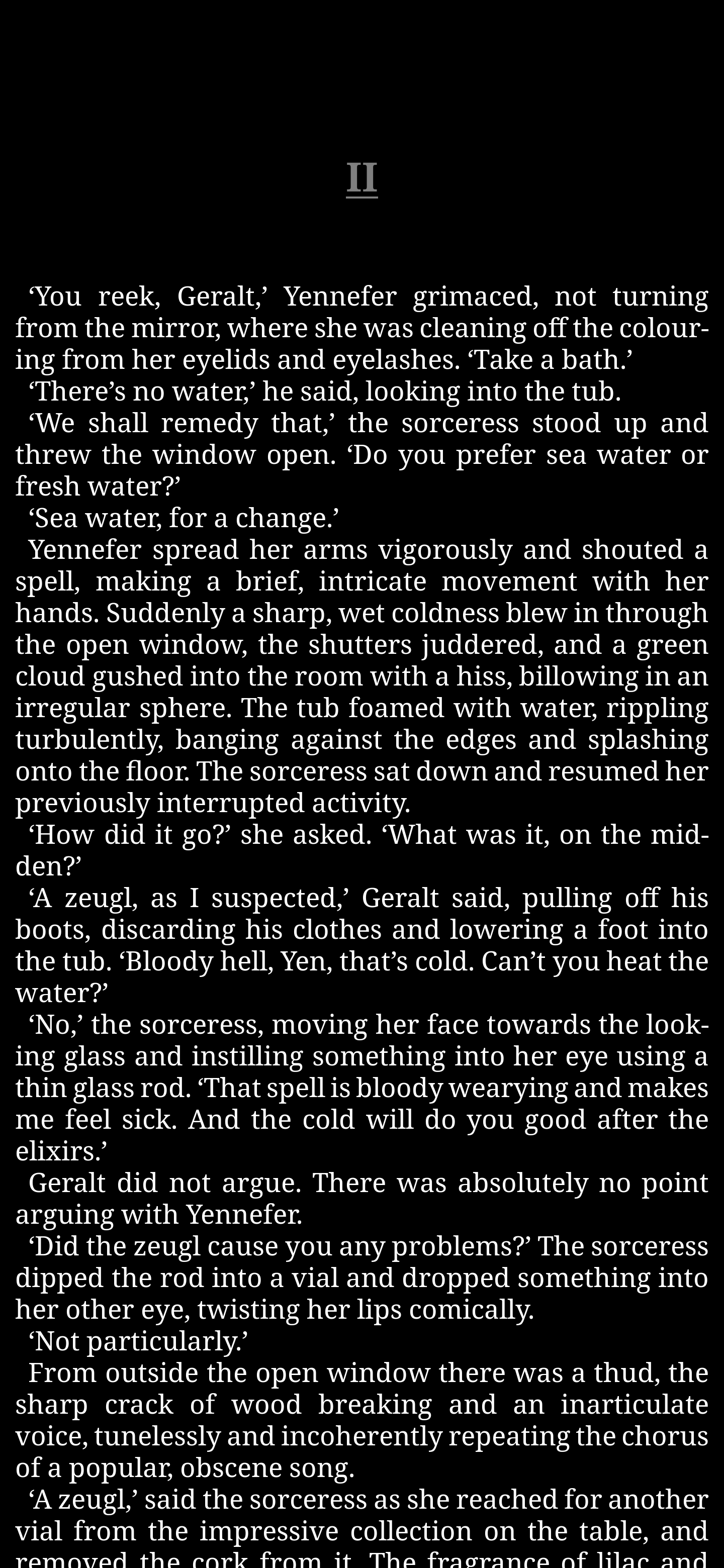

Can someone please upload an apk of the patched koreader for android 13?
I was going to myself, but I have ncurses installed but it fails to build because libncurses.so.5 is missing.
Creating a file /storage/emulated/0/koreader/patches/10-screen-offset.lua does nothing.
EDIT: apparently the patch only works when you install straight from github? Anyway I guess it is working now. Still feel a patched apk would be better

EDIT: apparently the patch only works when you install straight from github?
Yes, the fdroid version doesn't allow changing the runtime behaviour of the app.
Anyway I guess it is working now. Still feel a patched apk would be better.
I don't think so. Is better to keep your APK with a signature that comes from a reputable source and a little lua file that you can remove yourself when a proper fix arrives.
@Nfanja Thanks! This works very well with - 140 on my Pixel 4a.
Pixel 6a, Android 13, same issue.
As a workaround I'm using GitHub release version with the following patch:
/storage/emulated/0/koreader/patches/10-screen-offset.lua
local screen = require("android").screen
screen.height = screen.height - 120
On corvus os 4.0, (which is android 12.1) there is no "render apps below cutout area" in developer options. It's in Settings > Display > Display Cutout. But, this option doesn't help much in this situation. The 4th "hide" option worked for me in this case.


UPDATE: This doesn't seem to work for long. After using the 2022.10 version for some time, the top menu returns in the notch area. Tried 2022.08 (github and fdroid version) but it doesn't work. Hopefully the devs will look into it.
I have the Pixel 5a and the patch doesn't seem to work, even with the Github version. I am using GrapheneOS rom if this matters.

@Nfanja Thanks! This works very well with
- 140on my Pixel 4a.Pixel 6a, Android 13, same issue. As a workaround I'm using GitHub release version with the following patch: /storage/emulated/0/koreader/patches/10-screen-offset.lua
local screen = require("android").screen
screen.height = screen.height - 120
Can also confirm - 140 works well on Pixel 4a Android 13, with no additional modifications to a freshly-installed KOreader 2022.10.

Pixel 5, Android 13, same issue.
~~Will edit this post once I tried the lua patch file.~~
Uh, I am using the f-droid version, ~~guess I will wait for an official fix :)~~
Yes, the fdroid version doesn't allow changing the runtime behaviour of the app.
Oh wait, they have different package name, guess I can try the lua patch after all.

A quick recap on this issue topic and potential workaround, as well as future fixes.
-
This ticket covers issues with android 13 .Android 12 and before are not affected. If you have issues in these other versions with custom roms check if you can reproduce in stock or with serious roms (mostly LineageOS).
-
A potential workaround is highlighted in https://github.com/koreader/koreader/issues/9446#issuecomment-1228688656. AFAIK this should fix the issue in KO no matter the specific setup you have.
-
Another potential workaround is highlighted in https://github.com/koreader/koreader/issues/9446#issuecomment-1238296520. This works ONLY on the github/rocks version. NOT on FDROID and will work only if your device starts in portrait and never changes orientation. (also, AFAIK, please correct me if I'm wrong)
-
Now that we have support for 64bit builds it should be easy to get a proper fix just by testing the behaviour on android13 emulator. I will be pleased to do myself when I get a good internet connection again. If somebody wants to fix it and submit a patch in the mean time that would be very, very welcome
- Android 12 and before are not affected. If you have issues in these other versions with custom roms check if you can reproduce in stock or with serious roms (mostly LineageOS).
FWIW, no issues here on a notched phone on LineageOS 12 ;). (Just, don't play with the system notch settings, as they're buggy as hell).

Hi, I'm running Koreader on a Pixel 6 and I recently updated to Android 13 which is when the issue described here occured: bottom part of the screen is cut out
There was no issue whatsoever when on Android 12. I'm running the latest stable build v2022.07. I hope this helps narrowing down the root cause but if someone has a suggestion to bypass the problem while waiting for a fix (playing with margins or dpi perhaps), I'm open to suggestions.
Cheers
Same issue looks exactly like this on a realme gt neo 2
Im using PalyrimOS custom rom used arrowOS before it was the same.
Both android 13

Pixel 6a, Android 13, same issue.
As a workaround I'm using GitHub release version with the following patch:
/storage/emulated/0/koreader/patches/10-screen-offset.lua
local screen = require("android").screen
screen.height = screen.height - 120
Can confirm this works for now. In my case i set it to 109
And as stated in the 3rd comment before mine if i change orientation it messes this up and i need to restart koreader for it to appear properly again
But i only use koreader in vertical orientation so its good for me for now
Edit: using the latest 2022.11 version
For Android 13 on Galaxy S21+, forcing show camera cutout with KOReader through Android display settings (mostly) fixed the issue. The bottom corners of books and book display settings are cut off slightly but not unusable.
