

 koodo-reader
Failing to launch application (Debian)
I've already installed the latest developer version of Koodo Reader, this problem still exsits
- [X] Yes
There are no similar issues on the issue list
- [X] Yes
I've already read the document, still can't solve it.
- [X] Yes
Operating system or browser
Other Linux distribution
App Version
1.3.9
Bug Detail
Downloaded the .deb package from the official page installed with 'sudo apt-get install ./Koodo.Reader...', tried to launch through the UI nothing happens, nor trying to open a book with it. Tried launching it from the terminal and got the error that's attached to this report. Is there something I'm missing? (tried updating and upgrading the OS packages already)
Screenshots (Optional)
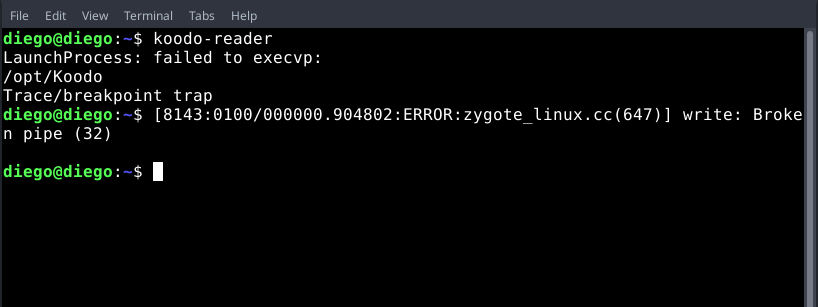 1
1
Extra: Forgot to add that I'm with Debian 10
Files (Optional)
No response

Sorry that i can't be of much help when it comes to Linux environment. I mostly works on Windows.

Koodo is installed in /opt/Koodo Reader/ (please note the space), and the binary name is koodo-reader. I suggest you give us the output of type koodo-reader, I believe there is a quote missing somewhere in a script or an alias (for the space in koodo path).
You could try to fix it by yourself (probably in script), or follow the procedure below.
Add a symlink to koodo-reader binary in /usr/local/bin :
$ sudo ln -s '/opt/Koodo Reader/koodo-reader' /usr/local/bin
After that, you should be able to run koodo-reader from your terminal.
For the launch failure from GUI, I believe there is also some quotes missing. You should try to view the details of the koodo launcher from your menu (maybe right click on it?), and send us a screenshot.
Note: Please send us the output of type koodo-reader, there is maybe something better to do than a symlink.

Sorry for the extreme delay, here's the output:
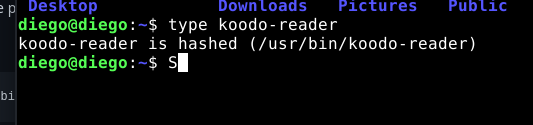
Tried the symlink still got hit with an error:

And regarding the koodo launcher, I couldn't really find it, all I got was this:
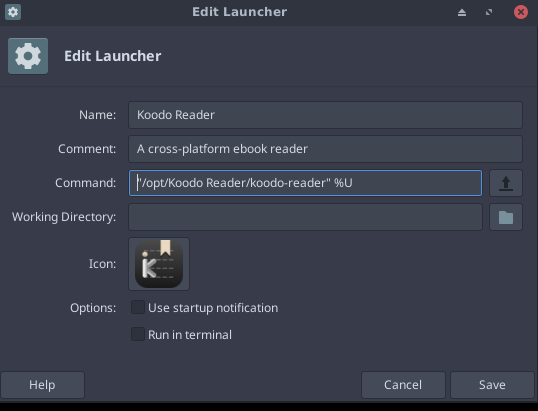
Which came from a right click on the launcher followed by a click on "Edit"
@diegowrhasta, now please give the output of the two following commands (text output is much better than screenshot, thanks) : \ls -l --quoting-style=shell /usr/bin/koodo-reader and \ls -l /opt/Koodo\ Reader/koodo-reader. Please do not forget the \ before the ls command and before the space in second command path.
For example, on my system, this gives:
$ \ls -l --quoting-style=shell /usr/bin/koodo-reader
lrwxrwxrwx 1 root root 30 Nov  6 20:34 /usr/bin/koodo-reader -> '/opt/Koodo Reader/koodo-reader'
$ \ls -l /opt/Koodo\ Reader/koodo-reader
-rwxr-xr-x 1 root root 142291832 Oct 15 12:24 /opt/Koodo Reader/koodo-reader
About your GUI, the command looks correct...
Hey, all right, here's my output:
\ls -l --quoting-style=shell /usr/bin/koodo-reader
lrwxrwxrwx 1 root root 30 Sep 10 10:44 /usr/bin/koodo-reader -> '/opt/Koodo Reader/koodo-reader'
\ls -l /opt/Koodo\ Reader/koodo-reader
-rwxrwxrwx 1 root root 142291832 Dec  4  2021 '/opt/Koodo Reader/koodo-reader'
Oh, it is weird, everything looks correct. What happens if you directly launch /opt/Koodo\ Reader/koodo-reader ?