

 kondratyev-nv
Misaligned Code Lens
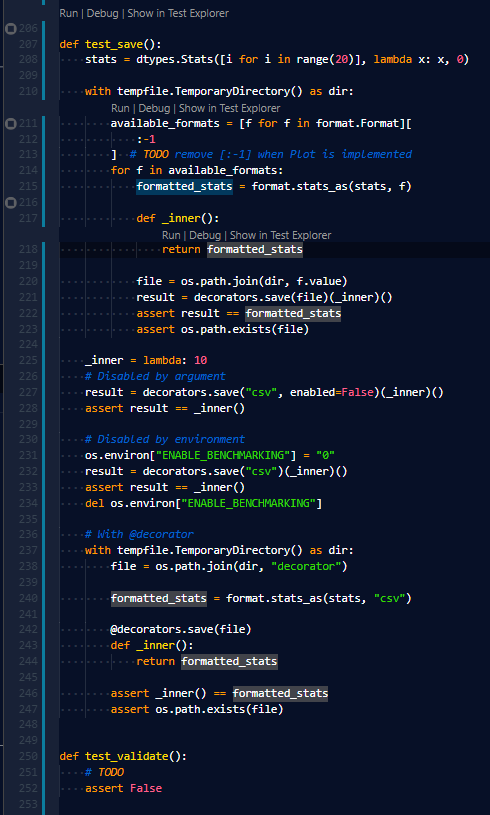
Sometimes, for no apparent reason the code lenses get totally screwed up.
I think this might be directly related to #132 which also happens for me.

@sleighsoft Thank you for the issue! What Python version and test framework are you using? Can you please provide a small example with misaligned code lenses to reproduce the issue?

Extensions
Test Explorer UI 2.17.0 Python Test Explorer 0.3.18 Python 2020.3.71659
Python 3.7.7 Pytest 5.4.1
One issue I already found is that when you format a test_X.py file with Black, the code lense will be misalgined if a function changes line. This can easily be reproduced when creating a test file, refreshing tests so that the code lense appears and the formatting the file with black.
I would have hoped that the code lense follows the function.
Though, I believe that this is not what I did in the above screenshot. I will come back to you in case it happens again and I paid closer attention to what I was doing, so that I can reproduce it.
can confirm that lenses are being messed up upon format document. for me its pylint, not black, and this issue happens as well.

@derhintze @sleighsoft I've just published a new version 0.6.0 that supports test auto-detection. Right now when python.testing.autoTestDiscoverOnSaveEnabled setting is set to true (which is the default value), tests will be re-discovered on save. That should fix Code Lenses. Please, update and let me know how it works for you and whether you have any issues with that change.