

 kohya-ss
"The paging file is too small for this operation to complete."
This is the error i get while trying to train with the script. Is my 1070ti with 8GB Vram the issue or did i mess up applying the script or a dependency issue?
steps:   0%|                                                                                    | 0/25 [00:00<?, ?it/s]epoch 1/1
Traceback (most recent call last):
  File "C:\Users\...\sd-scripts\venv\lib\site-packages\tensorflow\python\pywrap_tensorflow.py", line 62, in <module>
    from tensorflow.python._pywrap_tensorflow_internal import *
ImportError: DLL load failed while importing _pywrap_tensorflow_internal: The paging file is too small for this operation to complete.

During handling of the above exception, another exception occurred:

Traceback (most recent call last):
  File "<string>", line 1, in <module>
  File "C:\Users\...\AppData\Local\Programs\Python\Python310\lib\multiprocessing\spawn.py", line 116, in spawn_main
    exitcode = _main(fd, parent_sentinel)
  File "C:\Users\...\AppData\Local\Programs\Python\Python310\lib\multiprocessing\spawn.py", line 125, in _main
    prepare(preparation_data)
  File "C:\Users\...\AppData\Local\Programs\Python\Python310\lib\multiprocessing\spawn.py", line 236, in prepare
    _fixup_main_from_path(data['init_main_from_path'])
  File "C:\Users\...\AppData\Local\Programs\Python\Python310\lib\multiprocessing\spawn.py", line 287, in _fixup_main_from_path
    main_content = runpy.run_path(main_path,
  File "C:\Users\...\AppData\Local\Programs\Python\Python310\lib\runpy.py", line 289, in run_path
    return _run_module_code(code, init_globals, run_name,
  File "C:\Users\...\AppData\Local\Programs\Python\Python310\lib\runpy.py", line 96, in _run_module_code
    _run_code(code, mod_globals, init_globals,
  File "C:\Users\...\AppData\Local\Programs\Python\Python310\lib\runpy.py", line 86, in _run_code
    exec(code, run_globals)
  File "C:\Users\...\sd-scripts\lora_train_popup.py", line 8, in <module>
    import train_network
  File "C:\Users\...\sd-scripts\train_network.py", line 9, in <module>
    from accelerate.utils import set_seed
  File "C:\Users\...\sd-scripts\venv\lib\site-packages\accelerate\__init__.py", line 7, in <module>
    from .accelerator import Accelerator
  File "C:\Users\...\sd-scripts\venv\lib\site-packages\accelerate\accelerator.py", line 27, in <module>
    from .checkpointing import load_accelerator_state, load_custom_state, save_accelerator_state, save_custom_state
  File "C:\Users\...\sd-scripts\venv\lib\site-packages\accelerate\checkpointing.py", line 24, in <module>
    from .utils import (
  File "C:\Users\...\sd-scripts\venv\lib\site-packages\accelerate\utils\__init__.py", line 103, in <module>
    from .megatron_lm import (
  File "C:\Users\...\sd-scripts\venv\lib\site-packages\accelerate\utils\megatron_lm.py", line 32, in <module>
    from transformers.modeling_outputs import (
  File "C:\Users\...\sd-scripts\venv\lib\site-packages\transformers\__init__.py", line 30, in <module>
    from . import dependency_versions_check
  File "C:\Users\...\sd-scripts\venv\lib\site-packages\transformers\dependency_versions_check.py", line 17, in <module>
    from .utils.versions import require_version, require_version_core
  File "C:\Users\...\sd-scripts\venv\lib\site-packages\transformers\utils\__init__.py", line 34, in <module>
    from .generic import (
  File "C:\Users\...\sd-scripts\venv\lib\site-packages\transformers\utils\generic.py", line 33, in <module>
    import tensorflow as tf
  File "C:\Users\...\sd-scripts\venv\lib\site-packages\tensorflow\__init__.py", line 37, in <module>
    from tensorflow.python.tools import module_util as _module_util
  File "C:\Users\...\sd-scripts\venv\lib\site-packages\tensorflow\python\__init__.py", line 36, in <module>
    from tensorflow.python import pywrap_tensorflow as _pywrap_tensorflow
  File "C:\Users\...\sd-scripts\venv\lib\site-packages\tensorflow\python\pywrap_tensorflow.py", line 77, in <module>
    raise ImportError(
ImportError: Traceback (most recent call last):
  File "C:\Users\...\sd-scripts\venv\lib\site-packages\tensorflow\python\pywrap_tensorflow.py", line 62, in <module>
    from tensorflow.python._pywrap_tensorflow_internal import *
ImportError: DLL load failed while importing _pywrap_tensorflow_internal: The paging file is too small for this operation to complete.


Failed to load the native TensorFlow runtime.
See https://www.tensorflow.org/install/errors for some common causes and solutions.
If you need help, create an issue at https://github.com/tensorflow/tensorflow/issues and include the entire stack trace above this error message.

Try increasing your pagefile size:
https://mcci.com/support/guides/how-to-change-the-windows-pagefile-size/

Didnt help, still getting paging file error even after doubling pagefile size
  CUDA SETUP: Loading binary C:\Users\...\sd-scripts\venv\lib\site-packages\bitsandbytes\libbitsandbytes_cuda116.dll...
use 8-bit Adam optimizer
running training / 学習開始
  num train images * repeats / 学習画像の数×繰り返し回数: 5
  num reg images / 正則化画像の数: 0
  num batches per epoch / 1epochのバッチ数: 5
  num epochs / epoch数: 1
  batch size per device / バッチサイズ: 1
  total train batch size (with parallel & distributed & accumulation) / 総バッチサイズ(並列学習、勾配合計含む): 1
  gradient accumulation steps / 勾配を合計するステップ数 = 1
  total optimization steps / 学習ステップ数: 5
steps:   0%|                                                                                     | 0/5 [00:00<?, ?it/s]epoch 1/1
Traceback (most recent call last):
  File "<string>", line 1, in <module>
  File "C:\Users\...\AppData\Local\Programs\Python\Python310\lib\multiprocessing\spawn.py", line 116, in spawn_main
    exitcode = _main(fd, parent_sentinel)
  File "C:\Users\...\AppData\Local\Programs\Python\Python310\lib\multiprocessing\spawn.py", line 125, in _main
    prepare(preparation_data)
  File "C:\Users\...\AppData\Local\Programs\Python\Python310\lib\multiprocessing\spawn.py", line 236, in prepare
    _fixup_main_from_path(data['init_main_from_path'])
  File "C:\Users\...\AppData\Local\Programs\Python\Python310\lib\multiprocessing\spawn.py", line 287, in _fixup_main_from_path
    main_content = runpy.run_path(main_path,
  File "C:\Users\...\AppData\Local\Programs\Python\Python310\lib\runpy.py", line 289, in run_path
    return _run_module_code(code, init_globals, run_name,
  File "C:\Users\...\AppData\Local\Programs\Python\Python310\lib\runpy.py", line 96, in _run_module_code
    _run_code(code, mod_globals, init_globals,
  File "C:\Users\...\AppData\Local\Programs\Python\Python310\lib\runpy.py", line 86, in _run_code
    exec(code, run_globals)
  File "C:\Users\...\sd-scripts\lora_train_popup.py", line 8, in <module>
    import train_network
  File "C:\Users\...\sd-scripts\train_network.py", line 8, in <module>
    import torch
  File "C:\Users\...\sd-scripts\venv\lib\site-packages\torch\__init__.py", line 129, in <module>
    raise err
OSError: [WinError 1455] The paging file is too small for this operation to complete. Error loading "C:\Users\...\sd-scripts\venv\lib\site-packages\torch\lib\cusolver64_11.dll" or one of its dependencies.
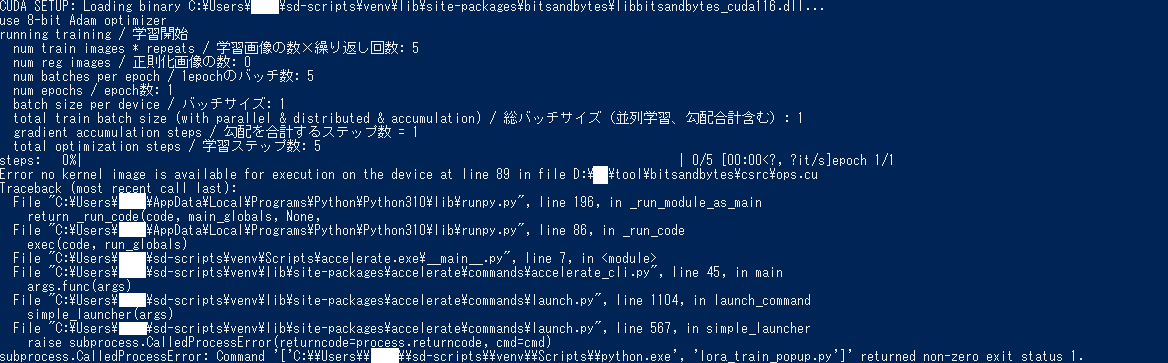
Increased page file size to the max amount i can and now i am getting a different error.
================================================================================
CUDA SETUP: Loading binary C:\Users\...\sd-scripts\venv\lib\site-packages\bitsandbytes\libbitsandbytes_cuda116.dll...
use 8-bit Adam optimizer
running training / 学習開始
  num train images * repeats / 学習画像の数×繰り返し回数: 5
  num reg images / 正則化画像の数: 0
  num batches per epoch / 1epochのバッチ数: 5
  num epochs / epoch数: 1
  batch size per device / バッチサイズ: 1
  total train batch size (with parallel & distributed & accumulation) / 総バッチサイズ(並列学習、勾配合計含む): 1
  gradient accumulation steps / 勾配を合計するステップ数 = 1
  total optimization steps / 学習ステップ数: 5
steps:   0%|                                                                                     | 0/5 [00:00<?, ?it/s]epoch 1/1
Error no kernel image is available for execution on the device at line 89 in file D:\ai\tool\bitsandbytes\csrc\ops.cu
Traceback (most recent call last):
  File "C:\Users\...\AppData\Local\Programs\Python\Python310\lib\runpy.py", line 196, in _run_module_as_main
    return _run_code(code, main_globals, None,
  File "C:\Users\...\AppData\Local\Programs\Python\Python310\lib\runpy.py", line 86, in _run_code
    exec(code, run_globals)
  File "C:\Users\...\sd-scripts\venv\Scripts\accelerate.exe\__main__.py", line 7, in <module>
  File "C:\Users\...\sd-scripts\venv\lib\site-packages\accelerate\commands\accelerate_cli.py", line 45, in main
    args.func(args)
  File "C:\Users\...\sd-scripts\venv\lib\site-packages\accelerate\commands\launch.py", line 1104, in launch_command
    simple_launcher(args)
  File "C:\Users\...\sd-scripts\venv\lib\site-packages\accelerate\commands\launch.py", line 567, in simple_launcher
    raise subprocess.CalledProcessError(returncode=process.returncode, cmd=cmd)
subprocess.CalledProcessError: Command '['C:\\Users\\...\\sd-scripts\\venv\\Scripts\\python.exe', 'lora_train_popup.py']' returned non-zero exit status 1.
Ah yeah that is a bitsandbytes library error, its is really finicky about detecting and using your CUDA install. You might want to look through the issues here: https://github.com/TimDettmers/bitsandbytes
Or just disable the 8 bit optimizer?
I had to add 2 environment variables to get it working in linux, but I never got that error specifically.
Wasnt 8bit optimizer for bad GPUs? Mine is a 1070ti with 8GB VRAM so don't think i can run this without 8bit optimizer?
This comment fixes the bitsandbytes issue: https://github.com/kohya-ss/sd-scripts/issues/44#issuecomment-1375690372
I've also run into this paging file issue. After doing some profiling, I've found at the start of each epoch, the program tries to spawn 7 extra worker threads which each take up 4GB of ram in my case, and then kills them all off after the epoch ends.
Setting the page file sufficiently large is a fix, but I'm not sure that:
- Each thread needs the 4GB it's consuming (I'm not even sure that it uses it for anything either)
- These threads need to be killed off after each epoch (spawning them takes a significant amount of time)
- Whether there needs to be that many threads in the first place, given that they consume so many resources.
I haven't looked at the code base yet, nor am I familiar with programming ML in python, so I'm not sure I can find the issue and submit a PR, but it does seem like a pretty big issue that should be addressed.

@TheDevelo Are you spawning 8 threads with the accelerate command?
Yeah, this could probably be dialed back, as I don't think training will be very CPU bound.
Normally yes, but I've also tried lowering the number of threads and it still spawns 8, so it seems to be independent of accelerate.
@TheDevelo If running LORA, try changing the line here to some static number (2?): https://github.com/kohya-ss/sd-scripts/blob/bf691aef69d883e4d9e61104609b479ba3be9aad/train_network.py#L129
@UBBK Try running python -m bitsandbytes in the console. It should spit out some more useful debug info.
Oh nevermind. Doing this AND increasing paging size at the same time solved the issue.
@TheDevelo If running LORA, try changing the line here to some static number (2?):
https://github.com/kohya-ss/sd-scripts/blob/bf691aef69d883e4d9e61104609b479ba3be9aad/train_network.py#L129
Yep, seems that's the issue. Changed it to 1 and now it only spawns 1 worker thread, which reduced RAM usage significantly. The time between epochs is reduced too, since spawning each thread took a good amount of time. It even takes less time per step too.
I've added --max_data_loader_n_workers option to specify the number of workers. Please try to use the option.
