
AspNetCore.RouteAnalyzer
 AspNetCore.RouteAnalyzer copied to clipboard
 kobake
AspNetCore.RouteAnalyzer
View all route information for ASP.NET Core project.
Pickuped screenshot
Usage on your ASP.NET Core project
Install NuGet package
PM> Install-Package AspNetCore.RouteAnalyzer
Edit Startup.cs
Insert code services.AddRouteAnalyzer(); and required using directive into Startup.cs as follows.
using AspNetCore.RouteAnalyzer; // Add
....
public void ConfigureServices(IServiceCollection services)
{
    services.AddMvc();
    services.AddRouteAnalyzer(); // Add
}
Case1: View route information on browser
Insert code routes.MapRouteAnalyzer("/routes"); into Startup.cs as follows.
public void Configure(IApplicationBuilder app, IHostingEnvironment env)
{
    ....
    app.UseMvc(routes =>
    {
        routes.MapRouteAnalyzer("/routes"); // Add
        routes.MapRoute(
            name: "default",
            template: "{controller}/{action=Index}/{id?}");
    });
}
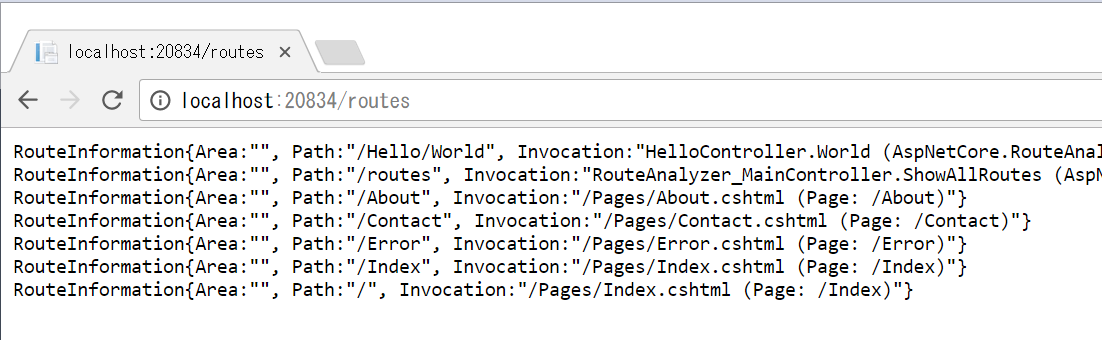
Then you can access url of http://..../routes to view all route informations on your browser. (This url /routes can be customized by MapRouteAnalyzer().)
Case2: Print routes on VS output panel
Insert a code block as below into Startup.cs.
public void Configure(
    IApplicationBuilder app,
    IHostingEnvironment env,
    IApplicationLifetime applicationLifetime, // Add
    IRouteAnalyzer routeAnalyzer // Add
)
{
    ....

    // Add this block
    applicationLifetime.ApplicationStarted.Register(() =>
    {
        var infos = routeAnalyzer.GetAllRouteInformations();
        Debug.WriteLine("======== ALL ROUTE INFORMATION ========");
        foreach (var info in infos)
        {
            Debug.WriteLine(info.ToString());
        }
        Debug.WriteLine("");
        Debug.WriteLine("");
    });
}
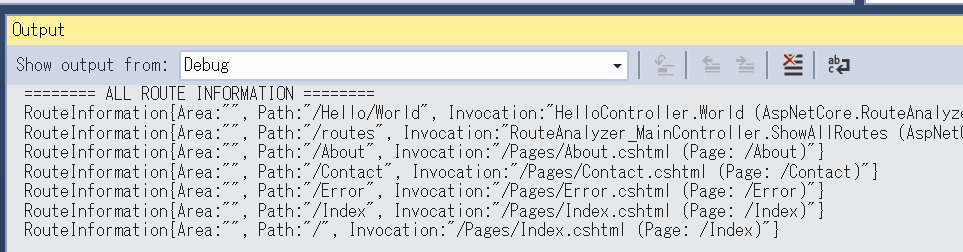
Then you can view all route informations on VS output panel.
 kobake