

 ko4life-net
Implement in game command list
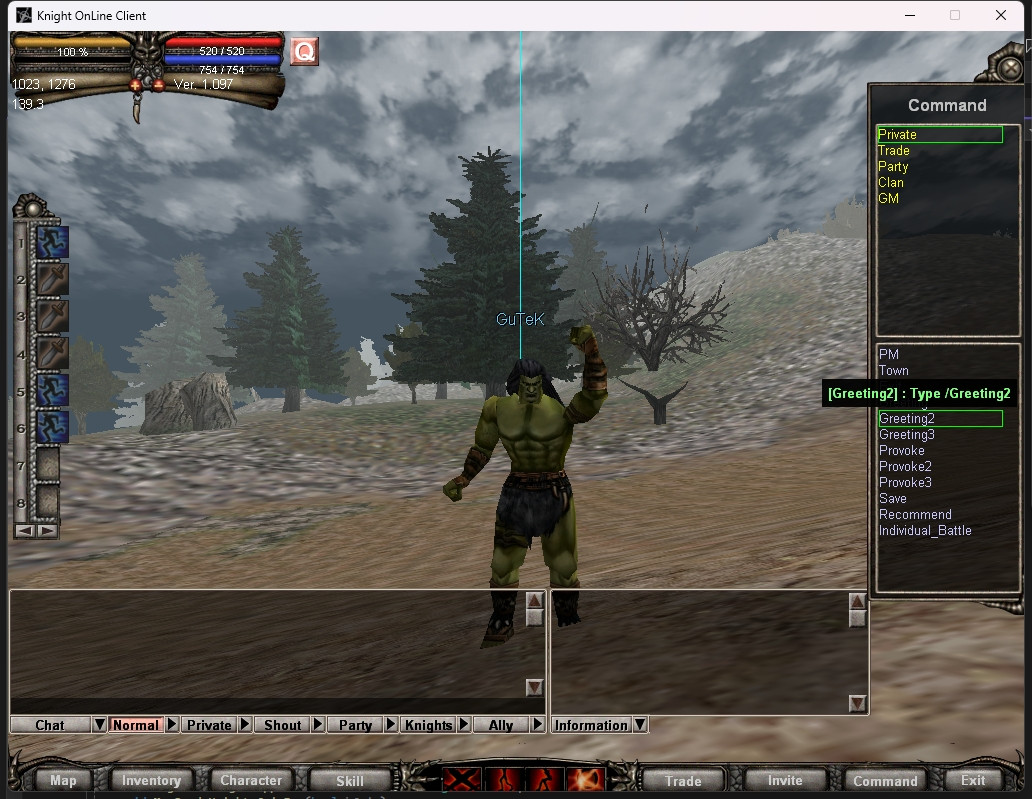

Great majority of my comments were rather nitpicky, and largely dependent on the intentions of the codebase, so take from that what you will.
I don't know if it's at all useful, but I will explain how this behaviour is handled officially, for reference.
Officially, on CGameProcMain::Init(), it calls what I name CUICmdList::InitCommands(). This has similar behaviour to the behaviour you inlined (maybe it got inlined in 1.264? I don't know if you were referencing this or not).
The thing with this, is it loads commands into an array for each and every category (not a singular array like it used to):
void __stdcall CUICmdList::InitCommands()
{
  // [COLLAPSED LOCAL DECLARATIONS. PRESS KEYPAD CTRL-"+" TO EXPAND]

  v0 = IDS_CMD_WHISPER;
  v1 = CUICmdList::szCommandsPrivate;           // Private (12)
  do
    CGameBase::GetText(v0++, v1++);
  while ( (int)v1 < (int)CUICmdList::ParseChattingCommand::szCmds );
  v2 = IDS_CMD_TRADE;
  v3 = CUICmdList::szCommandsTrade;             // Trade (4)
  do
    CGameBase::GetText(v2++, v3++);
  while ( (int)v3 < (int)CUICmdList::szCommandsKing );
  v4 = IDS_CMD_PARTY;
  v5 = CUICmdList::szCommandsParty;             // Party (5)
  do
    CGameBase::GetText(v4++, v5++);
  while ( (int)v5 < (int)CUICmdList::szCommandsClan );
  v6 = IDS_CMD_JOINCLAN;
  v7 = CUICmdList::szCommandsClan;              // Clan (9)
  do
    CGameBase::GetText(v6++, v7++);
  while ( (int)v7 < (int)&stru_815C10 );
  v8 = IDS_CMD_CONFEDERACY;
  v9 = CUICmdList::szCommandsKnights;           // Knights (3)
  do
    CGameBase::GetText(v8++, v9++);
  while ( (int)v9 < (int)CUICmdList::szCommandsParty );
  v10 = IDS_CMD_VISIBLE;
  v11 = CUICmdList::szCommandsGM;               // GM (21)
  do
    CGameBase::GetText(v10++, v11++);
  while ( (int)v11 < (int)&byte_815A48 );
  v12 = IDS_CMD_GUARD_HIDE;
  v13 = CUICmdList::szCommandsGuardianMonster;  // Guardian Monster (7)
  do
    CGameBase::GetText(v12++, v13++);
  while ( (int)v13 < (int)CUICmdList::szCommandsPrivate );
  v14 = IDS_CMD_KING_ROYALORDER;
  v15 = CUICmdList::szCommandsKing;             // King (7)
  do
    CGameBase::GetText(v14++, v15++);
  while ( (int)v15 < (int)CUICmdList::szCommandsKnights );
}
With these loaded, in what I call CUICmdList::ParseChattingCommand() (called by the original CGameProcMain implementation), it fetches the command parts as normal, then checks for any manually internally defined commands (e.g. /goto, /rental, etc.).
If none of those match, it then scans the various arrays in a particular order, with each category handled by its own method, which I've loosely named like CUICmdList::ProcessCommand_Private(), CUICmdList::ProcessCommand_Trade(), etc.
This then scans if they match, and based on the matching index in the array (which they'd have an enum coupled to), they handle the command appropriately, for example:
  switch ( eCmd )
  {
    case CMD_PRIVATE_WHISPER:
      szID._allocator._byte = v30;
      std::string::_Tidy(&szID, 0);
      std::string::assign(&szID, arg2, strlen(arg2));
      LOBYTE(v38) = 1;
      CGameProcMain::MsgSend_ChatSelectTarget(*(CGameProcMain **)v31, &szID, CHAT_TARGET_SELECT_PRIVATE);
      LOBYTE(v38) = 0;
      std::string::_Tidy(&szID, 1);
      goto LABEL_74;
    case CMD_PRIVATE_TOWN:
      if ( CGameBase::s_pPlayer->_.m_bStun )
        goto LABEL_16;
      if ( 2 * CGameBase::s_pPlayer->_.m_InfoBase.iHP >= CGameBase::s_pPlayer->_.m_InfoBase.iHPMax
        || CGameBase::s_pPlayer->_.m_InfoExt.iZoneCur == 55 )
      {
        strcpy((char *)&data, "H");
        CAPISocket::Send(CGameProcedure::s_pSocket, (BYTE *)&data._allocator, 2);
      }
      else
      {
        data._allocator._byte = v30;
        std::string::_Tidy(&data, 0);
        LOBYTE(v38) = 2;
        CGameBase::GetText(IDS_ERR_GOTO_TOWN_OUT_OF_HP, &data);
        CGameProcMain::MsgOutput(*(CGameProcMain **)v31, &data, 0xFFFF00FF);
        LOBYTE(v38) = 0;
        std::string::_Tidy(&data, 1);
      }
      goto LABEL_74;
    case CMD_PRIVATE_EXIT:
      CGameProcMain::RequestExit(*(CGameProcMain **)v31);
      goto LABEL_74;
Getting back to the list itself, when it's opened it'll reset the selected list to the category list, and toggle the "option" button on CUICmd appropriately.
When it sets the category, it naturally resets the content of the command list, and then depending on the selected (or default) category, it'll go through and fetch appropriately. For example:
        case CMD_GROUP_PRIVATE:
          v3 = 0;
          p_data_long = &CUICmdList::szCommandsPrivate[0]._data_long;
          do
          {
            CGameBase::GetText((e_TextResourceID)(v3 + 8100), &szMsg);
            v5 = *p_data_long;
            if ( !*p_data_long )
              v5 = NewFilename;
            data_long = szMsg._data_long;
            if ( !szMsg._data_long )
              data_long = NewFilename;
            sprintf(Buffer, data_long, v5);
            v7 = *p_data_long;
            if ( !*p_data_long )
              v7 = NewFilename;
            a2._allocator._byte = v56;
            std::string::_Tidy(&a2, 0);
            std::string::assign(&a2, v7, strlen(v7));
            v54 = 0xFF80FF80;
            v57 = (char **)&v53;
            LOBYTE(v75) = 1;
            sub_4A64F0(&v53, Buffer, &v56);
            v8 = v61->_.m_pList_Content;
            LOBYTE(v75) = 1;
            CN3UIList::AddString(v8, &a2, 0xFFC6C6FB, v53, v54);
            LOBYTE(v75) = 0;
            std::string::_Tidy(&a2, 1);
            p_data_long += 4;
            ++v3;
          }
          while ( (int)p_data_long < (int)&CUICmdList::ParseChattingCommand::szCmds[0][4] );
          break;
What they're (predominantly) doing here is they're just using the various command group enums (e.g. private's containing /PM, /TOWN, etc) and looping until they reach the end of this enum. For each of the categories.
Selecting a command predominantly just passes it through, but based on the selected category ID (and then consequently the appropriately selected command, by index in the array -- which is mapped to the previously mentioned enum), it'll determine whether or not it needs to show CUICmdEdit or not.
If it doesn't, it just passes it through to CUICmdList::ParseChattingCommand() to be handled.
CUICmdEdit's behaviour officially utilises CallBackProc to pass the notifications. On enter (specifically just DIK_RETURN, anyway), it'll forward the "1" event to its parent (CUICmdList) for handling.
CUICmdList then handles this in its CUICmdList::CallBackProc() implementation to fetch the command name and args, pass it to CUICmdList::ParseChattingCommand() and finally empties out the contents of CUICmdEdit's edit control.
I think that's about the general gist of how it works.

Great majority of my comments were rather nitpicky, and largely dependent on the intentions of the codebase, so take from that what you will.
I don't know if it's at all useful, but I will explain how this behaviour is handled officially, for reference.
Officially, on
CGameProcMain::Init(), it calls what I nameCUICmdList::InitCommands(). This has similar behaviour to the behaviour you inlined (maybe it got inlined in 1.264? I don't know if you were referencing this or not).The thing with this, is it loads commands into an array for each and every category (not a singular array like it used to):
void __stdcall CUICmdList::InitCommands()
{
  // [COLLAPSED LOCAL DECLARATIONS. PRESS KEYPAD CTRL-"+" TO EXPAND]

  v0 = IDS_CMD_WHISPER;
  v1 = CUICmdList::szCommandsPrivate;           // Private (12)
  do
    CGameBase::GetText(v0++, v1++);
  while ( (int)v1 < (int)CUICmdList::ParseChattingCommand::szCmds );
  v2 = IDS_CMD_TRADE;
  v3 = CUICmdList::szCommandsTrade;             // Trade (4)
  do
    CGameBase::GetText(v2++, v3++);
  while ( (int)v3 < (int)CUICmdList::szCommandsKing );
  v4 = IDS_CMD_PARTY;
  v5 = CUICmdList::szCommandsParty;             // Party (5)
  do
    CGameBase::GetText(v4++, v5++);
  while ( (int)v5 < (int)CUICmdList::szCommandsClan );
  v6 = IDS_CMD_JOINCLAN;
  v7 = CUICmdList::szCommandsClan;              // Clan (9)
  do
    CGameBase::GetText(v6++, v7++);
  while ( (int)v7 < (int)&stru_815C10 );
  v8 = IDS_CMD_CONFEDERACY;
  v9 = CUICmdList::szCommandsKnights;           // Knights (3)
  do
    CGameBase::GetText(v8++, v9++);
  while ( (int)v9 < (int)CUICmdList::szCommandsParty );
  v10 = IDS_CMD_VISIBLE;
  v11 = CUICmdList::szCommandsGM;               // GM (21)
  do
    CGameBase::GetText(v10++, v11++);
  while ( (int)v11 < (int)&byte_815A48 );
  v12 = IDS_CMD_GUARD_HIDE;
  v13 = CUICmdList::szCommandsGuardianMonster;  // Guardian Monster (7)
  do
    CGameBase::GetText(v12++, v13++);
  while ( (int)v13 < (int)CUICmdList::szCommandsPrivate );
  v14 = IDS_CMD_KING_ROYALORDER;
  v15 = CUICmdList::szCommandsKing;             // King (7)
  do
    CGameBase::GetText(v14++, v15++);
  while ( (int)v15 < (int)CUICmdList::szCommandsKnights );
}
With these loaded, in what I call
CUICmdList::ParseChattingCommand()(called by the originalCGameProcMainimplementation), it fetches the command parts as normal, then checks for any manually internally defined commands (e.g./goto,/rental, etc.).If none of those match, it then scans the various arrays in a particular order, with each category handled by its own method, which I've loosely named like
CUICmdList::ProcessCommand_Private(),CUICmdList::ProcessCommand_Trade(), etc.This then scans if they match, and based on the matching index in the array (which they'd have an enum coupled to), they handle the command appropriately, for example:
  switch ( eCmd )
  {
    case CMD_PRIVATE_WHISPER:
      szID._allocator._byte = v30;
      std::string::_Tidy(&szID, 0);
      std::string::assign(&szID, arg2, strlen(arg2));
      LOBYTE(v38) = 1;
      CGameProcMain::MsgSend_ChatSelectTarget(*(CGameProcMain **)v31, &szID, CHAT_TARGET_SELECT_PRIVATE);
      LOBYTE(v38) = 0;
      std::string::_Tidy(&szID, 1);
      goto LABEL_74;
    case CMD_PRIVATE_TOWN:
      if ( CGameBase::s_pPlayer->_.m_bStun )
        goto LABEL_16;
      if ( 2 * CGameBase::s_pPlayer->_.m_InfoBase.iHP >= CGameBase::s_pPlayer->_.m_InfoBase.iHPMax
        || CGameBase::s_pPlayer->_.m_InfoExt.iZoneCur == 55 )
      {
        strcpy((char *)&data, "H");
        CAPISocket::Send(CGameProcedure::s_pSocket, (BYTE *)&data._allocator, 2);
      }
      else
      {
        data._allocator._byte = v30;
        std::string::_Tidy(&data, 0);
        LOBYTE(v38) = 2;
        CGameBase::GetText(IDS_ERR_GOTO_TOWN_OUT_OF_HP, &data);
        CGameProcMain::MsgOutput(*(CGameProcMain **)v31, &data, 0xFFFF00FF);
        LOBYTE(v38) = 0;
        std::string::_Tidy(&data, 1);
      }
      goto LABEL_74;
    case CMD_PRIVATE_EXIT:
      CGameProcMain::RequestExit(*(CGameProcMain **)v31);
      goto LABEL_74;
Getting back to the list itself, when it's opened it'll reset the selected list to the category list, and toggle the "option" button on
CUICmdappropriately. When it sets the category, it naturally resets the content of the command list, and then depending on the selected (or default) category, it'll go through and fetch appropriately. For example:case CMD_GROUP_PRIVATE: v3 = 0; p_data_long = &CUICmdList::szCommandsPrivate[0]._data_long; do { CGameBase::GetText((e_TextResourceID)(v3 + 8100), &szMsg); v5 = *p_data_long; if ( !*p_data_long ) v5 = NewFilename; data_long = szMsg._data_long; if ( !szMsg._data_long ) data_long = NewFilename; sprintf(Buffer, data_long, v5); v7 = *p_data_long; if ( !*p_data_long ) v7 = NewFilename; a2._allocator._byte = v56; std::string::_Tidy(&a2, 0); std::string::assign(&a2, v7, strlen(v7)); v54 = 0xFF80FF80; v57 = (char **)&v53; LOBYTE(v75) = 1; sub_4A64F0(&v53, Buffer, &v56); v8 = v61->_.m_pList_Content; LOBYTE(v75) = 1; CN3UIList::AddString(v8, &a2, 0xFFC6C6FB, v53, v54); LOBYTE(v75) = 0; std::string::_Tidy(&a2, 1); p_data_long += 4; ++v3; } while ( (int)p_data_long < (int)&CUICmdList::ParseChattingCommand::szCmds[0][4] ); break;What they're (predominantly) doing here is they're just using the various command group enums (e.g. private's containing /PM, /TOWN, etc) and looping until they reach the end of this enum. For each of the categories.
Selecting a command predominantly just passes it through, but based on the selected category ID (and then consequently the appropriately selected command, by index in the array -- which is mapped to the previously mentioned enum), it'll determine whether or not it needs to show
CUICmdEditor not.If it doesn't, it just passes it through to
CUICmdList::ParseChattingCommand()to be handled.
CUICmdEdit's behaviour officially utilisesCallBackProcto pass the notifications. On enter (specifically justDIK_RETURN, anyway), it'll forward the "1" event to its parent (CUICmdList) for handling.
CUICmdListthen handles this in itsCUICmdList::CallBackProc()implementation to fetch the command name and args, pass it toCUICmdList::ParseChattingCommand()and finally empties out the contents ofCUICmdEdit's edit control.I think that's about the general gist of how it works.
Thank you, @twostars, for the ASM code. I think I understand how it works now. Do you know how the tooltips is set for the commands in the official version? I tried using SetTooltipText perhaps I am missing some code for rendering it or something else.
They include the tooltip and the colour in CN3UIList::AddString(). I should note that they use 0xEFFFFFFF as the default tooltip colour to denote that it should use the default colour from the list itself, but otherwise they just handle it there.
Oh i see AddString function has more parameters instead of one "szString"
CN3UIList::AddString(v8, &a2, 0xFFC6C6FB, v53, v54);
a2 = szString? 0xFFC6C6FB - color ? v53 - tooltiptext? v54 - tooltiptext color ?
so i will need also ASM for AddString function too
Oh i see AddString function has more parameters instead of one "szString"
CN3UIList::AddString(v8, &a2, 0xFFC6C6FB, v53, v54);
a2 = szString? 0xFFC6C6FB - color ? v53 - tooltiptext? v54 - tooltiptext color ?
so i will need also ASM for AddString function too
Yes, this is correct. Does this help you @xGuTeK?:
int CN3UIList::AddString(const CN3UIString & szString, D3DCOLOR crColor, std::string szToolTip, D3DCOLOR crToolTipColor)
{
  D3DCOLOR crFont;
  CN3UIString *v7; // eax
  CN3UIString *pString; // eax

  if ( crColor == 0xEFFFFFFF )
    crFont = this->CN3UIList.m_crFont;
  v7 = (CN3UIString *)operator new(0xECu);
  if ( v7 )
    pString = CN3UIString::ctor(v7);
  else
    pString = NULL;
  pString->vft->Init(pString, this);
  pString->vft->SetFont(
    pString,
    &this->CN3UIList.m_szFontName,
    this->CN3UIList.m_dwFontHeight,
    this->CN3UIList.m_bFontBold,
    this->CN3UIList.m_bFontItalic);
  pString->CN3UIString.m_Color = crFont;
  pString->vft->SetString(pString, szString);
  pString->CN3UIBase.m_szToolTip = szToolTip;
  pString->CN3UIBase.m_crToolTipColor = crToolTipColor;
  this->CN3UIList.m_ListString.push_back(pString);
  CN3UIList::UpdateChildRegions(this);
  return this->CN3UIList.m_ListString._Size - 1;
}
