

 knative
IngressNotConfigured after installation
What version of Knative?
Knative serving v1.9.0 Knative serving v1.10.2
Expected Behavior
It would be nice if services would start after knative is installed
Actual Behavior
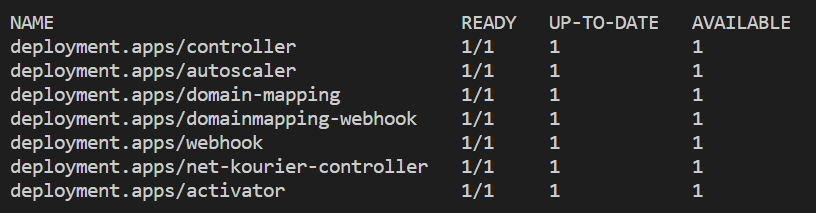
Status of Knative deployment
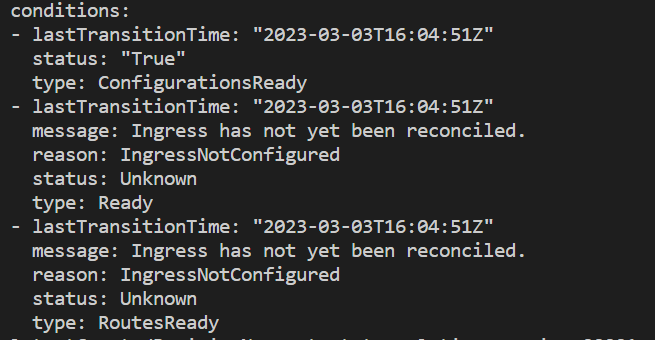
 New service shows IngressNotReady
 Detailed output
Steps to Reproduce the Problem
First install fails to configure Knative Serving Setup so that new Knative services can be started:
kubectl apply -f https://github.com/knative/serving/releases/download/knative-v1.9.0/serving-crds.yaml
kubectl wait --for=condition=Established --all crd
kubectl apply -f https://github.com/knative/serving/releases/download/knative-v1.9.0/serving-core.yaml
kubectl apply -f https://github.com/knative/net-kourier/releases/download/knative-v1.9.0/kourier.yaml

kubectl patch configmap/config-network --namespace knative-serving --type merge --patch '{"data":{"ingress-class":"kourier.ingress.networking.knative.dev"}}'

# Wait for Knative to become ready before starting knative services
kubectl wait --for=condition=ready --timeout=60s -n knative-serving --all pods
kubectl wait --for=condition=ready --timeout=60s -n kourier-system --all pods
Temporary solution:
Can be reproduced in Knative serving v1.10.2 Observations:
- ❌ 1. Knative service
poddelete does not help- ❌ 2. Knative service
deploymentdelete does not help- ❌ 3. Knative service
itselfdelete and recreation does not help- ❌ 4. Kourier service
poddelete does not help:kubectl delete --all pods --namespace=kourier-system- ❌ 5. Knative system service
poddelete does not help:kubectl delete --all pods --namespace=knative-serving- ✅ 6. [Solution that works] Delete Kourier deployment and recreate it:
# Remove kourier
kubectl delete -f https://github.com/knative/net-kourier/releases/download/knative-v1.10.0/kourier.yaml

# Install kourier
kubectl apply -f https://github.com/knative/net-kourier/releases/download/knative-v1.10.0/kourier.yaml
kubectl patch configmap/config-network --namespace knative-serving --type merge --patch '{\"data\":{\"ingress-class\":\"kourier.ingress.networking.knative.dev\"}}'

What environment are you using? Do you have K8S Services with type: LoadBalancer? Has the kourier-gateway received an IP?

I am not currently able to reproduce this issue to give more info, I would close this issue for now I think.
@ReToCode no, custom services in Kubernetes with type: LoadBalancer.
Kourier has cluster IP ready:
PS > kubectl --namespace kourier-system get service kourier
NAME      TYPE           CLUSTER-IP      EXTERNAL-IP   PORT(S)                      AGE
kourier   LoadBalancer   10.152.183.95   <pending>     80:30923/TCP,443:32232/TCP   22h
I currently have environment where I can reproduce this issue it seems. This environment would not be avaible forever, but if you quickly guide me where could I look for more info, we could solve this issue maybe.
Can be reproduced in Knative serving v1.10.2 Observations:
- ❌ 1. Knative service
poddelete does not help - ❌ 2. Knative service
deploymentdelete does not help - ❌ 3. Knative service
itselfdelete and recreation does not help - ❌ 4. Kourier service
poddelete does not help:kubectl delete --all pods --namespace=kourier-system - ❌ 5. Knative system service
poddelete does not help:kubectl delete --all pods --namespace=knative-serving - ✅ 6. [Solution that works] Delete Kourier deployment and recreate it:
# Remove kourier
kubectl delete -f https://github.com/knative/net-kourier/releases/download/knative-v1.10.0/kourier.yaml

# Install kourier
kubectl apply -f https://github.com/knative/net-kourier/releases/download/knative-v1.10.0/kourier.yaml
kubectl patch configmap/config-network --namespace knative-serving --type merge --patch '{\"data\":{\"ingress-class\":\"kourier.ingress.networking.knative.dev\"}}'
That is still a normal setup we do all the time in CI and locally, without issues. Can you check https://knative.dev/docs/install/troubleshooting/ for additional info? Especially take a look at the logs of the controller and the net-kourier-controller.
This issue is stale because it has been open for 90 days with no
activity. It will automatically close after 30 more days of
inactivity. Reopen the issue with /reopen. Mark the issue as
fresh by adding the comment /remove-lifecycle stale.
![github-actions[bot] avatar](https://avatars.githubusercontent.com/in/15368?v=4 "Published by a pub.dev verified publisher")