

 kkoomen
Support detection of nested syntax blocks
Is your feature request related to a problem? Please describe.
vim-markdown supports fenced language blocks.
vim-doge currently relies on &filetype to match a generator. It'd be nice if it could detect the syntax inside of nested languages blocks. See the screenshot below: &filetype is Markdown, but my cursor is currently inside of a TypeScript block.
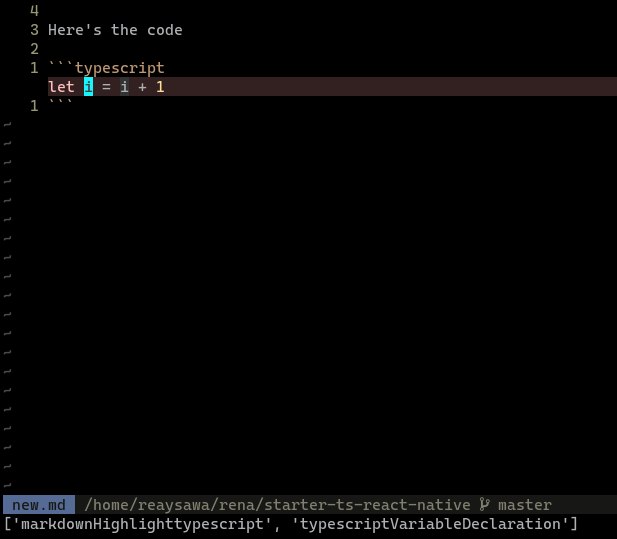
It'd also be useful for Vue files, which have different kinds of languages in different parts of the file.
Describe the solution you'd like
A known command to extract the current syntax from an arbitrary place in the file is:
map(synstack(line('.'), col('.')), 'synIDattr(v:val, "name")')
I think we could go through those named highlight groups and have some kind of matching strategy. Even with hardcoded names (e.g. markdownHighlighttypescript which vim-markdown generates) would be an improvement over the current situation.
Describe alternatives you've considered
I guess you could open a new file dummy.ts, paste the code there, generate, then paste it back...
Additional context

@resolritter Sorry for the terribly long response. At the time you've submitted this issue I did have a look around and asking around as well for better alternatives.
The best answer I got from an expert in Vim is:
There is no better approach than parsing the current syntax group hierarchy, which is heavily dependent on the current syntax being written in a parseable way. If the current group is
myCommentsin a C file then you are fucked.Alternatively, you can try to locate some opening and closing patterns and figure out if the cursor is in a
fooor abarregion but I suspect this is going to be slower than the "syntax" method and… it depends on there being a recognisable pattern in >the first place.
How do other plugins detect filetypes like this? Are there different approaches?

Hi @kkoomen it really has been a long time (more than a year!). Since then I've changed the highlighting in my editor to be backed by tree-sitter instead of the built-in regular-expression-based syntax engine. There are prominent projects for tree-sitter on Neovim such as nvim-treesitter. I don't know if there's something for Vim since I don't use it. End of aside.
How do other plugins detect filetypes like this?
&filetype is one per file (it might be a "composed filetype", but that's of no relevance to this). Plugins don't change the filetype, they instead use custom syntax rules for specific sections of the file.
A few ideas regarding this problem:
If you're willing to rely on Vim syntax plugins, then try the approach I mentioned in the OP: get all active syntax rules at the cursor's position and see if they belong to a specific language. i.e. if you wanted to detect JavaScript, something like the following
let active_rules = map(synstack(line('.'), col('.')), 'synIDattr(v:val, "name")')
let is_javascript = filter(active_rules, "stridx(v:val, 'javascript') != -1")
Another option is to implement a detection algorithm using the the search built-in function. e.g. check if the cursor is after a <script> opening tag and before a </script> closing tag by probing around the cursor position with search. This function has a flag for not moving the cursor after calling it, although you can always save the starting position and restore after, whenever, if needed. This is perhaps a better option because you'd not be relying on third-party plugins and Vim syntax plugins is not always reliable.
Lastly, you could try the tree-sitter plugins and see if there's something that would help you identify the current syntax at the cursor's position. If you're willing to escalate out of Vim, then there tools which identify programming languages (e.g. syntect) or, going even further, there's always the option of executing a language parser through a CLI command with system or Vim/Neovim jobs. Those are the least portable and self-contained options, but I thought I might as well mention them.
All options considered, I think the search one might be the most reliable since it'd work even for incomplete syntax. The downside is that it's complex to implement (have to account for comments and such).
@resolritter If you're using vim (not neovim, but just vim) you can use the following config for vue files:
let g:doge_filetype_aliases = {
\  'javascript': ['vue']
\}