

 kitodo
Add option to create new structure element and link selected page in one step
In the structure tree of the metadata editor, the context menu for the last page of a structure element should contain another option to simultaneously create a new structure element following the one to which the selected page is assigned and link the selected page to that new structure element.

Ikram, could you implement that in such a way that several divisions can be linked to one page, one after the other? Currently, this only works for two divisions. Sometimes that is needed:
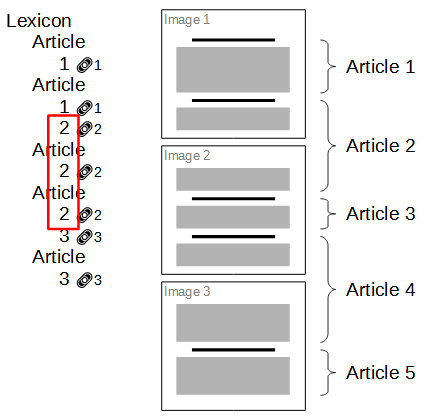

several divisions can be linked to one page
That has been added in a separate pull request: #4319
@matthias-ronge this feature is not yet implemented.
Currently when selecting the last page in a structural element, we just have the two options to either
- create a new structural element, optionally with the selected page assigned to it or
- link the selected page to the next structural element, if one exists (with the restriction being that pages can only be linked to multiple subsequent structural elements on the same hierarchical level - see #5469 and #5457 for details)
The feature described in this issue is not yet implemented and can be seen as some kind of combination of the two existing options: when selecting the last page of an existing structural element, the option should
- create a new structural element behind the one to which the selected page is assigned, on the same hiearachical level and then
- link the "old" structural element to the new element via the selected page
Perhaps it is best described visually:
Monograph
| - Chapter 1
    | - Page 1
    | - Page 1
    | - Page 3 (selected)
When the user then selects the new context menu option in the menu, the following structure would look like this:
Monograph
| - Chapter 1
    | - Page 1
    | - Page 1
    | - Page 3
| - Chapter 2
    | - Page 3 (link)