
elkjs
 elkjs copied to clipboard
 kieler
T-style intersections
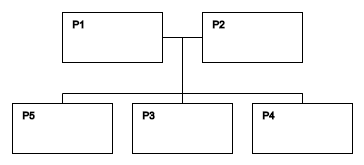
Is it possible to force ELK to create T-style intersections?
I'm trying to generate a layout for a family tree using elk.js.
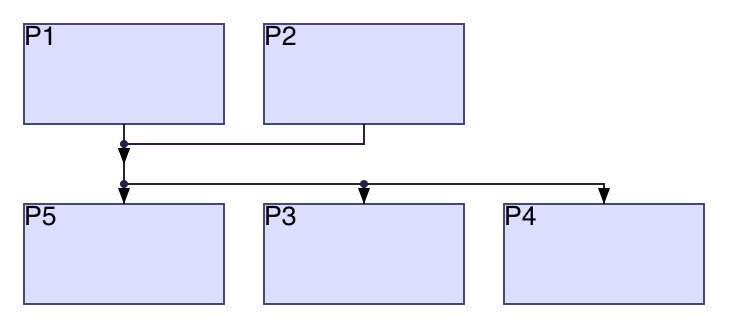
This is the expected layout:
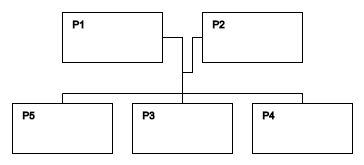
Actual layout is a bit off:
Here's the JSON I am using:
{
    "id": "root",
    "layoutOptions": {
        "elk.algorithm": "layered",
        "elk.direction": "DOWN",
        "elk.edgeRouting": "ORTHOGONAL",
        "elk.layered.mergeEdges": true
    },
    "children": [
        {
            "id": "P1",
            "width": 100,
            "height": 50,
            "layoutOptions": { "elk.portConstraints": "FIXED_SIDE" },
            "ports": [
                { "id": "P1:e", "layoutOptions": { "elk.port.side": "EAST" } },
                { "id": "P1:w", "layoutOptions": { "elk.port.side": "WEST" } }
            ]
        },
        {
            "id": "P2",
            "width": 100,
            "height": 50,
            "layoutOptions": { "elk.portConstraints": "FIXED_SIDE" },
            "ports": [
                { "id": "P2:e", "layoutOptions": { "elk.port.side": "EAST" } },
                { "id": "P2:w", "layoutOptions": { "elk.port.side": "WEST" } }
            ]
        },
        {
            "id": "P3",
            "width": 100,
            "height": 50,
            "layoutOptions": { "elk.portConstraints": "FIXED_SIDE" },
            "ports": [
                { "id": "P3:n", "layoutOptions": { "elk.port.side": "NORTH" } }
            ]
        },
        {
            "id": "P4",
            "width": 100,
            "height": 50,
            "layoutOptions": { "elk.portConstraints": "FIXED_SIDE" },
            "ports": [
                { "id": "P4:n", "layoutOptions": { "elk.port.side": "NORTH" } }
            ]
        },
        {
            "id": "P5",
            "width": 100,
            "height": 50,
            "layoutOptions": { "elk.portConstraints": "FIXED_SIDE" },
            "ports": [
                { "id": "P5:n", "layoutOptions": { "elk.port.side": "NORTH" } }
            ]
        },
        {
            "id": "R1",
            "width": 1,
            "height": 1,
            "layoutOptions": { "elk.portConstraints": "FIXED_SIDE" },
            "ports": [
                { "id": "R1:n", "layoutOptions": { "elk.port.side": "NORTH" } },
                { "id": "R1:s", "layoutOptions": { "elk.port.side": "SOUTH" } }
            ]
        }
    ],
    "edges": [
        { "id": "E1", "sources": [ "P1:e" ], "targets": [ "R1:n" ] },
        { "id": "E2", "sources": [ "P2:w" ], "targets": [ "R1:n" ] },
        { "id": "E3", "sources": [ "R1:s" ], "targets": [ "P3:n" ] },
        { "id": "E4", "sources": [ "R1:s" ], "targets": [ "P4:n" ] },
        { "id": "E5", "sources": [ "R1:s" ], "targets": [ "P5:n" ] }
    ]
}

No, we can't, due to eclipse/elk#328. I'll link back to this issue for another set of examples that demonstrate parts of that problem.

Maybe there's a way to force the fake connector node to be positioned in the same row as the parent nodes, like the [constraint=false] directive in DOT? Something like this:
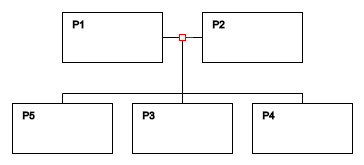
There are two fake connector nodes there, one each for P1 and P2. The solution will be to allow them to be merged. :)
I’ve been looking all over for a layout engine that supports family trees, and it’s really thorny when you get down to practical trees. Would love to see a fix for these T-shaped connectors.

@EmilStenstrom just in case you're wondering, I solved the problem for my case by using a layout like this:
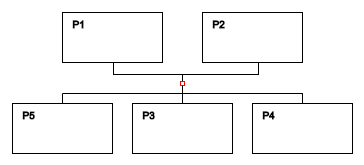
Where the red square is an invisible pseudo-node, which has a size of 1x1 pixels and two ports: north (for parents) and south (for descendants). Although it's not exactly what I wanted, it seems to be working pretty well.
@impworks What graphing library do you use? Is it web based? I can't find any examples of using elkjs with d3 for instance (but I see that Klayjs has a d3 adapter).
@EmilStenstrom I didn't need any library. Since ElkJS does all the calculations, all that's left is to display stuff on the page at given points. For the sample images above I used Canvas API, and for the real project I use a combination of SVG (for lines) and a lot of absolutely-positioned div tags for blocks. Here's a working example (it's in Russian though, but you get the idea):
http://bonsai.kirillorlov.pro/p/%D0%A1%D0%B5%D0%BC%D0%B5%D0%BD%D0%BE%D0%B2%D0%B0_%D0%98%D1%80%D0%B8%D0%BD%D0%B0_%D0%90%D0%BB%D0%B5%D0%BA%D1%81%D0%B5%D0%B5%D0%B2%D0%BD%D0%B0/tree
@impworks Thanks! It seems need to write a graphing library myself :) was hoping that someone else had written an adapter that worked well :)
I solved the problem for my case by using a layout like this:
Where the red square is an invisible pseudo-node, which has a size of 1x1 pixels and two ports: north (for parents) and south (for descendants). Although it's not exactly what I wanted, it seems to be working pretty well.
@impworks how did you get it centered? I used your example code from above, and changed the ports, and what I get is this:

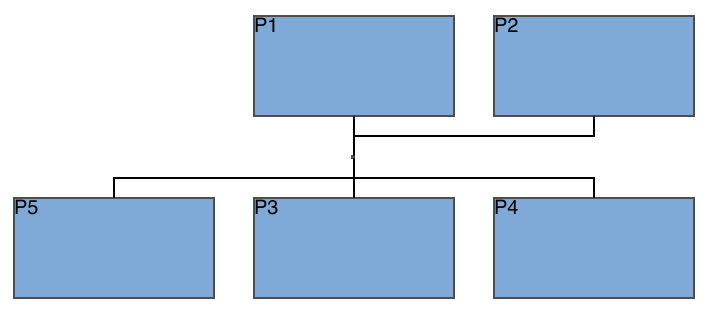
Oh! Seems SIMPLE and LINEAR_SEGMENTS achieved what I wanted! Thanks @uruuru!