kidscancode
[Discussion] AI: Path following

This seems incomplete and doesn't seem to explain the process like other recipes. PathFollow2D is almost forgotten about, the article seems to jump from path2d into code using NodePath without actually even mentioning PathFollow2D and how it is attached to the Path2D.

@brobruno51 I just ran the project under 3.3.1 and it works exactly the same. What makes you think it needs updating?
This tutorial is exactly what I was looking for! It doesn't use a PathFollow2D because it's for a KinematicBody2D.

@brobruno51 I just ran the project under 3.3.1 and it works exactly the same. What makes you think it needs updating?
Sorry, my bad! It works fine.

Not sure what I've messed up. It works fine until the character gets to the first Point on the Path2D, and then it gets stuck. I've got a simple path consisting of only 2 points, but the same thing happened when I tried a 4-point rectangular path.
I've got a CharacterMover node that controls the movement, but otherwise my code is basically identical.
Here's what it looks like in action:

Here's the code:
class_name Guard
extends KinematicBody2D

onready var character_mover = $CharacterMover

export (NodePath) var patrol_path
var patrol_points
var patrol_index = 0
export var is_patrolling: bool = true

func _ready():
	if patrol_path:
		patrol_points = get_node(patrol_path).curve.get_baked_points()

func _physics_process(delta):
	patrol()

func patrol():
	if !patrol_path or !is_patrolling:
		return

	var target = patrol_points[patrol_index]

	if position.distance_to(target) < 1:
		patrol_index = wrapi(patrol_index + 1, 0, patrol_points.size())
		target = patrol_points[patrol_index]

	go_to(target)


func go_to(target_pos: Vector2):
	var move_vec = Vector2()
	move_vec = position.direction_to(target_pos)
	character_mover.set_move_vec(move_vec)

class_name CharacterMover
extends Node2D

var body_to_move : KinematicBody2D = null

export var speed = 200

var move_vec : Vector2
var velocity : Vector2

func _ready():
	assert(owner is KinematicBody2D)
	body_to_move = owner

func set_move_vec(_move_vec: Vector2):
	move_vec = _move_vec.normalized()

func _physics_process(delta):
	velocity = move_vec * speed
	velocity = body_to_move.move_and_slide(velocity)

I suggest you to create a Line2D and set its point so that you can see the actual path in screen.
Your bug could be the chech "< 1", in my game i have a "stuck timer" of 1 second which automatically goes to the next point if stuck for more than 1 second.
Il dom 30 mag 2021, 23:44 craigostrin @.***> ha scritto:
Not sure what I've messed up. It works fine until the character gets to the first Point on the Path2D, and then it gets stuck. I've got a simple path consisting of only 2 points, but the same thing happened when I tried a 4-point rectangular path.
I've got a CharacterMover node that controls the movement, but otherwise my code is basically identical.
Here's what it looks like in action: [image: patrol_bug] https://user-images.githubusercontent.com/40326682/120120801-b8259980-c16d-11eb-9d54-b653ff30f050.gif
Here's the code:
class_name Guard extends KinematicBody2D
onready var character_mover = $CharacterMover
export (NodePath) var patrol_path var patrol_points var patrol_index = 0 export var is_patrolling: bool = true
func _ready(): if patrol_path: patrol_points = get_node(patrol_path).curve.get_baked_points()
func _physics_process(delta): patrol()
func patrol(): if !patrol_path or !is_patrolling: return
var target = patrol_points[patrol_index]
if position.distance_to(target) < 1: patrol_index = wrapi(patrol_index + 1, 0, patrol_points.size()) target = patrol_points[patrol_index]
go_to(target)
func go_to(target_pos: Vector2): var move_vec = Vector2() move_vec = position.direction_to(target_pos) character_mover.set_move_vec(move_vec)
class_name CharacterMover extends Node2D
var body_to_move : KinematicBody2D = null
export var speed = 200
var move_vec : Vector2 var velocity : Vector2
func _ready(): assert(owner is KinematicBody2D) body_to_move = owner
func set_move_vec(_move_vec: Vector2): move_vec = _move_vec.normalized()
func _physics_process(delta): velocity = move_vec * speed velocity = body_to_move.move_and_slide(velocity)
— You are receiving this because you commented. Reply to this email directly, view it on GitHub https://github.com/kidscancode/godot_recipes/issues/72#issuecomment-851065814, or unsubscribe https://github.com/notifications/unsubscribe-auth/ABRB2CM2TRPQ7SGB2ZR3VNLTQKWURANCNFSM4XADILHA .
Could it be possible to combine the PathFollow2D approach with the Chasing the player, making the KinematicBody2D chase the current PathFollow2D position as a target?

https://github.com/kidscancode/godot_recipes/issues/72#issuecomment-851065814
It works fine until the character gets to the first Point on the Path2D, and then it gets stuck.
I came across the same issue.
It happens because the recipe has a bug that causes it to only work for very low speeds because it will overshoot the target at higher speeds. E.g. if the follower is 2px from the target, the delta (physics time step) is a constant 1/60s and the speed is 240px/s, the follower will move 240*1/60 = 4pxtowards the target which overshoots by2px! The follower ends up still being 2px from the target at the end of the move_and_slide, so it will never satisfy if position.distance_to(target) < 1 and thus enter an infinite loop where it never goes to the next waypoint along the path. Only speeds less than `60px/s will work!
One easy solution comes to mind: check if the follower will overshoot, and in that case set the velocity so that it exactly reaches the next waypoint after the move_and_slide.
This has the advantage that it never overshoots, but the disadvantage that if there are a lot of tightly spaced waypoints then it might not actually move at the desired speed, since it can at most pass one waypoint per physics frame.
This can be worked around by setting the "Bake Interval" of the Curve2D of the Path2D to a higher value, with the tradeoff that the path will be less smooth:
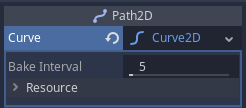
Another workaround is to replace the curve.get_baked_points call with curve.tessellate, which might generate fewer waypoints than get_baked_points depending on the exact "Bake Interval" setting.

One easy solution comes to mind: check if the follower will overshoot, and in that case set the velocity so that it exactly reaches the next waypoint after the
move_and_slide.
I tried making it work like that, and here's a GIF of the result:
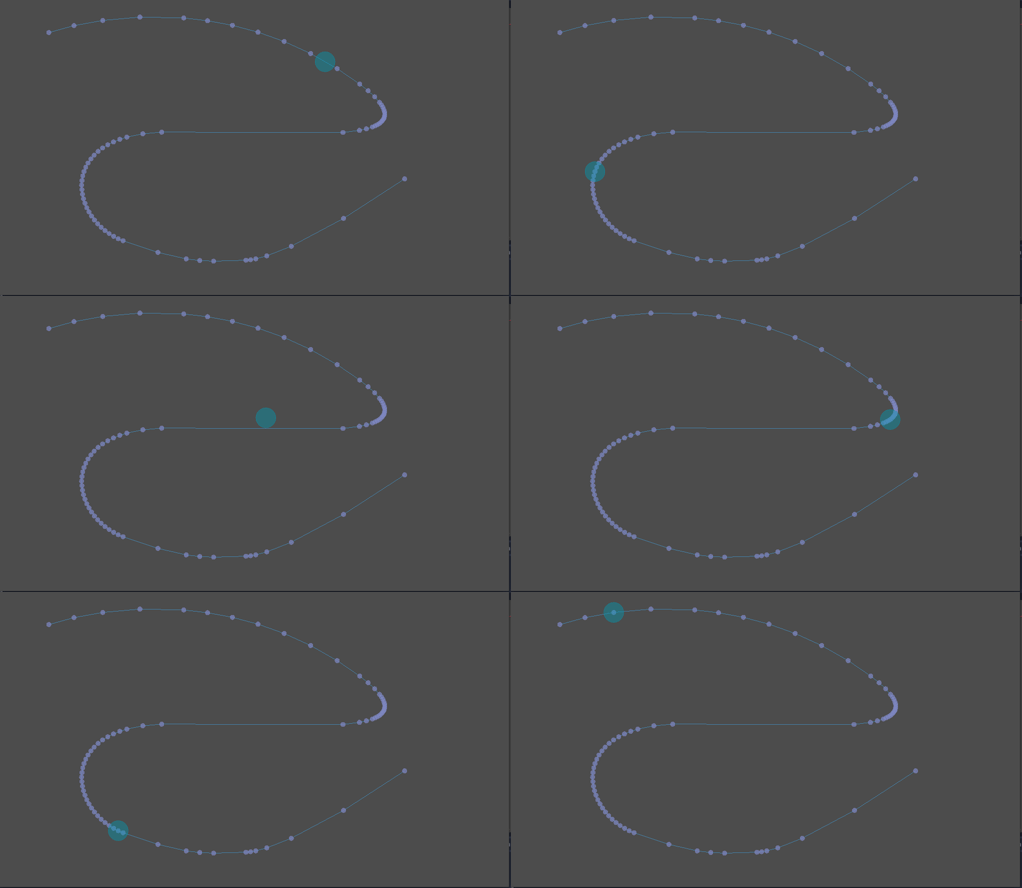
As can be seen it handles very fast speeds (no real upper limit in fact), and slows down when there's tightly spaced way points because it can at most traverse 1 way point per physics frame.
Here's the C# code:
private void IntegrateVelocity()
{
    _velocity = MoveAndSlide(_velocity);
}

private void ProcessPathFollowing(float delta)
{
    var target = _patrolPoints[_patrolIndex];

    if (Position.DistanceTo(target) < _nextWaypointDistanceThreshold)
    {
        _patrolIndex++;
        _patrolIndex = (_patrolIndex > _patrolPoints.Length - 1) ? 0 : _patrolIndex;
        target = _patrolPoints[_patrolIndex];
    }

    var vecToTarget = (target - Position);
    var dirToTarget = vecToTarget.Normalized();
    var distToTarget = vecToTarget.Length();

    var willOvershoot = _speed * delta > distToTarget;

    if (willOvershoot)
    {
        // The velocity needed to reach next patrol point in the next frame
        var tempSpeed = distToTarget / delta;
        _velocity = dirToTarget * tempSpeed;
    }
    else
    {
        _velocity = dirToTarget * _speed;
    }
}

public override void _PhysicsProcess(float delta)
{
    if (_patrolPoints?.Length != 0)
        ProcessPathFollowing(delta);

    IntegrateVelocity();
}
The above solution works, but it's not ideal. Not only doesn't it do an especially good job of following a Path2D at a given speed, even if it did so perfectly it'd just be replicating the behavior of PathFollow2D. A solution that is simpler and gives better results is to have the unit inherit from PathFollow2D instead of KinematicBody2D, but the guide specifically mentions avoiding that as a goal, so here's another approach that manages that but still utilizes the build-in behavior of PathFollow2D. It references an actual PathFollow2D object. It uses that to figure out what the next "target position along the path" should be for this frame, which is used to calculate a "target position" to move towards. Here's the code:
public class Unit : KinematicBody2D
{
    [Export] private NodePath _pathPath;
    [Export] private float _speed = 100f;
    [Export] private float _pathOffset = 0f;

    private Vector2 _velocity;
    private PathFollow2D _pathFollow;

    public override void _Ready()
    {
        if (GetNode<Path2D>(_pathPath) == null)
            throw new ArgumentNullException();

        if (GetNode<Path2D>(_pathPath).GetNode<PathFollow2D>("PathFollow2D") == null)
            throw new ArgumentNullException();

        _pathFollow = GetNode<Path2D>(_pathPath).GetNode<PathFollow2D>("PathFollow2D");
    }

    private void IntegrateVelocity()
    {
        _velocity = MoveAndSlide(_velocity);
    }

    private void ProcessPathFollowing(float delta)
    {
        _pathOffset += _speed * delta;
        _pathFollow.Offset = _pathOffset;

        var targetTranslation = _pathFollow.GlobalPosition - GlobalPosition;
        _velocity = targetTranslation / delta;
        Debug.Print(_velocity.Length().ToString());
    }

    public override void _PhysicsProcess(float delta)
    {
        ProcessPathFollowing(delta);
        IntegrateVelocity();
    }
}
Oh, and here's the scene tree that makes it work: