wNim

wNim copied to clipboard
 khchen
setBackgroundColor to button only draw a colorful border
In the wxPython code, self.btn.SetBackgroundColour((255, 230, 200, 255)) makes a yellow button
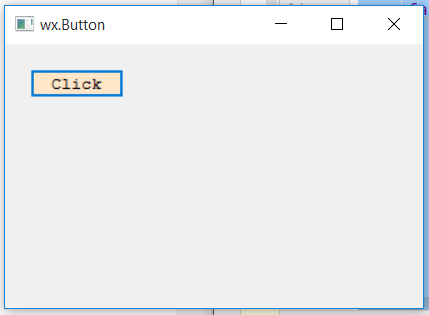
Then I try to setBackgroundColor to button in wNim
import winim
import wnim

let app = App(wSystemDpiAware)

let mainForm = Frame(size=(220, 220))
let panel = Panel(mainForm)

let button_c = Button(panel, label="CLICK ME!", )
button_c.backgroundColor = wRed

let button2_c = Button(panel, label="CLICK ME!", )
button2_c.foregroundColor = wRed
button2_c.backgroundColor = wBlue

mainForm.layout:
    button2_c:
        left = 19
        top = 94
        right = 160
        bottom = 135

    button_c:
        left = 19
        top = 22
        right = 160
        bottom = 63

mainForm.center
mainForm.show()

app.mainLoop()
however the foregroundcolor is only displayed as the border of button.
What have I made wrong? Thanks

In wNim, setBackgroundColor only uses the system API to set the color. I think wxPython draws the button with its own code instead of using the system API.