

 khaled-alshamaa
Issue in rendering some Quran text
In verse 46 Chapter 7, the following is an image generated by the library:

But the following is screenshot of the rendered text on the browser:

The original text in Arabic:
وَبَيْنَهُمَا حِجَابٌ ۚ وَعَلَى الْأَعْرَافِ رِجَالٌ يَعْرِفُونَ كُلًّا بِسِيمَاهُمْ ۚ وَنَادَوْا أَصْحَابَ الْجَنَّةِ أَنْ سَلَامٌ عَلَيْكُمْ ۚ لَمْ يَدْخُلُوهَا وَهُمْ يَطْمَعُونَ﴿46﴾
A UTF-8 encoded text file, created by Kate text editor (Kubuntu Linux) is attached 46.txt

Which library are you using to render your example image? I can't reproduce one of the issues reported by you (the LAM-ALEF weird shape in سلام and الأعراف words).
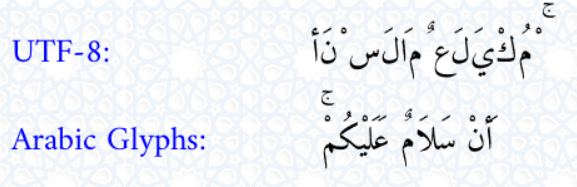
On the other hand, I confirm the issue of overlapping HARAKAT and ALEF with HAMZA (e.g., FATHA and ALEF with HAMZA above, or KASRA and ALEF with HAMZA below, etc.). Frankly, I currently have no clue how we can resolve it! Therefore, I am seeking here to get @khaledhosny expertise. He is one of the best experts I have ever met in this domain.
Finally, I am working on the issue of كُلًّا that is shown in your example. We will release patch 6.3.1 once we resolved these issues. Thank you for reporting them, my friend.

I don't think there is anyway to fix the mark overlap (other than using the standalone mark glyphs). This is all that can be done without proper text layout support in the application.
I suggest you find a different library or applications that supports proper text layout.

Which library are you using to render your example image? I can't reproduce one of the issues reported by you (the LAM-ALEF weird shape in سلام and الأعراف words).
On the other hand, I confirm the issue of overlapping HARAKAT and ALEF with HAMZA (e.g., FATHA and ALEF with HAMZA above, or KASRA and ALEF with HAMZA below, etc.). Frankly, I currently have no clue how we can resolve it! Therefore, I am seeking here to get @khaledhosny expertise. He is one of the best experts I have ever met in this domain.
Finally, I am working on the issue of كُلًّا that is shown in your example. We will release patch 6.3.1 once we resolved these issues. Thank you for reporting them, my friend.
It seems that I use an old version. I will try to update it using composer.
I have updated to version 6.3. The result is below:
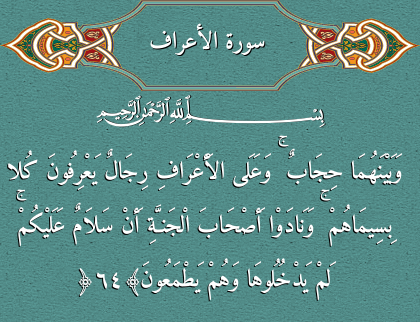
However, in many other verses, such verse 44 of the same chapter,
بِسْمِ اللَّهِ الرَّحْمَٰنِ الرَّحِيمِ
وَنَادَىٰ أَصْحَابُ الْجَنَّةِ أَصْحَابَ النَّارِ أَنْ قَدْ وَجَدْنَا مَا وَعَدَنَا رَبُّنَا حَقًّا فَهَلْ وَجَدْتُمْ مَا وَعَدَ رَبُّكُمْ حَقًّا ۖ قَالُوا نَعَمْ ۚ فَأَذَّنَ مُؤَذِّنٌ بَيْنَهُمْ أَنْ لَعْنَةُ اللَّهِ عَلَى الظَّالِمِينَ﴿44﴾
Undefined index error is generated:
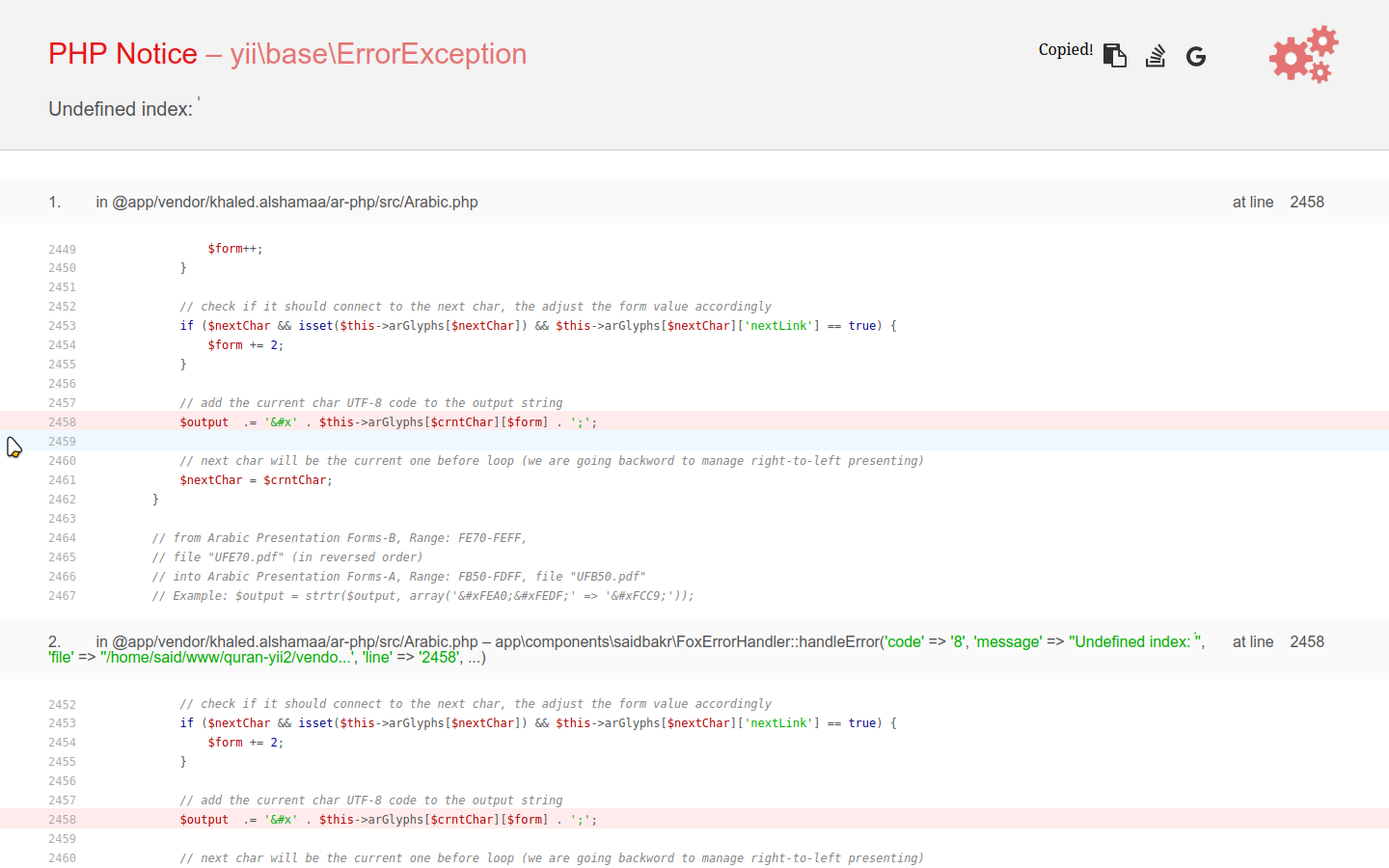
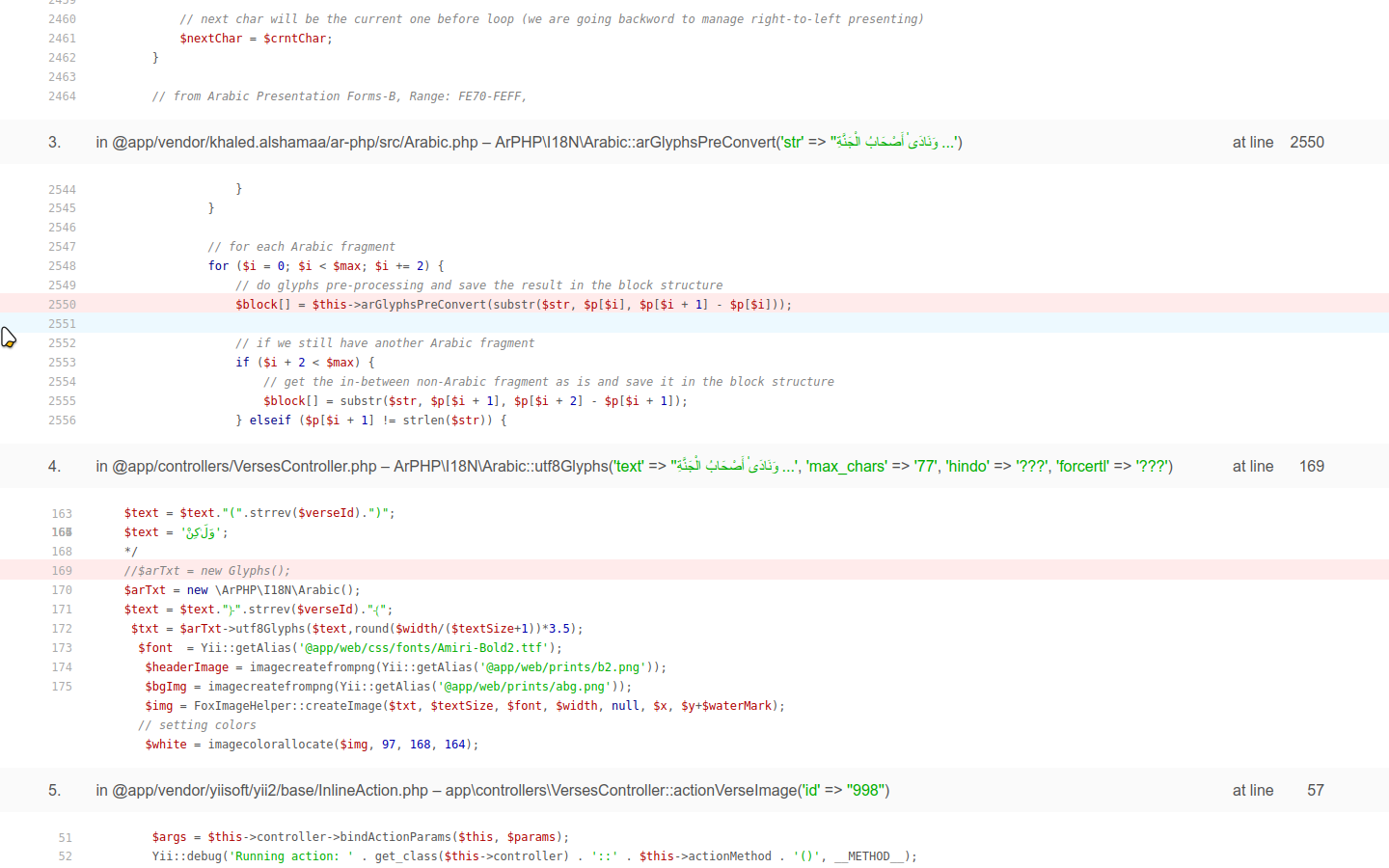
PHP Notice – [yii\base\ErrorException](http://www.yiiframework.com/doc-2.0/yii-base-errorexception.html)
Undefined index: ٰ

    1. in @app/vendor/khaled.alshamaa/ar-php/src/Arabic.php at line 2458
    2449245024512452245324542455245624572458245924602461246224632464246524662467

                    $form++;
                }

                // check if it should connect to the next char, the adjust the form value accordingly
                if ($nextChar && isset($this->arGlyphs[$nextChar]) && $this->arGlyphs[$nextChar]['nextLink'] == true) {
                    $form += 2;
                }

                // add the current char UTF-8 code to the output string
                $output  .= '&#x' . $this->arGlyphs[$crntChar][$form] . ';';

                // next char will be the current one before loop (we are going backword to manage right-to-left presenting)
                $nextChar = $crntChar;
            }

            // from Arabic Presentation Forms-B, Range: FE70-FEFF,
            // file "UFE70.pdf" (in reversed order)
            // into Arabic Presentation Forms-A, Range: FB50-FDFF, file "UFB50.pdf"
            // Example: $output = strtr($output, array('ﺠﻟ' => 'ﳉ'));

    2. in @app/vendor/khaled.alshamaa/ar-php/src/Arabic.php at line 2458 – app\components\saidbakr\FoxErrorHandler::handleError('code' => '8', 'message' => ''Undefined index: ٰ'', 'file' => ''/home/said/www/quran-yii2/vendo...', 'line' => '2458', ...)
    2452245324542455245624572458245924602461246224632464

                // check if it should connect to the next char, the adjust the form value accordingly
                if ($nextChar && isset($this->arGlyphs[$nextChar]) && $this->arGlyphs[$nextChar]['nextLink'] == true) {
                    $form += 2;
                }

                // add the current char UTF-8 code to the output string
                $output  .= '&#x' . $this->arGlyphs[$crntChar][$form] . ';';

                // next char will be the current one before loop (we are going backword to manage right-to-left presenting)
                $nextChar = $crntChar;
            }

            // from Arabic Presentation Forms-B, Range: FE70-FEFF,

    3. in @app/vendor/khaled.alshamaa/ar-php/src/Arabic.php at line 2550 – ArPHP\I18N\Arabic::arGlyphsPreConvert('str' => ''وَنَادَىٰ أَصْحَابُ الْجَنَّةِ ...')
    2544254525462547254825492550255125522553255425552556

                        }
                    }

                    // for each Arabic fragment
                    for ($i = 0; $i < $max; $i += 2) {
                        // do glyphs pre-processing and save the result in the block structure
                        $block[] = $this->arGlyphsPreConvert(substr($str, $p[$i], $p[$i + 1] - $p[$i]));

                        // if we still have another Arabic fragment
                        if ($i + 2 < $max) {
                            // get the in-between non-Arabic fragment as is and save it in the block structure
                            $block[] = substr($str, $p[$i + 1], $p[$i + 2] - $p[$i + 1]);
                        } elseif ($p[$i + 1] != strlen($str)) {

    4. in @app/controllers/VersesController.php at line 169 – ArPHP\I18N\Arabic::utf8Glyphs('text' => ''وَنَادَىٰ أَصْحَابُ الْجَنَّةِ ...', 'max_chars' => '77', 'hindo' => '???', 'forcertl' => '???')
yii\base\ErrorException: Undefined index: ٰ in /home/said/www/quran-yii2/vendor/khaled.alshamaa/ar-php/src/Arabic.php:2458
Stack trace:
#0 /home/said/www/quran-yii2/vendor/khaled.alshamaa/ar-php/src/Arabic.php(2458): app\components\saidbakr\FoxErrorHandler->handleError('8', ''Undefined inde...', ''/home/said/www...', '2458', '['str' => '\xD9\x88\xD9\x8E...')
#1 /home/said/www/quran-yii2/vendor/khaled.alshamaa/ar-php/src/Arabic.php(2550): ArPHP\I18N\Arabic->arGlyphsPreConvert(''\xD9\x88\xD9\x8E\xD9\x86\xD9\x8E\xD8\xA7\xD8\xAF\xD9\x8E...')
#2 /home/said/www/quran-yii2/controllers/VersesController.php(169): ArPHP\I18N\Arabic->utf8Glyphs(''\xD9\x88\xD9\x8E\xD9\x86\xD9\x8E\xD8\xA7\xD8\xAF\xD9\x8E...', '77', '???', '???')
#3 /home/said/www/quran-yii2/vendor/yiisoft/yii2/base/InlineAction.php(57): app\controllers\VersesController->actionVerseImage(''998'')
#4 /home/said/www/quran-yii2/vendor/yiisoft/yii2/base/InlineAction.php(57): ::call_user_func_array:{/home/said/www/quran-yii2/vendor/yiisoft/yii2/base/InlineAction.php:57}('[0 => class app...', '[0 => '998']')
#5 /home/said/www/quran-yii2/vendor/yiisoft/yii2/base/Controller.php(178): yii\base\InlineAction->runWithParams('['id' => '998']')
#6 /home/said/www/quran-yii2/vendor/yiisoft/yii2/base/Module.php(552): app\controllers\VersesController->runAction(''verse-image'', '['id' => '998']')
#7 /home/said/www/quran-yii2/vendor/yiisoft/yii2/web/Application.php(103): yii\web\Application->runAction(''verses/verse-i...', '['id' => '998']')
#8 /home/said/www/quran-yii2/vendor/yiisoft/yii2/base/Application.php(384): yii\web\Application->handleRequest('class yii\\web\\R...')
#9 /home/said/www/quran-yii2/web/index.php(16): yii\web\Application->run()
#10 {main}
I suggest you find a different library or applications that supports proper text layout.
(to b clear, I meant a different graphics library, not a different library than ar-php)
I suggest you find a different library or applications that supports proper text layout.
(to b clear, I meant a different graphics library, not a different library than ar-php)
Which one you may advise for PHP? Any known option available and supported by most hosting servers by default?
@saidbakr can you please try the latest development version from GitHub instead of version 6.3 using composer? Currently updates are only in the src/Arabic.php file ;-)
After replacing Arabic.php from the github directly:
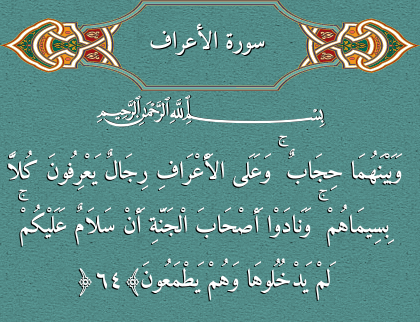
However, the undefined index error is still exists in the verse 44
Also we have to notice that the letter ر In الأعراف is rendered differently between the image and the HTML text.
Another Important Notice
All verses with undefined index error has super script alef ٰ in their text. Like that in وَنَادَىٰ
Adding the Superscript Alef to the $this->arGlyphsVowel in line 638 solves the issue.
$this->arGlyphsVowel = 'ًٌٍَُِّْ'.'ٰ';
Checkout PR #36
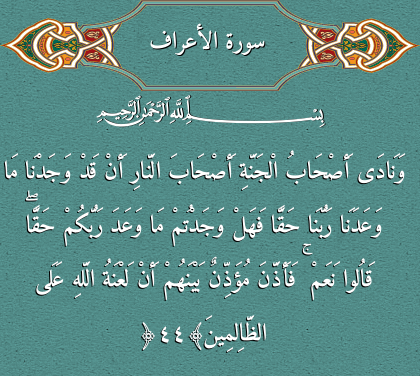
In PR #36 I wonder, the undefined index disappeared but the superscript alef disappeared too from the rendered image!
When I recovered $this->arGlyphsVowel = 'ًٌٍَُِّْ'; to its original state. i.e without adding superscript alef, but adding the following entry to ar_glyphs.json, it works but the superscript alef is rendered very much high:
 "ﲐ":{
    "0": "FC5D",
    "1": "FC90",
    "2": "0670",
    "3": "0670",
    "prevLink": true,
    "nextLink": false
    }
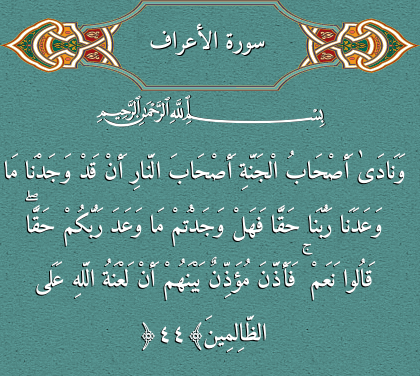
When I recovered
$this->arGlyphsVowel = 'ًٌٍَُِّْ';to its original state. i.e without adding superscript alef, but adding the following entry toar_glyphs.json, it works but the superscript alef is rendered very much high:"ﲐ":{ "0": "FC5D", "1": "FC90", "2": "0670", "3": "0670", "prevLink": true, "nextLink": false }
Dear friend @saidbakr, you need to update your PR reflecting your latest suggested solution that resolves the reported issue of the superscript alef. Doing this will enable me to accept your contribution and welcome you in the family of Ar-PHP library developers ;-)
Please note that how superscript alef renders is a matter of the font itself, and you can't control its position using your PHP script!
Also we have to notice that the letter
رInالأعرافis rendered differently between the image and the HTML text.
Well, this is related to the Arabic Presentation Forms-A, where character rendering may alter depending on the context of 2 or even 3 letters. This improvement is yet to come!
Please keep in your mind that activating such a feature should be optional because many Arabic fonts do not support these forms. In such a case, you must only stick with the standard forms.
I suggest you find a different library or applications that supports proper text layout.
(to b clear, I meant a different graphics library, not a different library than ar-php)
Which one you may advise for PHP? Any known option available and supported by most hosting servers by default?
I’m not very well versed in PHP, to know what are the available options. What do you currently use, and it there a way to build these libraries from source or do people use a PHP package manager?
When I recovered
$this->arGlyphsVowel = 'ًٌٍَُِّْ';to its original state. i.e without adding superscript alef, but adding the following entry toar_glyphs.json, it works but the superscript alef is rendered very much high:"ﲐ":{ "0": "FC5D", "1": "FC90", "2": "0670", "3": "0670", "prevLink": true, "nextLink": false }
Dear friend @saidbakr, you need to update your PR reflecting your latest suggested solution that resolves the reported issue of the superscript alef. Doing this will enable me to accept your contribution and welcome you in the family of Ar-PHP library developers ;-)
Please note that how superscript alef renders is a matter of the font itself, and you can't control its position using your PHP script!
"Please note that how superscript alef renders is a matter of the font itself" The same font renders the superscript alef well in HTML output using webfont generated from the same Amiri font.
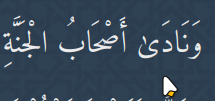
When I recovered
$this->arGlyphsVowel = 'ًٌٍَُِّْ';to its original state. i.e without adding superscript alef, but adding the following entry toar_glyphs.json, it works but the superscript alef is rendered very much high:"ﲐ":{ "0": "FC5D", "1": "FC90", "2": "0670", "3": "0670", "prevLink": true, "nextLink": false }
Dear friend @saidbakr, you need to update your PR reflecting your latest suggested solution that resolves the reported issue of the superscript alef. Doing this will enable me to accept your contribution and welcome you in the family of Ar-PHP library developers ;-)
Please note that how superscript alef renders is a matter of the font itself, and you can't control its position using your PHP script!
Dear @saidbakr, please do update your PR reflecting the latest suggestion ASAP (recover the arGlyphsVowel to its original value and update the ar_glyphs.json file) to accept it.