

 keycloak
Ability to configure LDAP Environment Properties
Describe the bug
We have configured LDAP federation for one of our customers, but it doesn't import any users. Please note that the users and the group don't have the same dc part of a qualified name: dc=amer,dc=example,dc=com vs dc=apac,dc=example,dc=com. Are there any restrictions in this regard? Are there any other ways to debug Keycloak LDAP federation besides turning on the trace logs?
(We are pretty experienced with setting up LDAP federation via Keycloak, this is the first big issue we've encountered.)
Here is that trace log from Keycloak:
LdapOperation: searchPaginated
 baseDn: dc=apac,dc=example,dc=com
 filter: (&(&(ObjectClass=user)(|(memberOf=cn=EXAMPLE_USER_GROUP,ou=groups,dc=amer,dc=example,dc=com)))(objectclass=user))
 returningAttrs: [cn, whenChanged, mail, sn, givenName, whenCreated, pwdLastSet, userAccountControl]
 resultSize: 0
The same filter via ldapsearch utility returns expected users:
ldapsearch -x -LLL -H ldaps://ldapserver.amer.example.com:3269 -D "cn=devuser,ou=Service Accounts,dc=amer,dc=example,dc=com" -W -b "dc=apac,dc=example,dc=com" "(&(&(ObjectClass=user)(|(memberOf=cn=EXAMPLE_USER_GROUP,ou=groups,dc=amer,dc=example,dc=com)))(objectclass=user))"
Version
18.0.0
Expected behavior
Users should be imported into Keycloak
Actual behavior
No users are imported
How to Reproduce?
No response
Anything else?
No response

How do you perform the LDAP search in Keycloak? Since you are searching using dc=apac as the base, which will likely not include the users directly (they would be placed in an OU), the search should be done using a subtree scope. The ldapsearch utility uses the sub scope by default (and can be changed using the -s flag). Please check that Keycloak also tries to perform a subtree search, and not an one-level search.

@darius-m Thank you for your response. I can confirm, that the Search Scope in Keycloak is set to 'Subtree'. (On a separate note, it would be nice if this was visible from the trace log as well, but that's not important at the moment.)
Here is (anonymized) example of a DN returned by the ldapsearch query:
dn: CN=JohnDoe,OU=Users,OU=Dalaran,DC=apac,DC=example,DC=com
I think it would be helpful if you could attach a screenshot of your configuration in Keycloak. Please make sure to hide any confidential information using blank rectangles.
Are you using the same directory user to authenticate from Keycloak, or have implemented any ACIs for access in LDAP?
Hi Darius,
sorry for the delay, our contact person in the customer organization was on vacation. Please find the screenshot attached.
Thanks, Jakub
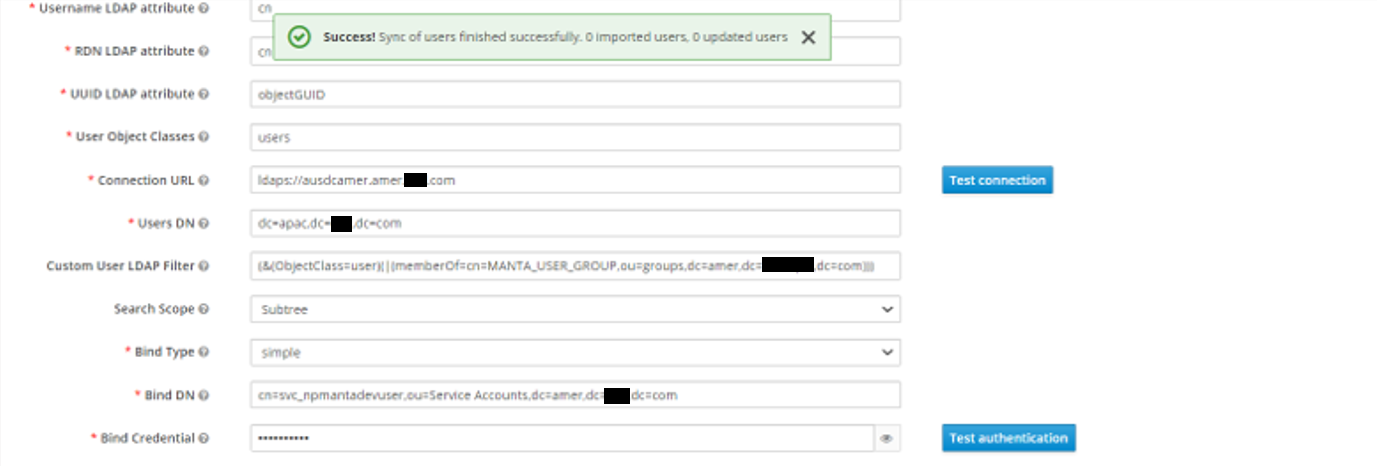
Not sure how this information should be translated to ldapsearch so you can test it, but please make sure that the following attributes are correct:
- UUID LDAP attribute - this must be an attribute that Keycloak can use to uniquely identify the user, and must be present in the user representation;
- User Object Classes - Java classes that are implemented by the objects - in 389ds common values are
inetOrgPersonororganizationalPerson. Looking at theldapsearchthat you have provided above, it appears that you usedobjectclass=user, but setusersas the value in Keycloak.
@jakub-moravec @darius-m I think I found something that might be relevant, but I don't see where in the code it is happening, and I don't know for sure that it would affect all LDAP servers.
I created a Wireshark capture of traffic from Keycloak to an LDAP server (see attached) and I see that the search request is including the ManageDSAIT control.
My case is a very unusual however, because I wrote my own X.500 directory server that supports the real X.500 DAP, but also, secondarily, LDAP. In the X.500 specifications the ManageDSAIT option does something a little different, but similar, to LDAP. This difference in behavior explains exactly why this does not work for Meerkat DSA, but I am not sure why it wouldn't work for you, since you are probably using just a plain ol' LDAP server rather than a full X.500 directory server.
That said, I would try adding -E manageDSAit to your ldapsearch command to see if it stops working. If it no longer works after adding that option, we know that it is because Keycloak is surreptitiously sending the ManageDSAIT control. I hope that helps!
On that note, I'd also like to add that there is no good reason for Keycloak to send the ManageDSAIT control. I think this should be considered a bug / undone, or at least made configurable.
P.S. After a second look, it still appears that my directory server implements the ManageDSAIT control correctly to the specifications, but I think there is actually a bug in the X.500 specifications themselves that the authors may not have foreseen: namely, use of the ManageDSAIT control is going to result in the Search(II) procedure being invoked instead of Search(I) which will only return context prefixes. I just wanted to throw that out there so you don't think there is a bug in Meerkat DSA. :wink:
keycloak-ldap-managedsait.pcapng.zip

Update: I found in the Java standard library where it adds the ManageDSAIT control here: java.naming/com/sun/jndi/ldap/LdapCtx.java. It is called ManageReferralControl in this library just to make it inconvenient for me to find. This is only added automatically if the LDAP client's referral mode (handleReferrals) is set to LdapClient.LDAP_REF_IGNORE, which is the default.
I think this could be made configurable by overriding the request controls in a line after this one: https://github.com/keycloak/keycloak/blob/f789b7997e03f6c474a9329db607ca0a1c51486e/federation/ldap/src/main/java/org/keycloak/storage/ldap/idm/store/ldap/LDAPContextManager.java#L80
The code would look something like:
if (!configOptions.manageDSAIT) {
    ldapContext.setRequestControls(reqCtls); // where reqCtls does NOT include ManageDSAIT.
}
I also just released an update for Meerkat DSA that makes ManageDSAIT work as expected in both LDAP and DAP. I have tested it and I confirm that entries now appear when synchronized.
@darius-m the search doesn't return results even if we narrow down the parameters you mentioned, specifically when using:
- UUID LDAP =
distinguishedName(which we are sure can be used) - User Object Classes =
user(again, it's confirmed that this class is correct)
With these in place, I can still see the following log message:
LdapOperation: searchPaginated
 baseDn: dc=apac,dc=example,dc=com
 filter: (&(&(ObjectClass=user)(|(memberOf=cn=EXAMPLE_USER_GROUP,ou=groups,dc=amer,dc=example,dc=com)))(objectclass=user))
 returningAttrs: [cn, whenChanged, mail, sn, givenName, whenCreated, pwdLastSet, userAccountControl]
 resultSize: 0
Is there anything that can be done to make the trace log more useful?
@JonathanWilbur thank you for your inputs! I will try to do the test you suggested and update the ticket.
I was referring to the screenshot you posted, where the User Object Classes field is set to users instead of user. Not sure if the field is used when you specify the filter, however. The tooltip mentions "existing LDAP user records are found just if they contain all those object classes"; because of this, the lookup may actually return some values, but they are additionally filtered by the connector and the result is empty.
@darius-m it's ok, I understood your comment. We tried with the fixed value, and the result is still the same.
As I asked in my last comment, is there any way how the trace log could be improved to make it possible to identify which configuration is incorrect? We've had similar solution in place when we had our own implementation of LDAP connector (prior to switching to Keycloak).
@jakub-moravec @darius-m I think I found something that might be relevant, but I don't see where in the code it is happening, and I don't know for sure that it would affect all LDAP servers.
I created a Wireshark capture of traffic from Keycloak to an LDAP server (see attached) and I see that the search request is including the
ManageDSAITcontrol.My case is a very unusual however, because I wrote my own X.500 directory server that supports the real X.500 DAP, but also, secondarily, LDAP. In the X.500 specifications the
ManageDSAIToption does something a little different, but similar, to LDAP. This difference in behavior explains exactly why this does not work for Meerkat DSA, but I am not sure why it wouldn't work for you, since you are probably using just a plain ol' LDAP server rather than a full X.500 directory server.That said, I would try adding
-E manageDSAitto yourldapsearchcommand to see if it stops working. If it no longer works after adding that option, we know that it is because Keycloak is surreptitiously sending theManageDSAITcontrol. I hope that helps!On that note, I'd also like to add that there is no good reason for Keycloak to send the
ManageDSAITcontrol. I think this should be considered a bug / undone, or at least made configurable.P.S. After a second look, it still appears that my directory server implements the ManageDSAIT control correctly to the specifications, but I think there is actually a bug in the X.500 specifications themselves that the authors may not have foreseen: namely, use of the ManageDSAIT control is going to result in the Search(II) procedure being invoked instead of Search(I) which will only return context prefixes. I just wanted to throw that out there so you don't think there is a bug in Meerkat DSA. 😉
@JonathanWilbur This might actually be really the issue, if we add -E manageDSAit to the ldapsearch command, it stops working. If we add -M manageDSAit instead, though, it still works.
Keycloak team, is there any way how we could configure Keycloak not to use this flag, or use -M instead? (At least for testing now.)
Hi, Keycloak team, is there any update on this topic? Thank you!
Keycloak team, is there any way how we could configure Keycloak not to use this flag, or use -M instead? (At least for testing now.)
I can confirm this behaviour. ManageDSAIT is forced by JDK when Context.REFERRAL is set to ignore which happens to be the default value [1]. Keycloak has no option to override this value, thus this is an enhancement request.
It is unlikely that this will be addressed in the legacy store but it should be counted on in the new LDAP storage.
Dev note: This value is possible to override using jndi.properties file placed in a root-level classpath. [2]
[1] https://docs.oracle.com/javase/jndi/tutorial/ldap/referral/jndi.html [2] https://docs.oracle.com/javase/jndi/tutorial/beyond/env/source.html

Hi All,
As per this https://github.com/keycloak/keycloak/pull/24852 (description), they have provided an option to switch between ignore and follow (Referral Property) However, I'm unable to find any such option on the Keycloak GUI. Any suggestions?
Thanks.
