

 keybase
Account reset
similar to #3628
I'd like to do an account reset but I don't know how.


I have no options mentioned here:
- no "I don't have any of these devices"
- no "I don't have any of these, reset your account"


Because I'm getting error while trying to login on my computer and as far as I remember (I've registered Keybase account many years ago), I don't have and I never had any PGP keys.
▶ ERROR Sorry, your account is already established with a PGP public key, but this
utility cannot find the corresponding private key on this machine.
This is the fingerprint of the PGP key in your account:

   xxxx xxxx xxxx xxxx xxxx xxxx xxxx xxxx xxxx xxxx

You need to prove you're you. We suggest one of the following:

   - put one of the PGP private keys listed above on this machine and try again
   - reset your account and start fresh: https://keybase.io/#account-reset
Looks like there is no way to reset account with PGP keys right now. It's an oversight on our part, in a process of securing and simplifying other flows we accidentally removed this one.
This bug is now tracked internally and should be fixed by the end of next week. I'll let you know when it's done.
You should now be able to reset your account from the website. You can use either of the following methods:
- Log into the account on keybase.io, go to account settings and click "Reset account".
- When logged out, open the "Login" form, then "Recover your password".
If you run into any more issues please let us know!

You should now be able to reset your account from the website. You can use either of the following methods:
1. Log into the account on keybase.io, go to account settings and click "Reset account".

2. When logged out, open the "Login" form, then "Recover your password".
If you run into any more issues please let us know!
@pzduniak @zapu Sadly both methods don't work. After clicking "Start account reset" on page https://keybase.io/account/reset_me , there is error page
Error 500. Something is not right. We will look into it.
Second method don't send email. Yes, I checked spam folder.

@wkania Can you please send me your Keybase username? If you'd like to keep it private, please email it to [email protected] - I'll look into it.
@pzduniak Thx for quick reply. Sorry, I didn't check my email during weekend.
I send you email.
I see you already fixing something because now method two generate error.
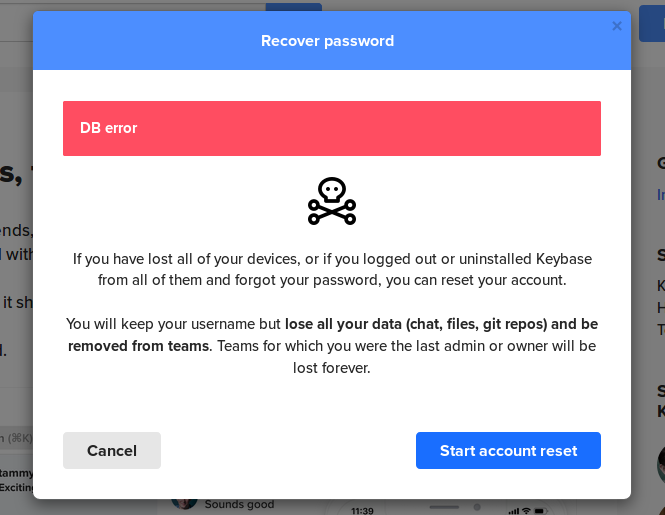

@pzduniak I am unable to reset my account from web/android/windows. Android and Windows both attempted with password
