FunctionFlip
 FunctionFlip copied to clipboard
 kevingessner
Memory leak, especially during sleep
I think FunctionFlip still has a memory leak that is most prominent when the Mac is sleeping.
I kept noticing FunctionFlip taking inordinate amounts of memory, upwards of 1 gig. Stopping and restarting it from the prefs pane seemed to knock it back down to a very reasonable 7 MB or so.
I wrote a bash script to monitor the memory usage over time:
#! /bin/bash

while [ TRUE ]; do
    output="$(top -l 1 -o MEM -stats pid,command,cpu,time,mem,rprvt,purg,vsize,kprvt,kshrd,faults,cmprs | grep FunctionFlip)"
    echo "$(date +%Y-%m-%dT%H:%M:%S) $output" >> FunctionFlip.log
sleep 60
Which results in a log like:
2018-05-16T08:37:59 34254  FunctionFlip     0.0  00:00.18 7504K+ N/A   0B     N/A   N/A   N/A   9283+      0B
2018-05-16T08:39:00 34254  FunctionFlip     0.0  00:00.20 7468K+ N/A   0B     N/A   N/A   N/A   9292+      0B
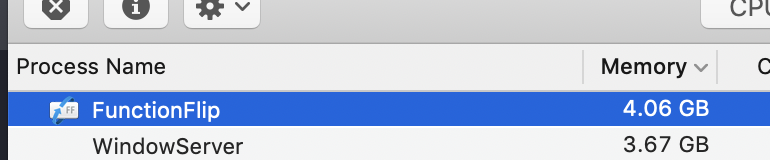
After sleeping my Mac for a little over an hour to go to lunch, I took a look at Activity Monitor:

So then looked at the log. It looks like what Activity Monitor reports as "Memory" is actually the sum of the mem (internal memory size) and cmprs (bytes of compressed data belonging to process) values. Most of the rest of the data turned out to be useless, but I graphed those two values in addition to page faults:
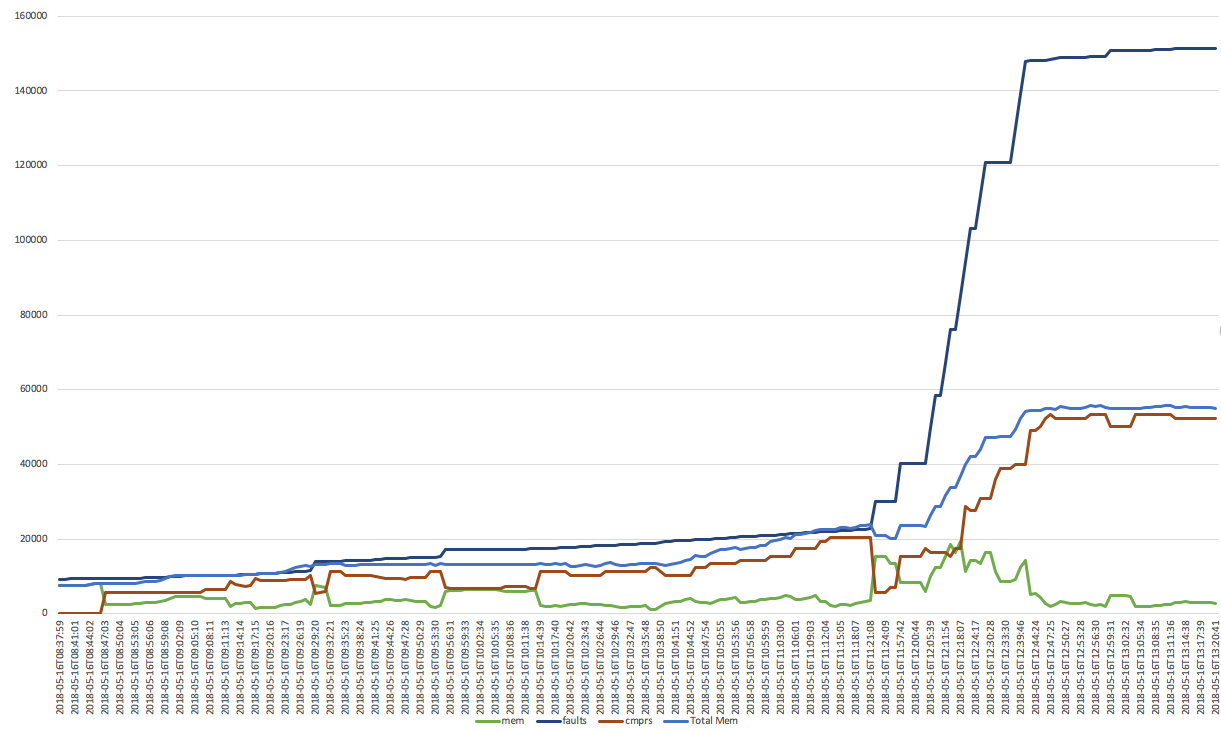
The huge ramp-up in page faults (dark blue) and total memory (royal blue, really driven by compressed memory in red) occurred at the same time I put my Mac to sleep and leveled at the point where they level off.
Hopefully this investigation helps somehow? I'd be thrilled to donate some beer money if this can be fixed, as this is a tool I use every single day.

For now I've resorted to this bash script, running via cron every 5 minutes, to kill and restart the FunctionFlip app every 5 minutes if it consumes more than 50M of RAM.
Disclaimer: I suck at bash.
#! /bin/bash

data="$(top -l 1 -o MEM -stats pid,command,mem | grep FunctionFlip)"
pid="$(echo $data | egrep -o '^[0-9]+ FunctionFlip' | egrep -o '[0-9]+')"
mb="$(echo $data | egrep -o 'FunctionFlip [0-9]+M\+' | egrep -o '[0-9]+')"

if [[ ! -z "${mb// }" ]]
then
    if (( $mb > 50 ))
    then
        kill $pid
        open /Library/PreferencePanes/FunctionFlip.prefPane/Contents/Resources/FunctionFlip.app
    fi
fi
Xcode's static analysis tool finds a fair number of potential memory leaks, so it might be worth trying to fix those; they look pretty simple. It's also probably worth running the Leaks instrument, although it seemed to hang my system when I tried.

An update: I'm running 2.2.4 on macOS 10.14.5, and my iMac has been on for 42 days. Check out FunctionFlip's memory usage: