

 kevinchappell
Builder - Select - unable to uncheck "selected" if checked once
Description:
Once you have clicked "selected" Option in a SELECT FIELD, you can no longer remove this. Several "selected" are possible.
Environment Details:
- formBuilder Version: 3.7.3
- Browser: Firefox
- OS: Windows 10
Expected Behavior
uncheck "selected" on another click on it ...
Actual Behavior
unable to disable "selected" once it's set
Steps to Reproduce
- https://formbuilder.online/
- add SELECT Field
- add a few Options
- click on the "selected" Icon in front of the Row
- try to unselect it ...
Screenshot - (optional)
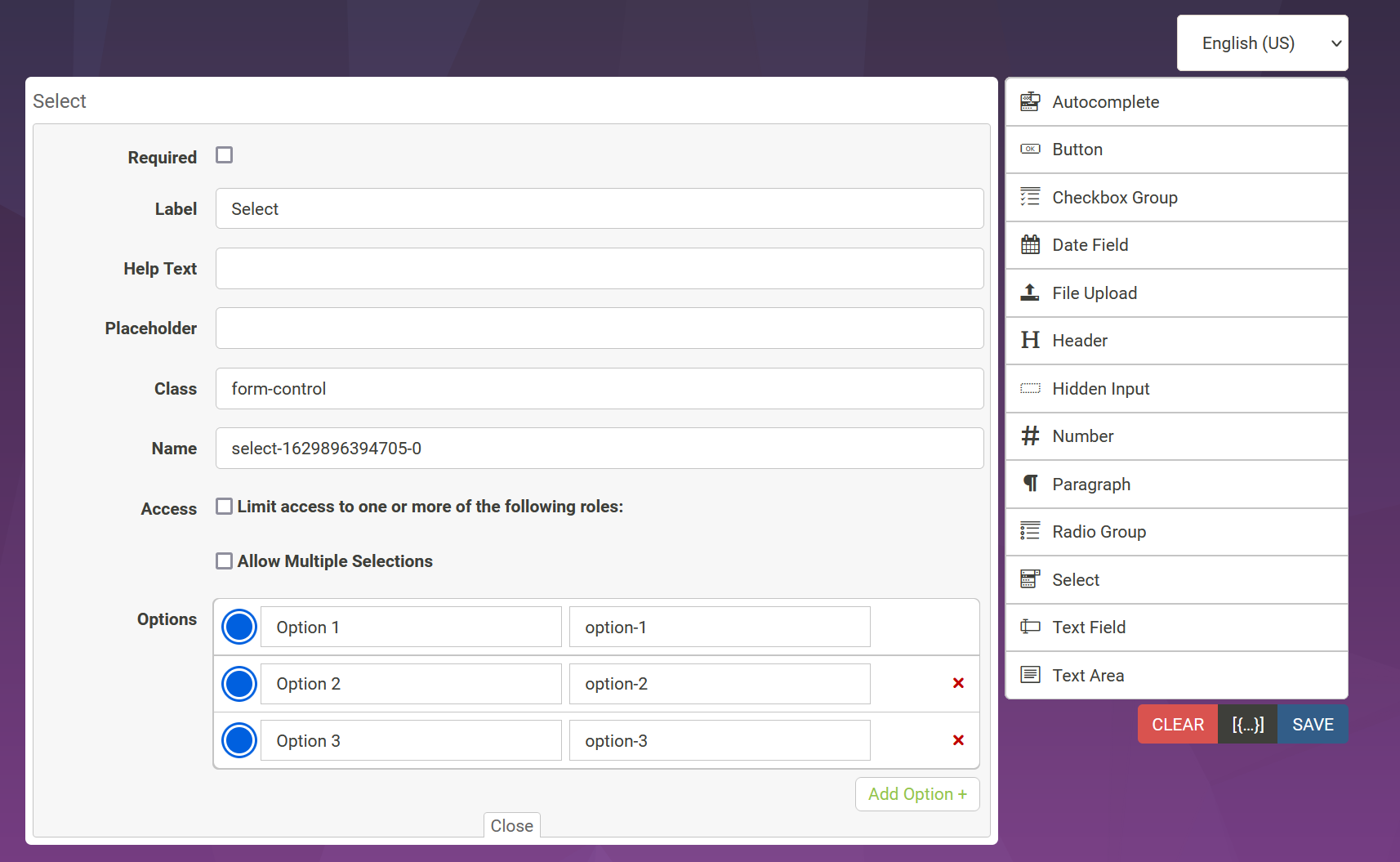

A small workaround is to click 'Allow Multiple Selections', uncheck the boxes, then toggle multiple off

While waiting for the proper fix I wrote this quick and dirty fix. I call fixSingleSelects after the formBuilder is loaded, and every time the formBuilder is mutated:
function initFormBuilder(formBuildElement, options) {
    $(formBuildElement).formBuilder(options).promise.then(formBuilder => {
        var observer = new MutationObserver(function (mutations) {
            fixSingleSelects();
        });
        observer.observe(formBuildElement, {childList: true, subtree: true, characterData: true});
        fixSingleSelects();
    });
}

function fixSingleSelects() {
    var selectRadioInputQuery = 'li > input[type="radio"]';
    var radioTargets = $(selectRadioInputQuery);

    radioTargets.off('click.fixSingleSelects');
    radioTargets.on('click.fixSingleSelects', function (event) {
        var inputs = $(event.target.parentElement.parentElement).find(selectRadioInputQuery);
        if (inputs) {
            for (var i = 0; i < inputs.length; i++) {
                if (inputs[i] !== event.target) {
                    $(inputs[i]).prop('checked', false);
                }
            }
        }
    });
}

This is still unfixed. However, the solution by @FrancineBlerter works great in general.
Unfortunately, I can't find a solution to work with the actions from the lib. Without the fix you can simply get the current configuration by formBuilder.actions.getData('json'). With the mutation, actions is undefined. Any idea how to solve this?
Example from the documentation: https://formbuilder.online/docs/formBuilder/actions/getData/

Short update for all who have the same problem. For the actions to continue to work, the corresponding calls must be relocated within the promise.
You'll find a working example at: https://codepen.io/webserviceXXL/pen/wvpGmJL
The issue of selecting multiple radio-buttons in the options builder was fixed in https://github.com/kevinchappell/formBuilder/pull/1333 released in v3.9.0
