

 keepassxreboot
Contrast text color based on entry background color
Summary
If an entry has a background color, it can make text unreadable when a dark or light color is used. (depending on the used theme) Also, coloring the full line can be quite overwhelming. Maybe it would be a good idea to add a column "background color" to the available columns, and if that is added to the displayed columns, a colored dot fills this column and the row does not get colored. (I know about the text-color, and while that solves this issue, it can be tedious)
Examples
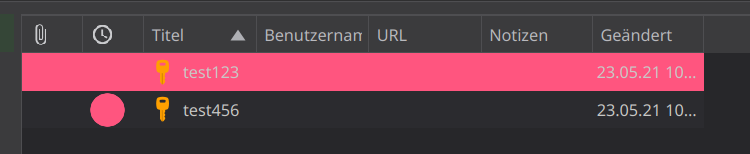 (I used the totp columm for the dot, and it should be either a colored row or the dot, not both)
Context
I don't know if this would be a truly useful addition, it could make the ui a bit more clear and easy to read

This is about the main list view, correct?
The health check report has this:
 (screenshot from #6534)

yes, it's about the main list, but with the background-color instead of a health check
The entry background color is an afterthought and definitely conflicts with theming, it's a carry over from original keepass. The text color should contrast with the background color so that is a ui bug. I kind of like the idea of a color column, but the utility is very limited. We are working on the tags feature which will add another way to differentiate entries as well.

I tried to do it myself and create a pr, but i am not used to qt/c++ If you could give me hints where to start, maybe i can figure this out
@droidmonkey Any news? I could still try creating that bubble if you want me to! :)
~~I have archieved the desired style with changing the password-strength column, however, adding a new Column to the EntryModel::ModelColumn-Enum (and all the switch-statements) does not add a new column.~~
~~How do i duplicate a row in the column-head, preferably the password-strenght one?~~
Edit: I found out that i needed to increment the column-count in the EntryModel::columnCount-method