

 keepassxreboot
Allow loading key file from command line without unlocking
Overview
Issue #105 describes that it should be possible to silently start with a locked database if you configure to start minimized, and to hide to system tray when minimized.
Unfortunately, this only works if I enable remembering database and keyfile. It does not work if I want to launch the app via command line parameters.
Steps to Reproduce
- Configure keepassxc to start minimized and to hide to systemtray when minimzed
- Configure keepassxc to not remember databases or keyfiles
- Launch application with command line parameters: keepassxc --keyfile
Expected Behavior
keepassxc launches silently into the system tray
Actual Behavior
keepassxc complains that no password was given
KeePassXC - Version 2.6.4 Revision: 34a78f0
Operating System: Windows 10 Version 2009

That issue is ancient. What is the exact command line you are trying to issue?

Oh sorry, I didn't recognize that the text in brackets <example file> didn't make it into the report, stripped away. So the concrete command line is:
keepassxc --keyfile d:\data\keyfile d:\data\databasefile
Seems to be related to using a keyfile. Does not happen when using a database w/o a keyfile.
With a keyfile, I get the following error on startup: "Unlock failed and no password given"
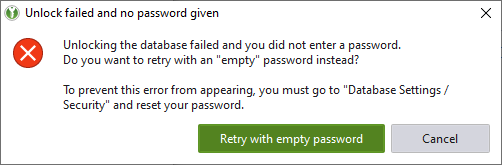
The ui is trying to unlock the database using the key file and no password. That is the designed behavior. By stipulating the key file (also when using --pw-stdin) it triggers an unlock request.
Thanks for clarification!
But even if you say it would be the designed behavior - does it make sense? Normally, keyfiles are used in addition to a password, not as a replacement for a password. So providing the keyfile via command line should not imply that I want to use it for unlocking w/o a password.
If I let KeepassXC store database and keyfile in the settings, I can start KeepassXC silently. Providing these 2 settings via command line should result in the same behavior like having it in the settings (as long as I don't provide --pw-stdin)
I am currently using the old Keepass application, and wanted to switch to KeepassCX, but this really hinders me. In old Keepass, there is an option in Options / Advanced: Start minimized and locked. In KeepassXC, the combination of the two settings mentioned in the report should result in the same.
What would it be good for to unlock the database when the App was only started to be available in the systray? Password query will follow once the user opens it or uses keyboard shortcuts to fill-in some date somewhere. Directly asking for a password would be fine if the App is not configured to "hide" itself immediately.
Designed does not equal desired. There isn't a bug, but perhaps a ux issue for your specific expectations.
Thanks for changing the title accordingly 👍
For me, it would also be ok to simply pass a parameter "--keep-locked". Then it can't have any side effects for other people.