

 keepassxreboot
Cannot run `cmd` from URL field
For example the following line in the URL field works in keepass (cmd://ssh {Username}@whatever) but doesn't work in keepassxc (nothing happens). This also happens if I specify the full path to the ssh executable. However If I try cmd://notepad it works on both keepass and keepassxc.
Note: This isn't only an issue for the ssh command but also for many other executables. cmd://nslookup (I know this is a stupid example) also won't open.
Expected Behavior
keepassxc should open any executable I pass.
Current Behavior
keepassxc doesn't open some executables
Steps to Reproduce
- Create a new Entry in Database on windows with
cmd://ssh {Username}@whateverin the URL field - Try to open that URL
Debug Info
KeePassXC - Version 2.6.0 Revision: 0765954
Qt 5.15.0 Debugging mode is disabled.
Operating system: Windows 10 Version 1909 CPU architecture: x86_64 Kernel: winnt 10.0.18363
Enabled extensions:
- Auto-Type
- Browser Integration
- SSH Agent
- KeeShare (signed and unsigned sharing)
- YubiKey
Cryptographic libraries: libgcrypt 1.8.5

I get this bug with v2.5.4.
I see the the problem exists with applications which do not have a GUI, i.e. are usually run on the command line. I am using it with Oracle's sqlplus and I see in Process Explorer that a the process is started but it does not open any visible Window, so I have to kill it.


The command you want to run needs to be on your PATH or an absolute path to the executable. We don't do anything fancy here, just tell Qt to start the command provided.

@droidmonkey
ssh for example is in PATH since Windows 10. Also specifying the full path doesn't work. A bit quick to close here IMHO.
All of these commands worked flawlessly:
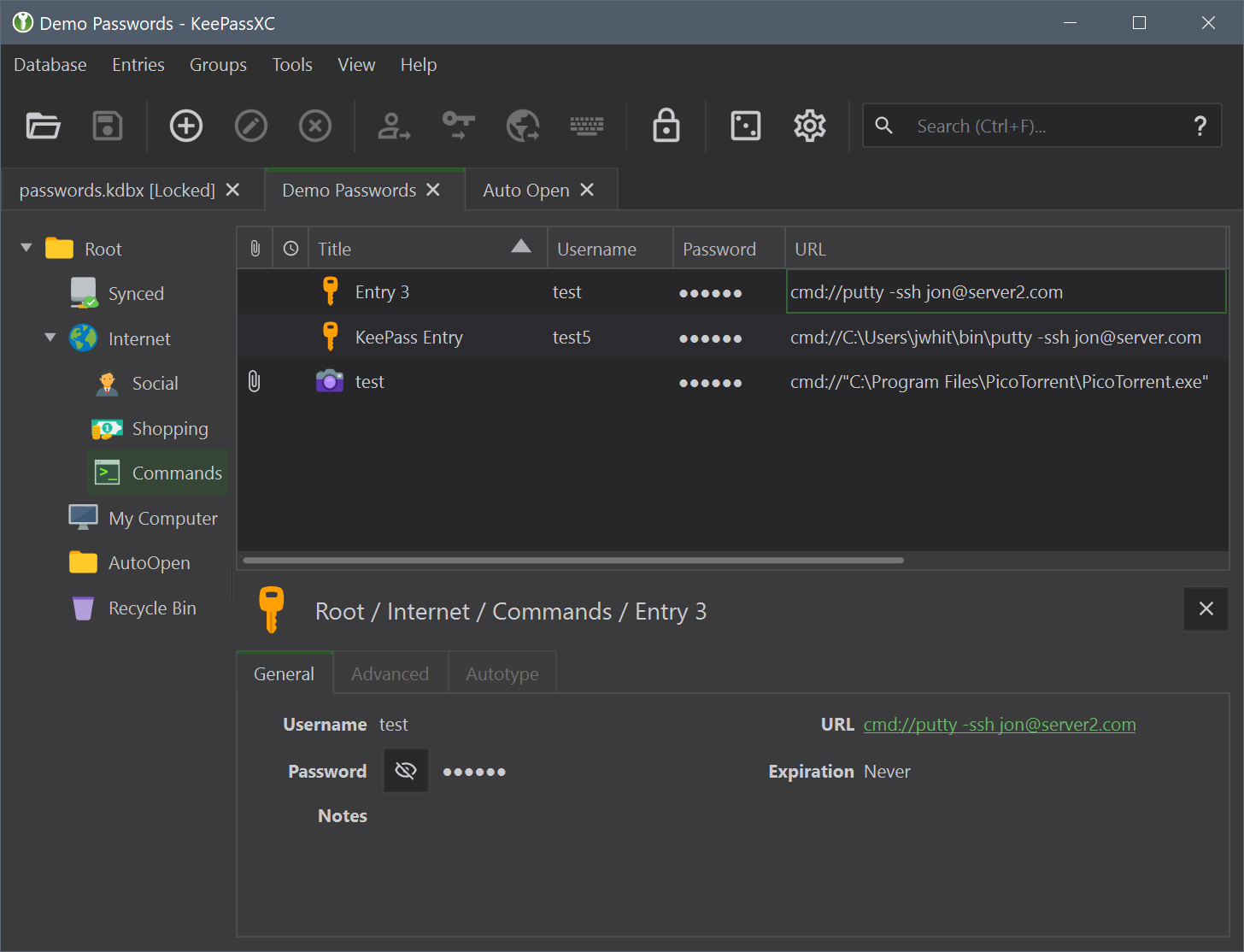
I put putty.exe on my PATH environment var to test that case as well, worked without issue. If you have a space in the path you need to wrap it in quotes.
@droidmonkey putty is working for me also. Does it work for you if you enter
cmd://C:\Windows\system32\OpenSSH\ssh.exe username@host?
There is no space in this command but it's still not working.
Because that command is where this issue is rooted for me. If I double click on an entry with that command nothing happens. While it's working fine if I copy paste it into a cmd or use putty instead.
You cannot run ssh.exe on it's own, you have to run it from a command prompt or powershell. To do this simply enter:
cmd://cmd /k ssh ....
If you want the command prompt to close when you are done with your session use /c instead.
I tried your command and it's still not working.
Edit: okay. Thanks for re opening.
Just stumbled across this post because I tried the following commands:
cmd://cmd.exe
cmd://"C:\Windows\System32\cmd.exe"
cmd://"C:\Windows\System32\cmdkey.exe"
None of them worked... When I tried
cmd://"C:\Windows\System32\Bubbles.scr"
I get an error message which I do not see when I start Bubbles.scr directly. (No worries, I do not want to start this Screensaver via KeepassXC, it's just an example...) So there seems to be a difference betweet starting a command with KeepassXC or starting it directly.

I have a similar problem. I try to run four consecutive commands: cmdkey to set credentials, mstsc to connect to the server, timeout to wait a few seconds and cmdkey to remove credentials.
Example for my command: cmdkey /generic:"server" /user:"Admin" /pass:"AdminPass" && mstsc /v:server && timeout 5 && cmdkey /delete:server
I run it in the cmd window without any problems. When I run from the XC window I don't get any output. I tried different combinations of commands like cmd://cmdkey..., cmd://cmd /c cmdkey..., cmd://C:\Windows\System32\cmd.exe /c cmdkey...
Without it I can't start the remote desktop so that I am automatically logged in.
Note:
I also tried to save the settings in the attached rdp file, but if I click on Attachment: server.rdp. KeepassXC copies it to the temp folder and mstsc refuses to open such a file (declares that the file does not exist). This is probably because it is located in the temp folder and the following policy applies in the system: https://admx.help/?Category=Windows_10_2016&Policy=Microsoft.Policies.TerminalServer::TS_TEMP_PER_SESSION&Language=sk-sk So I don't know any workaround for that yet

One more observation: I noticed that if I enter the path to the program directly into url:
C:\Windows\System32\cmd.exe or C:\Windows\System32\WindowsPowerShell\v1.0\powershell.exe
The XC open cmd or powershell window without any problems (this is not usable for sending any other parameters), but if I use cmd in url
cmd://C:\Windows\System32\cmd.exe or cmd://C:\Windows\System32\WindowsPowerShell\v1.0\powershell.exe
it does not work.
The process is started like this:
QProcess::startDetached(cmdString.mid(6));
That should work for single commands, but not for commands with arguments. I'm not quite sure why it's working for some, but not for others.

I apologize if this is complete nonsense (I don't have enough resources to install full qt development environment now to do the tests), but I checked startDetached line, then I found out from this article that new process running with startDetached uses flag DETACHED_PROCESS. To fix this you need start process with CREATE_NEW_CONSOLE flag.
I don't know if this is possible for any OS or only for windows but I think about something like this:
QDetachableProcess process;
process.setCreateProcessArgumentsModifier(
            [](QProcess::CreateProcessArguments *args) {
    args->flags |= CREATE_NEW_CONSOLE;
    args->startupInfo->dwFlags &=~ STARTF_USESTDHANDLES;
});
process.start(cmdString.mid(6), arguments);
process.detach();
... after some more research I found a solution how to show cmd window.
You can check solution for similar problem in openfluid commit https://github.com/OpenFLUID/openfluid/commit/ebe432203f511ff76f9a015d2cb320b6ea2e2b92
They run this to show cmd.exe: cmd.exe /c start cmd.exe
So as a workaround, full command that run cmd window in XC is cmd://cmd.exe /c start cmd.exe so so i wrote this in the XC url to check my problematic use case:
cmd://cmd.exe /c start cmd.exe /c "cmdkey /generic:\"server\" /user:\"Admin\" /pass:\"AdminPass\" && mstsc /v:server && timeout 5 && cmdkey /delete:server"
and the window was already visible. This didn't work fully due to escape quotes, so I can't use quotes very much, but in the end I partially ran it and it works, but there would be a better solution.
I think there is a regression from v2.7.1 to v2.7.3
In v2.7.1 URLs of the form cmd://cmd /C "start powershell -ExecutionPolicy ByPass -NoProfile -File ^"{DB_DIR}\scripts\Connect-Rdp.ps1^" -Server {TITLE}" were working for me
In v2.7.3 the exact same URL is no longer working.

If you are launching that by clicking the link in the preview pane... that is a bug fixed for 2.7.4
If you are launching that by clicking the link in the preview pane... that is a bug fixed for 2.7.4
Not sure exactly what bug is mentioned here.
I'm using version 2.7.4 and while it's true now that a popup is showing up asking for confirmation to execute the command, even if we click Yes nothing happens.
For example this simple command is just printing Hello, World! in a Windows console.
cmd://cmd /k echo Hello, World!
While this is working perfectly in KeePass, it seems it does nothing in KeePassXC.

I had the same issue. It is a fresh install of version 2.7.4. Windows 10. Both clicking on the URL in the preview pane or right click -> Open URL opened window with "Execute command?" Yes/No, but after clicking "Yes" nothing happened. I solved it by providing the full path to the executable.
For example in original KeePass the following URL worked just fine:
cmd://sapshcut.exe -maxgui -system={TITLE}
But in KeePassXC I had to change it to the following command:
cmd://"C:\Program Files (x86)\SAP\FrontEnd\SAPgui\sapshcut.exe" -maxgui -system={TITLE}
It is a pity, that URL field behavior isn't the same in KP and KPXC. It will hurdle the user migration to KPXC. I hope, developers will manage to do something about it.

Not sure how the keepass version of your command would have ever worked without that folder path being on your PATH environment variable. Something must have changed in your environment in between or you set some specific options in keepass to modify your path?
@droidmonkey only this path is in my Path variable:
%USERPROFILE%\AppData\Local\Microsoft\WindowsApps
It was fresh install of KeePass without any specific changes in the Settings to let it find executables of programs. I can still reproduce the issue: it will run the command without specifying full path in KeePass, but not in KeePassXC.
I had the same issue. [...] But in KeePassXC I had to change it to the following command:
cmd://"C:\Program Files (x86)\SAP\FrontEnd\SAPgui\sapshcut.exe" -maxgui -system={TITLE}
In my opinion this is not the same issue described in my initial bug report. This issue here is about some commands like cmd://C:\Windows\System32\cmd.exe not working at all, even if you set the full path or add it to you PATH Variable.
Another note to add, the environment variable %ProgramFiles% does not work either. It works with original Keepass software (so I had to change my migrated database...)

If you are launching that by clicking the link in the preview pane... that is a bug fixed for 2.7.4
Not sure exactly what bug is mentioned here. I'm using version 2.7.4 and while it's true now that a popup is showing up asking for confirmation to execute the command, even if we click
Yesnothing happens.For example this simple command is just printing
Hello, World!in a Windows console.cmd://cmd /k echo Hello, World!While this is working perfectly in KeePass, it seems it does nothing in KeePassXC.
I just tested this on Win11 with KeePassXC 2.7.6 and this is partially working. The cmd process does appears in task manager but the window is not displayed at all.
Could the problem be just that the launched app's GUI isn't assigned to the desktop?
Windows info: Edition Windows 11 Pro Version 23H2 Installed on 2023-04-27 OS build 22631.3085 Experience Windows Feature Experience Pack 1000.22684.1000.0

If you use ssh on wsl (debian or ubuntu for example), you can try this way:
cmd://cmd.exe /k start debian.exe -c "sshpass -p {PASSWORD} ssh {USERNAME}"
Note in the command line to change debian.exe with the wsl distrib you use, and also you need to have sshpass install in the wsl distrib if you want to use it.
Also for {USERNAME} just enter full ssh URL like [email protected]

I found a workaround for ssh'ing on Windows 11, this rely on the "wt" alias for the Windows Terminal app (it won't work directly on Windows 10).
cmd://wt -window-id=0 new-tab --profile "PowerShell" --tabColor #050 -c ssh.exe {USERNAME}@{S:IP Address} -p {S:Port}"
Basically, anything after "-c " will be run in the new terminal window as is. I also use keys to connect so with the SSH Agent activated, it's pretty seamless to ssh into.
This works for me in Windows 11 and KeePassXC 2.7.8 to open an ssh connection using MobaXTerm:
Username: USER@DOMAIN
or
Username: USER@DOMAIN -p PORT
URL:
cmd://"C:\Program Files (x86)\Mobatek\MobaXterm\MobaXterm.exe" -newtab "sshpass -p '{PASSWORD}' ssh {USERNAME}"
Also works with opening a VPN connection using OpenVPN GUI
cmd://"C:\Program Files\OpenVPN\bin\openvpn-gui.exe" --command connect VPNConfig(KTC).ovpn
