

 keepassxreboot
Firefox Snap / KeepassXC flatpak: KeePassXC-Browser - Failed to connect: Unknown error
Expected Behavior
Connect my Firefox KeePassXC-Brower WebExtension to my KeepassXC flatpak
Current Behavior
It does not.
Possible Solution
I don't know if firefox snap on ubuntu 22.04 is currently supported or not, so that may be the issue, but in that case I recommend making that more clear as firefox snap is the default on ubuntu 22.04 afaik.
Steps to Reproduce (for bugs)
- Start KeepassXC
- start firefox snap
- install KeepassXC-Browser
- Enable Browser integration in KeepassXC
- Open Extension in browser
- See "Cannot connect to KeePassXC. Check that browser integration is enabled in KeePassXC settings."
- Click Reload in Extension
- KeepassXC window comes to front with unlocked DB, but nothing else
- Go back to browser extension
- See "Key exchange was not successful."
Debug info
KeePassXC - Version 2.7.4 Revision: 63b2394 Distribution: Flatpak
Qt 5.15.8 Debugging mode is disabled.
Operating system: KDE Flatpak runtime CPU architecture: x86_64 Kernel: linux 5.19.0-32-generic
Enabled extensions:
- Auto-Type
- Browser Integration
- SSH Agent
- KeeShare
- YubiKey
- Secret Service Integration
Cryptographic libraries:
- Botan 2.19.1
KeePassXC-Browser - 1.8.5.1 Operating system: Linux x86_64 Browser: Mozilla Firefox Snap For Ubuntu 110.0.1 (64-bit)
Operating system:
Ubuntu 22.04.2 LTS GNOME 42.5 X11
Troubleshooting results
- native_messaging-hosts file:
{
    "allowed_extensions": [
        "[email protected]"
    ],
    "description": "KeePassXC integration with native messaging support",
    "name": "org.keepassxc.keepassxc_browser",
    "path": "/var/lib/flatpak/exports/bin/org.keepassxc.KeePassXC",
    "type": "stdio"
}
- keepassxc-proxy is not running
sudo strace -f -p $(pgrep firefox) 2>&1 | grep keepassyields noopenatmessages whatsoever/run/user/1000/app/org.keepassxc.KeePassXC/org.keepassxc.KeePassXC.BrowserServerexists/run/user/1000/org.keepassxc.KeePassXC.BrowserServerdoes not exist
$ flatpak permissions webextensions
Table         Object                          App          Permissions Data
webextensions org.keepassxc.keepassxc_browser snap.firefox yes         0x00

KeepassXC window comes to front with unlocked DB, but nothing else
This shouldn't happen. Make sure you have the most up to date flatpak version of keepassxc flatpak update and make sure you are not pulling from a beta channel or similar.
After that, uncheck Firefox from the browser settings, press ok, then go back in and check Firefox, press ok.

I don't know if firefox snap on ubuntu 22.04 is currently supported or not..
It is. After you have installed the extension to Snap Firefox there should be a separate permissions prompt for Native Messaging.

flatpak update
I installed the flatpak version only yesterday, after having the same problems with the apt version of keepassxc (minus the window comes to front without anything happening) which was, however, outdated.
After that, uncheck Firefox from the browser settings, press ok, then go back in and check Firefox, press ok.
Didn't change anything.
there should be a separate permissions prompt for Native Messaging.
Wow. I've never seen that. I had the extension already installed before upgrading ubuntu to 22.04 from 20.04.
@marcelklehr Have you tried to remove the extension and install it again? Maybe the prompt is not appearing because of an update.
Have you tried to remove the extension and install it again?
Just tried. Doesn't help.
Good morning, I use snap firefox 110.0.1, everything was working fine until now, the connection is no longer made... I'm on ubuntu 22.04.2, keepassxc 2.7.4 and keepassxc-browser 1.8.5.1. ...

Both KeePassXC Flatpak and Appimage are having the same problem with Firefox Snap: The browser is trying to start the keepassxc process inside the image instead of keepassxc-proxy. So maybe the Firefox Snap is starting something differently with Native Messaging and KeePassXC cannot identify if the process is trying to start the proxy or the main application.
Is there a way to reference keepassxc-proxy inside the flatpak in the native-messaging-hosts file?
Currently it references:
"path": "/var/lib/flatpak/exports/bin/org.keepassxc.KeePassXC",
- No, you need to reference the start script on order to load the proper environment
Firefox is supposed to add the extension ID as a command line parameter
Firefox is supposed to add the extension ID as a command line parameter
Snap Firefox isn't clearly doing that.
I'm experiencing the same with KeePassXC installed via flatpak and EdgeBrowser.
(Using flatpak version, as it's newer than the v2.6.6 available on Ubuntu 22.04, which I also tried with the "Advanced" configuration to connect to .config/microsoft-edge/NativeMessagingHosts/, but also didn't connect)
This is a fresh install in the last week.
Environment:
OS: Ubuntu 22.04 Edge: microsoft-edge-stable 110.0.1587.69-1 KeePassXC: org.keepassxc.KeePassXC 2.7.4 (Flatpak) Flatpak: v1.12.7-1 KeePassXC-Browser: 1.8.5.1
Steps
- installed edge
- installed keepassxc via flatpak
- configured keepassxc to allow browser, and checked only the "edge" box
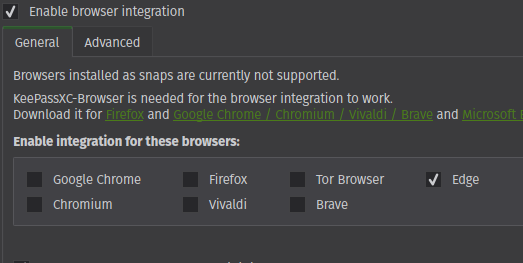
- installed keepassxc-browser extension
- click the browser icon to "reload"
- then error:
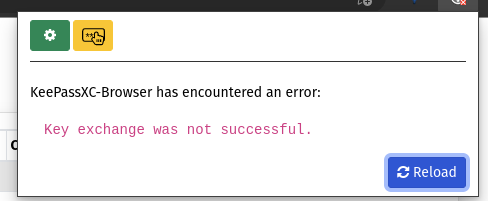
Once I enabled Extensions "Developer Mode" and for Keepassxc-browser to "collect errors", and viewing the inspect views for "background page" I see:


I'm having this problem in snap and PPA as well. Tested each with a new Firefox Profile. At the same time plasma-browser-integration is working. About permissions:
$ flatpak permissions webextensions                                                                                                                             (base)
Tabla         Objeto                             Aplicación   Permisos Datos
webextensions org.keepassxc.keepassxc_browser    snap.firefox yes      0x00
webextensions org.kde.plasma.browser_integration snap.firefox yes      0x00

@Leokap Check https://github.com/keepassxreboot/keepassxc-browser/wiki/Troubleshooting-guide#6-apparmor-with-ubuntu
in #1879 I assumed you told me to install Keepass from PPA. That is what I did. I would rather like to keep my browser sandboxed... (In this guide it says what to do if Firefox is installed from PPA)
@Leokap Did the Firefox prompted you for additional permissions when you installed the extension?
I'm having this problem in snap and PPA as well. Tested each with a new Firefox Profile. At the same time plasma-browser-integration is working. About permissions:
$ flatpak permissions webextensions                                                                                                                             (base)
Tabla         Objeto                             Aplicación   Permisos Datos
webextensions org.keepassxc.keepassxc_browser    snap.firefox yes      0x00
webextensions org.kde.plasma.browser_integration snap.firefox yes      0x00
well the permission is certainly set. And it has been set by the prompt, yes. Or are you talking about Addon Permissions within Firefox?
@Leokap So are you using KeePassXC from the PPA or Snap now? I'm a little confused. If you are using the PPA, check the troubleshooting guide again and report your findings.
I have both flatpak and PPA versions of KeepassXC installed. Removed snap (and .deb=2.6.6) since I thought it might interfere. Only 2.6.6 was able to connect. I was able to get it connected with firefox snap. I also have firefox .deb distributed in KDE Neon (probably from the firefox-PPA, don't know how to check) the PPA-Keepass version also can't communicate with that firefox. If you want I can also test flatpak and snap of Keepass.
(I tested .deb, snap and flatpak of Firefox for Video Hardware Encoding, only snap was able to do it. (due to 12th gen intel cpu another reason why I want to stay with snap.)
I'm sorry the Firefox-.deb version works. I didn't see that sudo aa-enforce /etc/apparmor.d/usr.bin.firefox returned an error because I didn't put the text from the guide between the parentheses.
Narrow down to using just the flatpak keepassxc and one version of Firefox. You have a mess on your system and this isn't keepassxc at fault.
you are right. I tried it on a Live USB and it worked. (firefox-snap and keepass-PPA)
I got it working on my main system by now. Don't know what exactly made the difference. I moved the files in ~/.mozilla/native-messaging-hosts/ to Trash and re-enabled the Browser integration in Keepassxc. Keepassxc wrote the exact same file into the folder (checked with diff) but somehow it works now.
Sorry for having wasted your time, hope this helps others with the same issue. I will definitely test my problems on a clean system first from now on.
On snap firefox 110.0.1, everything was working fine until now, the connection is no longer made... I'm on ubuntu 22.04.2, keepassxc 2.7.4 and keepassxc-browser 1.8.5.1. ...
1 - ubuntu 22.04.2 : firefox snap 110.0.01+ keepassxc 2.7.4 deb+keepassxc-browser 1.8.5.1 => does not work anymore !
2 - ubuntu 22.04.2 : firefox deb 110.0.01+ keepassxc 2.7.4 deb+keepassxc-browser 1.8.5.1 => everything is OK !
A try ubuntu lunar lobster (developpement branch) : firefox snap 110.0.01+ keepassxc 2.7.4 deb+keepassxc-browser 1.8.5.1 => everything is OK !
what is broken in case 1?
enough, i don't use firefox snap anymore!
@dom21121 Probably the AppArmor profile. See the previous messages for solution.
ubuntu 22.10 fresh install (firefox snap + keepassxc deb), not working...
I will try to understand the AppArmor profile question.
In the initial popup that authorizes the connection (attachment), it is written: "this permission can be changed at any time from the privacy settings"

Sorry but I'm an average user and I don't see where? I would like to check.
THANKS
That is likely done in the ubuntu store app while looking at the Firefox snap entry. Unless they have introduced a dedicated privacy settings panel for snaps.
I've run
- sudo apt install flatpak
- flatpak permission-set webextensions org.keepassxc.keepassxc_browser snap.firefox yes
everything is working fine again... understand nothing... (I've keepassxc deb installed...) Sorry to bother you
1 - ubuntu 22.04.2 : firefox snap 110.0.01+ keepassxc 2.7.4 deb+keepassxc-browser 1.8.5.1 => does not work anymore !
2 - ubuntu 22.04.2 : firefox deb 110.0.01+ keepassxc 2.7.4 deb+keepassxc-browser 1.8.5.1 => everything is OK !
It's the same setup (1) with the exact same versions mentioned. I've just dropped firefox as snap and reinstalled it as deb from PPA. Now everything is working as expected again. I wanted to get rid of snap anyway, so canonical just give me another reason.

I've run
* sudo apt install flatpak

* flatpak permission-set webextensions org.keepassxc.keepassxc_browser snap.firefox yes
everything is working fine again... understand nothing... (I've keepassxc deb installed...) Sorry to bother you
This worked for me. Thanks! Not sure if this has anything to do with Canonical changing me over from deb firefox to snap firefox during an upgrade to Ubuntu 23.04 Lunar Lobster.
