

 kartaview
Carly Universal Adapter
Is this OBD adapter supported? Because I recently bought the universal adapter with the hope of using it for KartaView. I love the idea of supporting OSM data by with my car's data. Now when I'm in the app, it constantly says "Connecting to OBD" but there's never a green checkmark or something like that. But when I look at the track at the end, it says it collected OBD data?!


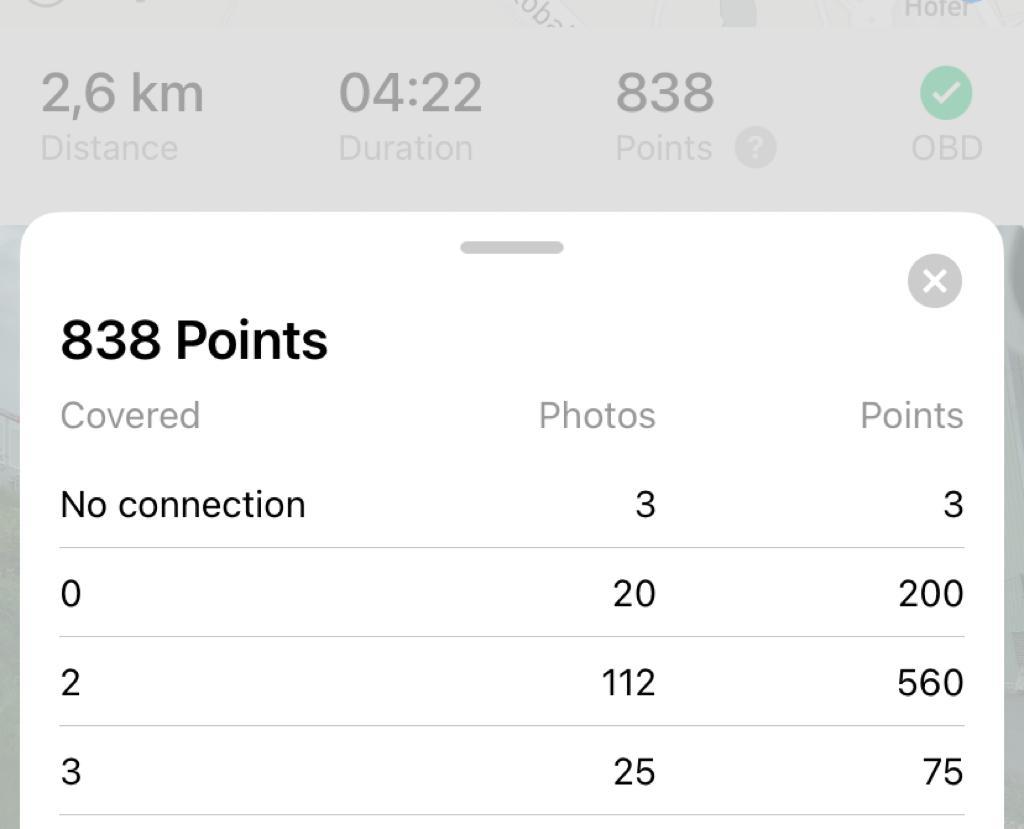
What do the different "Covered" categories mean? And why is there no 1?
Hi, while you record you need to press on the OBD button and go through the connection flow. In case you already done that can you please share a sequence that you have recorded to check if all data was collected? and we can continue discussing from there.

That's what I did. Sometimes I did it multiple times because it seemed to have lost the connection. Here's an example track: https://kartaview.org/details/5166521/8/track-info
As I said, it would be very helpful to know what the "Covered" categories mean.
Covered = there was at least 1 image on that road Images on that road: 0 -> 10 points/ image 1, 2 -> 5 points/ image 3, 4 -> 3 points/ image 5, 6, 7, 8, 9 -> 2 points/ image 10 or more -> 1 point/ image if you have OBD connected then all points are multiplied by 2 that means : 0 -> 20 points / image 1, 2 -> 10 points/ image 3, 4 -> 6 points/ image 5, 6, 7, 8, 9 -> 4 points/ image 10 or more -> 2 points/ image
It looks like this was an old bug that should have been fixed since then.
Covered = there was at least 1 image on that road Images on that road: 0 -> 10 points/ image 1, 2 -> 5 points/ image 3, 4 -> 3 points/ image 5, 6, 7, 8, 9 -> 2 points/ image 10 or more -> 1 point/ image if you have OBD connected then all points are multiplied by 2 that means : 0 -> 20 points / image 1, 2 -> 10 points/ image 3, 4 -> 6 points/ image 5, 6, 7, 8, 9 -> 4 points/ image 10 or more -> 2 points/ image
Thanks for the clarification. Does it say that anywhere? If not, it would be nice to include that information in the app somehow. I recorded a track a few days ago (https://kartaview.org/details/6327145/0/track-info) and I still noticed that I lost connection to OBD a few times, is there an update I am missing? I am running 4.9.1. (2)
Also, is there a way to look at the OBD info of a track or is it even included? That way, I could see if my specific connector was the problem..