

 karmada-io
karmadactl apply operations will traverse all APIs every time, but kubectl doesn't
Please provide an in-depth description of the question you have:
I have the following yaml:
apiVersion: apps/v1
kind: Deployment
metadata:
  name: nginx
  labels:
    app: nginx
spec:
  replicas: 2
  selector:
    matchLabels:
      app: nginx
  template:
    metadata:
      labels:
        app: nginx
    spec:
      containers:
      - image: nginx
        name: nginx
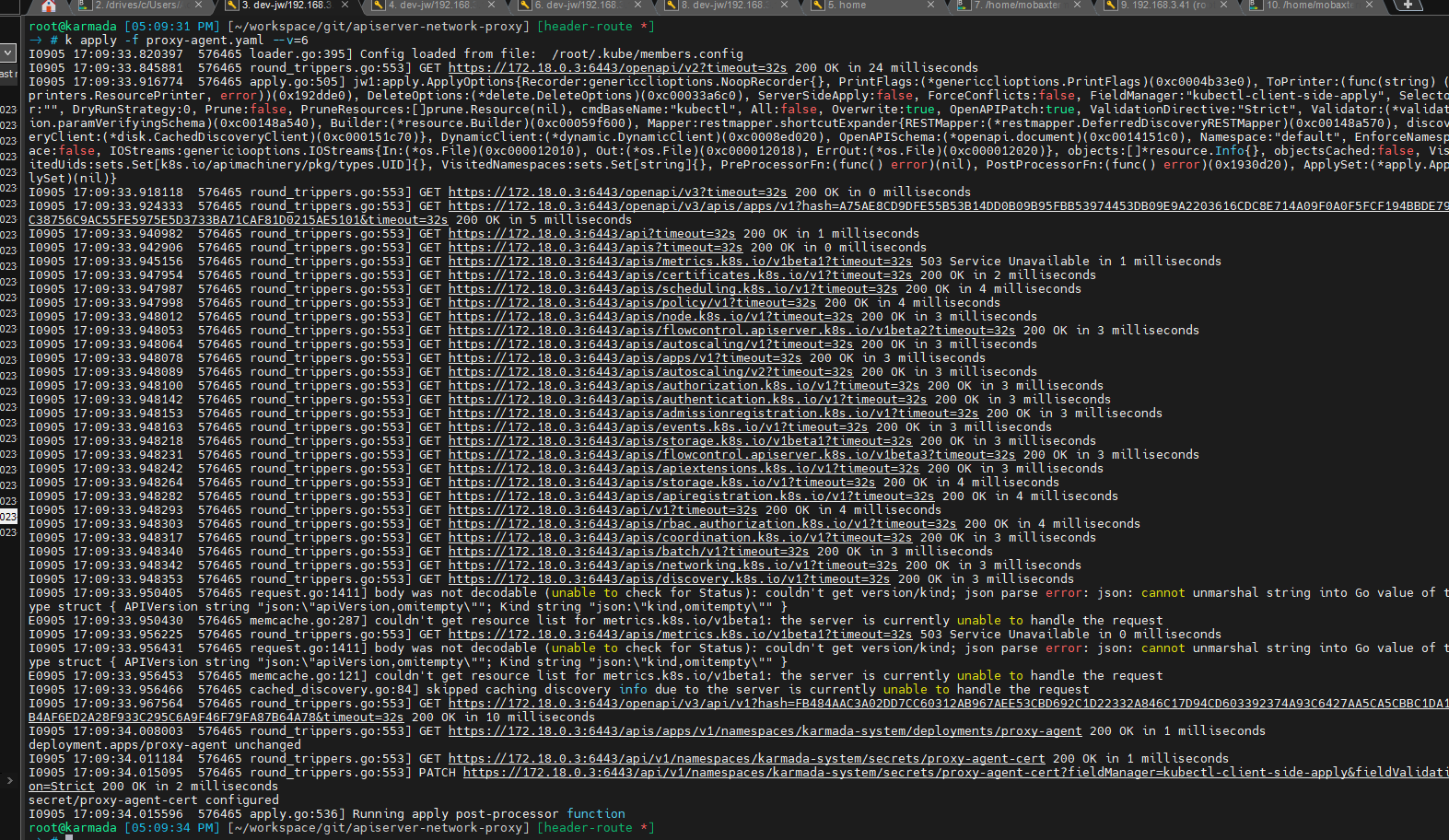
Apply one deployment yaml with karmadctl, the request logs:
Apply one deployment yaml with kubectl, the request logs:
I tried many times, and
- karmadactl will traverse all the APIs that exist in karmada-apiserver every time.
- kubectl will not traverse all the APIs that exist every time, but sometimes.
What do you think about this question?:
I check the code of karmadactl apply, It utilizes the same code as kubectl. https://github.com/karmada-io/karmada/blob/bd37e7472bb055aeb220cfe56e10492eb49d900a/pkg/karmadactl/apply/apply.go#L149
This may be because the cache: https://github.com/kubernetes/kubernetes/blob/c4d752765b3bbac2237bf87cf0b1c2e307844666/staging/src/k8s.io/cli-runtime/pkg/genericclioptions/config_flags.go#L59
But I deleted it and tried the apply operation again with kubectl, but it still did not traverse all the APIs. I am unsure in what situation kubectl will traverse the APIs and why karmadactl will do it every time.
Do you have any idea about this? @lonelyCZ
Environment:
- Karmada version: v1.7.0
- Kubernetes version: v1.27.3
- Others: none

I want to reproduce it and got nothing.
lan@lan:~/lan$ karmadactl apply -f nginx.yaml -v 6
I0926 08:08:37.228471   47541 loader.go:373] Config loaded from file:  /home/lan/.kube/config
I0926 08:08:37.264321   47541 round_trippers.go:553] GET https://172.18.0.2:6443/openapi/v2?timeout=32s 200 OK in 32 milliseconds
I0926 08:08:37.446497   47541 round_trippers.go:553] GET https://172.18.0.2:6443/openapi/v3?timeout=32s 200 OK in 4 milliseconds
I0926 08:08:37.459574   47541 round_trippers.go:553] GET https://172.18.0.2:6443/openapi/v3/apis/apps/v1?hash=21B689A63ECEA562A6D447EE541A8E67441E92DCC42AD47AC7FBA5AB9643FD2C43ECD6123A28722FDE56362A3EEF04FB88E2864CF67BF682A5B5B1C346C175B7&timeout=32s 200 OK in 12 milliseconds
I0926 08:08:37.568227   47541 round_trippers.go:553] GET https://172.18.0.2:6443/apis/apps/v1/namespaces/default/deployments/nginx 404 Not Found in 6 milliseconds
I0926 08:08:37.606400   47541 round_trippers.go:553] POST https://172.18.0.2:6443/apis/apps/v1/namespaces/default/deployments?fieldManager=kubectl-client-side-apply&fieldValidation=Strict 201 Created in 37 milliseconds
deployment.apps/nginx created
I0926 08:08:37.606654   47541 apply.go:534] Running apply post-processor function
lan@lan:~/lan$ k1 apply -f nginx.yaml -v 6  (cluster of member1 )
I0926 08:01:49.083606   46563 loader.go:373] Config loaded from file:  /home/lan/.kube/member1_config
I0926 08:01:49.106172   46563 round_trippers.go:553] GET https://172.18.0.3:6443/openapi/v2?timeout=32s 200 OK in 21 milliseconds
I0926 08:01:49.270641   46563 round_trippers.go:553] GET https://172.18.0.3:6443/apis/apps/v1/namespaces/default/deployments/nginx 404 Not Found in 6 milliseconds
I0926 08:01:49.299972   46563 round_trippers.go:553] POST https://172.18.0.3:6443/apis/apps/v1/namespaces/default/deployments?fieldManager=kubectl-client-side-apply&fieldValidation=Strict 201 Created in 28 milliseconds
deployment.apps/nginx created
I0926 08:01:49.300546   46563 apply.go:476] Running apply post-processor function
@jwcesign Could you reproduce it in the new env?

uh... I didn't find the reproduction condition, Can you try to delete ~/.kube/cache and try again?
This may be because the cache: https://github.com/kubernetes/kubernetes/blob/c4d752765b3bbac2237bf87cf0b1c2e307844666/staging/src/k8s.io/cli-runtime/pkg/genericclioptions/config_flags.go#L59
It is indeed due to caching when using kubectl v1.23.17.
But I deleted it and tried the apply operation again with kubectl, but it still did not traverse all the APIs.
I'm guessing this is because you accidentally executed kubectl and there was already a cache, or the cache has been expired. In general, if there is no cache, it will first traverse the cache when using kubectl v1.23.17
I am unsure in what situation kubectl will traverse the APIs and why karmadactl will do it every time.
I found the reproduction when the version of kubectl and karmadactl is different. if using kubectl v1.27.3 and karmadactl v1.7.0, you will found the behaviors are same.
And I tested it that traverses theh APIs every time sincekubectl v1.26.0. But I haven't found why to change the behavior.

And I tested it that traverses theh APIs every time sincekubectl v1.26.0
I tested, and found kubectl will not traverse the APIs since v1.26.0: https://docs.google.com/document/d/1_moxzcLCc4ij9GVAaMt-mnhBsp9xsVN-yF6GHK-vyQc/edit?usp=sharing
And karmadactl uses the lib same as kubectl, so, since v1.5.0(corresponding to kubectl v1.26.0), karmadactl will not traverse the APIs anymore(I tested in real env).
I tested, and found kubectl will not traverse the APIs since v1.26.0: https://docs.google.com/document/d/1_moxzcLCc4ij9GVAaMt-mnhBsp9xsVN-yF6GHK-vyQc/edit?usp=sharing
It also seems about kube-apiserver version. Could you help to test that access karmada v1.7.0 by kubectl v1.26.0?
After installing karmada v1.7.0 and kubectl v1.26.0: If access host cluster's kube-apiserver(v1.27.3), kubectl will not traverse APIs. If access karmada-apiserver(v1.25.2), kubectl will traverse APIs in the first time or last traverse failed.
After upgrading karmada-spiserver to v1.27.0, access karmada-apiserver will not traverse APIs.
So, following conclusion is right.
It also seems about kube-apiserver version.
I think we should upgrade our karmada-apiserver version
It also seems about kube-apiserver version.
It's true, I have reproduce it with karmada-apiserver v1.25.2. I'm using karmada-apiserver v1.28.0 in my dev cluster and it's the reason of can not reproduce it .