

 karmada-io
Timeout waiting for file exist /root/.kube/karmada.config
Environment:
- Karmada version: master
- kubectl-karmada or karmadactl version (the result of
kubectl-karmada versionorkarmadactl version): - Others:
According to the installation steps in the readme, it has been stuck in the step of "Waiting for kubeconfig file /root/.kube/karmada.config and clusters karmada-host to be ready", I increased the timeout time, but it still doesn't work. Is there any way?

We are using kind to create clusters and it's log at /tmp/karmada/<clustername>.log, can you post the log here?

The following is the log of host-cluster
I0218 08:17:15.920861     191 round_trippers.go:454] GET https://karmada-host-control-plane:6443/healthz?timeout=10s  in 0 milliseconds
I0218 08:17:16.420464     191 round_trippers.go:454] GET https://karmada-host-control-plane:6443/healthz?timeout=10s  in 0 milliseconds
I0218 08:17:16.921143     191 round_trippers.go:454] GET https://karmada-host-control-plane:6443/healthz?timeout=10s  in 0 milliseconds
I0218 08:17:17.421593     191 round_trippers.go:454] GET https://karmada-host-control-plane:6443/healthz?timeout=10s  in 1 milliseconds
[kubelet-check] It seems like the kubelet isn't running or healthy.
[kubelet-check] The HTTP call equal to 'curl -sSL http://localhost:10248/healthz' failed with error: Get "http://localhost:10248/healthz": dial tcp [::1]:10248: connect: connection refused.

	Unfortunately, an error has occurred:
		timed out waiting for the condition

	This error is likely caused by:
		- The kubelet is not running
		- The kubelet is unhealthy due to a misconfiguration of the node in some way (required cgroups disabled)

	If you are on a systemd-powered system, you can try to troubleshoot the error with the following commands:
		- 'systemctl status kubelet'
		- 'journalctl -xeu kubelet'

	Additionally, a control plane component may have crashed or exited when started by the container runtime.
	To troubleshoot, list all containers using your preferred container runtimes CLI.

	Here is one example how you may list all Kubernetes containers running in cri-o/containerd using crictl:
		- 'crictl --runtime-endpoint unix:///run/containerd/containerd.sock ps -a | grep kube | grep -v pause'
		Once you have found the failing container, you can inspect its logs with:
		- 'crictl --runtime-endpoint unix:///run/containerd/containerd.sock logs CONTAINERID'

couldn't initialize a Kubernetes cluster
k8s.io/kubernetes/cmd/kubeadm/app/cmd/phases/init.runWaitControlPlanePhase
	/go/src/k8s.io/kubernetes/_output/dockerized/go/src/k8s.io/kubernetes/cmd/kubeadm/app/cmd/phases/init/waitcontrolplane.go:116
k8s.io/kubernetes/cmd/kubeadm/app/cmd/phases/workflow.(*Runner).Run.func1
	/go/src/k8s.io/kubernetes/_output/dockerized/go/src/k8s.io/kubernetes/cmd/kubeadm/app/cmd/phases/workflow/runner.go:234
k8s.io/kubernetes/cmd/kubeadm/app/cmd/phases/workflow.(*Runner).visitAll
	/go/src/k8s.io/kubernetes/_output/dockerized/go/src/k8s.io/kubernetes/cmd/kubeadm/app/cmd/phases/workflow/runner.go:421
k8s.io/kubernetes/cmd/kubeadm/app/cmd/phases/workflow.(*Runner).Run
	/go/src/k8s.io/kubernetes/_output/dockerized/go/src/k8s.io/kubernetes/cmd/kubeadm/app/cmd/phases/workflow/runner.go:207
k8s.io/kubernetes/cmd/kubeadm/app/cmd.newCmdInit.func1
	/go/src/k8s.io/kubernetes/_output/dockerized/go/src/k8s.io/kubernetes/cmd/kubeadm/app/cmd/init.go:153
k8s.io/kubernetes/vendor/github.com/spf13/cobra.(*Command).execute
	/go/src/k8s.io/kubernetes/_output/dockerized/go/src/k8s.io/kubernetes/vendor/github.com/spf13/cobra/command.go:852
k8s.io/kubernetes/vendor/github.com/spf13/cobra.(*Command).ExecuteC
	/go/src/k8s.io/kubernetes/_output/dockerized/go/src/k8s.io/kubernetes/vendor/github.com/spf13/cobra/command.go:960
k8s.io/kubernetes/vendor/github.com/spf13/cobra.(*Command).Execute
	/go/src/k8s.io/kubernetes/_output/dockerized/go/src/k8s.io/kubernetes/vendor/github.com/spf13/cobra/command.go:897
k8s.io/kubernetes/cmd/kubeadm/app.Run
	/go/src/k8s.io/kubernetes/_output/dockerized/go/src/k8s.io/kubernetes/cmd/kubeadm/app/kubeadm.go:50
main.main
	_output/dockerized/go/src/k8s.io/kubernetes/cmd/kubeadm/kubeadm.go:25
runtime.main
	/usr/local/go/src/runtime/proc.go:225
runtime.goexit
	/usr/local/go/src/runtime/asm_amd64.s:1371
error execution phase wait-control-plane
k8s.io/kubernetes/cmd/kubeadm/app/cmd/phases/workflow.(*Runner).Run.func1
	/go/src/k8s.io/kubernetes/_output/dockerized/go/src/k8s.io/kubernetes/cmd/kubeadm/app/cmd/phases/workflow/runner.go:235
k8s.io/kubernetes/cmd/kubeadm/app/cmd/phases/workflow.(*Runner).visitAll
	/go/src/k8s.io/kubernetes/_output/dockerized/go/src/k8s.io/kubernetes/cmd/kubeadm/app/cmd/phases/workflow/runner.go:421
k8s.io/kubernetes/cmd/kubeadm/app/cmd/phases/workflow.(*Runner).Run
	/go/src/k8s.io/kubernetes/_output/dockerized/go/src/k8s.io/kubernetes/cmd/kubeadm/app/cmd/phases/workflow/runner.go:207
k8s.io/kubernetes/cmd/kubeadm/app/cmd.newCmdInit.func1
	/go/src/k8s.io/kubernetes/_output/dockerized/go/src/k8s.io/kubernetes/cmd/kubeadm/app/cmd/init.go:153
k8s.io/kubernetes/vendor/github.com/spf13/cobra.(*Command).execute
	/go/src/k8s.io/kubernetes/_output/dockerized/go/src/k8s.io/kubernetes/vendor/github.com/spf13/cobra/command.go:852
k8s.io/kubernetes/vendor/github.com/spf13/cobra.(*Command).ExecuteC
	/go/src/k8s.io/kubernetes/_output/dockerized/go/src/k8s.io/kubernetes/vendor/github.com/spf13/cobra/command.go:960
k8s.io/kubernetes/vendor/github.com/spf13/cobra.(*Command).Execute
	/go/src/k8s.io/kubernetes/_output/dockerized/go/src/k8s.io/kubernetes/vendor/github.com/spf13/cobra/command.go:897
k8s.io/kubernetes/cmd/kubeadm/app.Run
	/go/src/k8s.io/kubernetes/_output/dockerized/go/src/k8s.io/kubernetes/cmd/kubeadm/app/kubeadm.go:50
main.main
	_output/dockerized/go/src/k8s.io/kubernetes/cmd/kubeadm/kubeadm.go:25
runtime.main
	/usr/local/go/src/runtime/proc.go:225
runtime.goexit
	/usr/local/go/src/runtime/asm_amd64.s:1371```
Found some suspicious logs:
	This error is likely caused by:
		- The kubelet is not running
		- The kubelet is unhealthy due to a misconfiguration of the node in some way (required cgroups disabled)
Can you help run the following command on your side and post the output here? :
kind create cluster
This command creates a default kind by default, more details please refer to kind installation and usage.
The kubelet is unhealthy due to a misconfiguration of the node in some way (required cgroups disabled) Hi, the cluster was created successfully
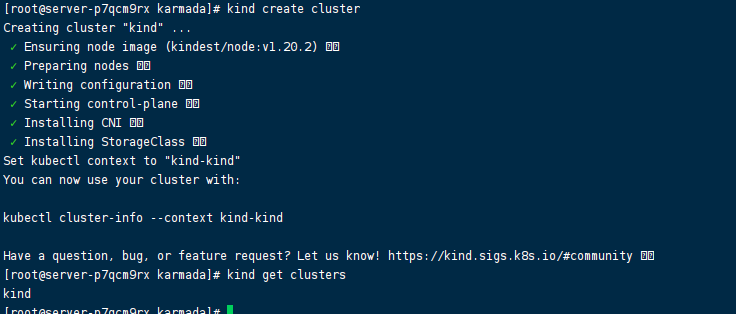
OK, thanks. Which operation system you are using? macOS or Linux?
Linux CentOS Linux release 7.9.2009 (Core)
Thanks. Can you help to check the kind version, by the following command, and post the output here:
# kind version
From the previous log, I guess you are using the kind version lower than v0.11.1.
Can you upgrade the kind the v0.11.1 and try again? You can do that by
curl -Lo ./kind https://kind.sigs.k8s.io/dl/v0.11.1/kind-linux-amd64
chmod +x ./kind
mv ./kind /some-dir-in-your-PATH/kind
Or just remove the kind from your system, they hack/local-up-karmada.sh will install it automatically.
kind version
kind version
kind v0.10.0 go1.15.7 linux/amd64
After upgrading to 0.11, you can continue to go down, and some package downloads time out and cause the installation to fail
Waiting for kubeconfig file /root/.kube/karmada.config and clusters karmada-host to be ready...
Context "kind-karmada-host" renamed to "karmada-host".
Cluster "kind-karmada-host" set.
Image: "swr.ap-southeast-1.myhuaweicloud.com/karmada/karmada-controller-manager:latest" with ID "sha256:c4213d7b4839bc369d79e3dcb7a4aa50c59a130b8d3e40cab16a98622cc0e99a" not yet present on node "karmada-host-control-plane", loading...
Image: "swr.ap-southeast-1.myhuaweicloud.com/karmada/karmada-scheduler:latest" with ID "sha256:6fc91e48d6f755d034730bd776de7408075805a7a0700a0970d64789b4d603ae" not yet present on node "karmada-host-control-plane", loading...
Image: "swr.ap-southeast-1.myhuaweicloud.com/karmada/karmada-webhook:latest" with ID "sha256:ebb29c3388f36b61706bc34cd156be73585f6eb357b03f95607e1efa80f67f7d" not yet present on node "karmada-host-control-plane", loading...
kindImage: "swr.ap-southeast-1.myhuaweicloud.com/karmada/karmada-scheduler-estimator:latest" with ID "sha256:d811d8a1c5a862a09e5b97b11da520ee479e576d5138976e0c308cac53d99fdd" not yet present on node "karmada-host-control-plane", loading...
Image: "swr.ap-southeast-1.myhuaweicloud.com/karmada/karmada-aggregated-apiserver:latest" with ID "sha256:99512a5ca5032f31cbc037dd9c3b8d3c8d3473f97b37a69745955d6b5075d887" not yet present on node "karmada-host-control-plane", loading...
go install github.com/cloudflare/cfssl/cmd/[email protected]
go install github.com/cloudflare/cfssl/cmd/[email protected]: github.com/cloudflare/cfssl/[email protected]: Get "https://proxy.golang.org/github.com/cloudflare/cfssl/cmd/@v/v1.5.0.info": dial tcp 142.251.42.241:443: i/o timeout
That's the network problem, you might have to set up a proxy on your machine to download go modules.
Thanks for reporting this. I'll add a case to Troubleshooting later.
@RainbowMango: The label(s) kind/document cannot be applied, because the repository doesn't have them.
In response to this:
/assign /remove-kind bug /kind document
Instructions for interacting with me using PR comments are available here. If you have questions or suggestions related to my behavior, please file an issue against the kubernetes/test-infra repository.

My kind version is 0.12 but I met the same problem, time out waiting for file exist. I think maybe I should downgrade my kind to ..?

Hi @edsheera, we are using [email protected] in the CI system, so that might not be the reason.
Have you ever gone through the discussions above? if it is another problem, please create an issue with bug template. Thanks.
Did you set the http_proxy and https_proxy in your global environment ? The kubectl would also use the proxy to connect to apiserver. I met the same problem before and solved by adding the 172.0.0.0/8 to no_proxy, which is the address of apiserver.

This problem has not been reported in recent versions. If you encounter this problem, you can always open it again. /close

@XiShanYongYe-Chang: Closing this issue.
In response to this:
This problem has not been reported in recent versions. If you encounter this problem, you can always open it again. /close
Instructions for interacting with me using PR comments are available here. If you have questions or suggestions related to my behavior, please file an issue against the kubernetes/test-infra repository.