

 kahst
kahst
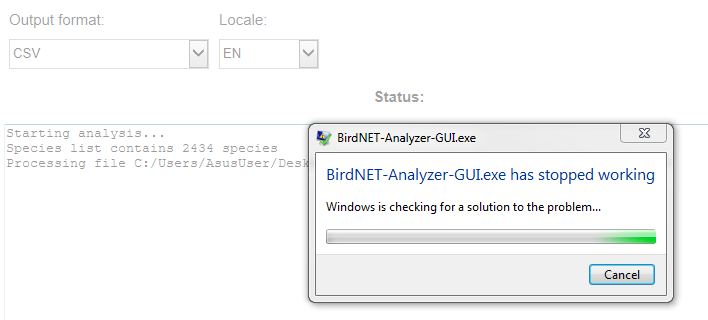
BirdNET-Analyzer-GUI.exe has stopped working
I downloaded the zip file BirdNET-Analyzer for Windows and followed the instructions to check the box "Unblock" before unpacking. I launch BirdNET-Analyzer-GUI.exe and enter my data. After clicking on the button "start analysis" the message "BirdNET-Analyzer-GUI.exe has stopped working" appears and the program closes. What could be the problem?

Hmmm, to be honest, I have no idea. Do you by any chance have a second device, you could give this a try on and see if you can replicate the behavior?

Thanks for the reply. Do you think that the problem could be that I use Windows 7?
It might indeed. We compiled it on Windows 10 - we might have to do a Windows 7 version, too.
Not sure if related (if not let me know and I will open a new issue) but the GUI does not produce outputs for me (I am using Windows 10). When I run the example I get the update
Starting analysis...
Species list contains 41 species
but do not get any output file. Am I doing something wrong or has someone else encountered this?

Hmm, weird...not sure how to debug this. Are you able to run the code from the command line? Is it just taking very long? Can you launch the GUI as admin?
Haven't tried in Windows, but I run it in Linux (using Windows Subsystem for Linux) and ran very quickly. Will check if I can the GUI as admin.
Hello all - just for reference I downloaded the zip file for BirdNET-Analyzer for Windows last week and followed the instructions and it runs fine on Windows 10:
OS Name Microsoft Windows 10 Pro Version 10.0.19044 Build 19044
Jonathan
