kaby76
The 'AntlrLanguageClient' package did not load correctly
The extension is having trouble loading AntlrLanguageClient in Microsoft Visual Studio Professional 2019 Version 16.6.5
I'm receiving this dialog
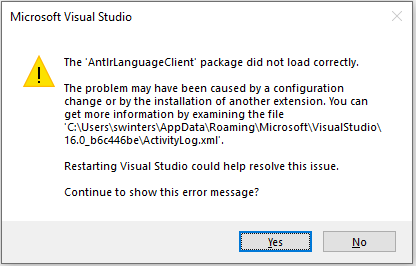
And when checking the ActivityLog.xml, it's showing the following error:
System.IO.FileNotFoundException: Could not load file or assembly 'Microsoft.VisualStudio.LanguageServer.Client, Version=16.7.0.0, Culture=neutral, PublicKeyToken=b03f5f7f11d50a3a' or one of its dependencies. The system cannot find the file specified. File name: 'Microsoft.VisualStudio.LanguageServer.Client, Version=16.7.0.0, Culture=neutral, PublicKeyToken=b03f5f7f11d50a3a' at LspAntlr.AntlrClassifier.<GetTags>d__8.MoveNext() at Microsoft.VisualStudio.Text.Tagging.Implementation.TagAggregator`1.<GetTagsForBuffer>d__47.MoveNext() WRN: Assembly binding logging is turned OFF. To enable assembly bind failure logging, set the registry value [HKLM\Software\Microsoft\Fusion!EnableLog] (DWORD) to 1. Note: There is some performance penalty associated with assembly bind failure logging. To turn this feature off, remove the registry value [HKLM\Software\Microsoft\Fusion!EnableLog]. --

Thanks for the info. Unfortunately, each major version of VS2019 (e.g., 16.6 vs 16.7) seems to require a different Language Server Protocol (LSP) client, which I didn't anticipate. Right now, the client Antlrvsix links to is v16.7, and that works with VS2019 v16.8 and v16.7, but not for VS2019 v16.6. I don't package Antlrvsix for different clients, so it won't work until you upgrade to the latest.
But, due to another bug in Antlrvsix, scrolling and typing with semantic highlighting is quite slow. In lieu of that, I recommend that you install Mads' Open in Visual Studio Code in VS2019, install VSCode, then install either Antlrvsix for VSCode (which supports LSP), or Mike's excellent vscode-antlr extension for VSCode. When you want to edit the .g4 file from VS2019, right click on the file in the Solution Manager. Mads' extension will offer to open the file in VSCode. After VSCode opens up on the grammar file, you can edit the .g4 grammar very nicely, save, then go back to VS2019 to do the build if you like.
I will be redoing the whole implementation of semantic highlighting for VS2019 because the current implementation is too slow except for small grammars. I think the next release to fix this will be at the end of December, v8.4. I really wish MS get on the ball and implement LSP semantic highlighting for VS2019, but the current client and LSP protocol supported in VS2019 is now 3 years behind VSCode. We need more people to complain to MS.