sharepoint-list-plugin icon indicating copy to clipboard operation
sharepoint-list-plugin copied to clipboard

获得 OneDrive 文件下载直链的 TamperMonkey 插件

Results 9 sharepoint-list-plugin issues
Sort by recently updated
recently updated
newest added

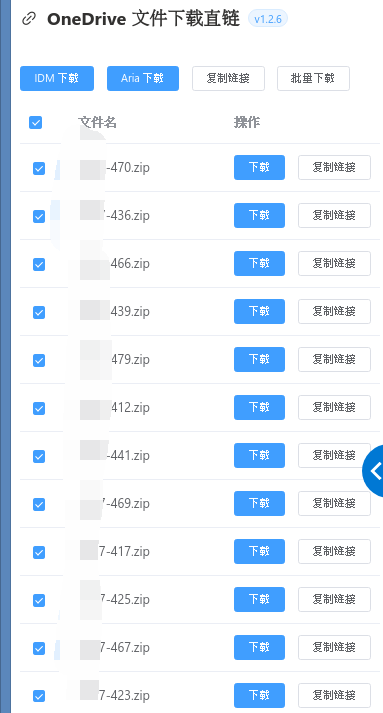
![image](https://user-images.githubusercontent.com/63099104/186837482-7cc09c76-68bd-44d4-9852-f7983a9df0c0.png) 这个链接有717个文件,不知道是什么原因

question

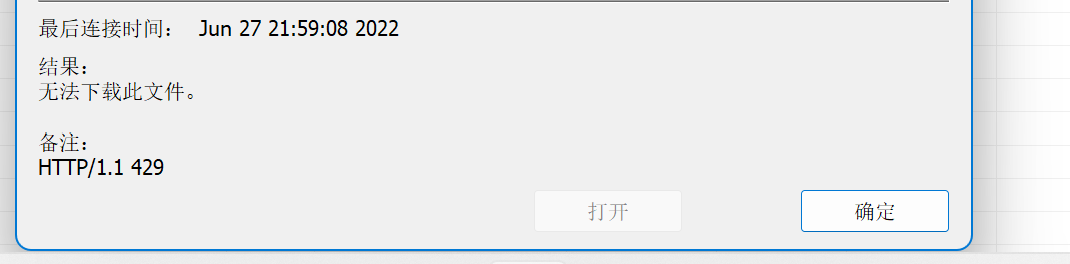
![屏幕截图 2022-06-27 215858](https://user-images.githubusercontent.com/85331400/175959542-bb122d46-10b4-49d9-a413-3b029e84e319.png) ![屏幕截图 2022-06-27 215922](https://user-images.githubusercontent.com/85331400/175959570-ddd4f085-cd3e-441e-aa85-639d474d9889.png) 使用脚本提取链接下载总是失败,但是直接使用idm进行下载可以成功

question

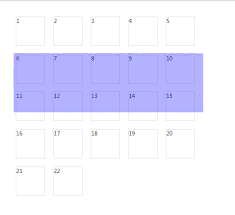
![image](https://user-images.githubusercontent.com/98703352/174905141-88a977bd-9388-455e-b0db-d2e23bc71e08.png) 首先非常感谢这款插件,真的很好用,提2个小建议: 1. 建议增加按名称排序功能;不知道为什么,文件名的顺序是随机的,而且无法按照顺序排列。 ![image](https://user-images.githubusercontent.com/98703352/174905569-34c2051c-1423-4199-99ef-2dc915bb3b0d.png) 2. 实现鼠标拖拽多选功能;一个文件夹文件很多,想下载一两个的话没问题,如果只想下载比如1/3的话一个个选择会很麻烦,如果可以排序并且支持鼠标拖拽多选可以大幅提高效率。
enhancement

文件数量多,挺容易卡死的。 [其他相关反馈](https://greasyfork.org/zh-CN/scripts/432415-onedrive-%E6%96%87%E4%BB%B6%E4%B8%8B%E8%BD%BD%E7%9B%B4%E9%93%BE/discussions/136028)

enhancement

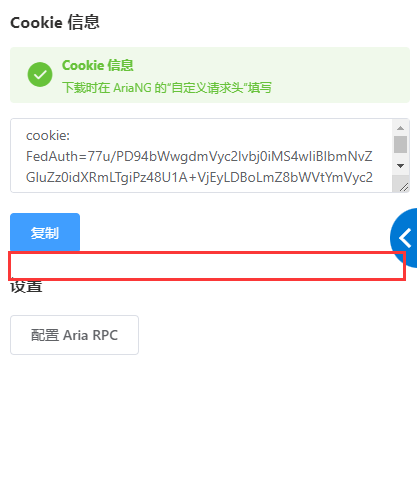
![image](https://user-images.githubusercontent.com/56804964/169494276-613e4ad5-4cdd-43ba-aac9-adb6557c9284.png) 能不能在如上图框框的位置加上一个一键复制```wget --header 'cookie: FedAuth=xxxxxxxx;' ```,可以方便用LinuxVPS下载单个文件 还有就是分享链接文件多的情况会非常卡,因为是遍历所有文件。且不好找想要的文件,能不能考虑在原页面的右键菜单加一个复制直链的选项。不过和现有的功能差距有点大,应该不好实现。

enhancement

似乎只支持企业版的网盘,即sharepoint域名下的OneDrive,可否扩展支持一下个人版本的域名onedrive.live.com

enhancement
help wanted

推送到Motrix时,显示推送失败,请支持一下Motrix

feature request

onedirve on the edge browser sets the cookie to HttpOnly, causing the cookie to be empty ![屏幕截图 2024-04-29 011149](https://github.com/kaaass/sharepoint-list-plugin/assets/46371097/083afc36-b84f-43b2-9a40-b33f28ba69cd) ![屏幕截图 2024-04-30 012716](https://github.com/kaaass/sharepoint-list-plugin/assets/46371097/be8043bd-4015-4c9d-84c1-dc3cd8d8b669)