
uptime-kuma-helm
 uptime-kuma-helm copied to clipboard
 k3rnelpan1c-dev
race: Error: EACCES: permission denied, mkdir './data/upload/'
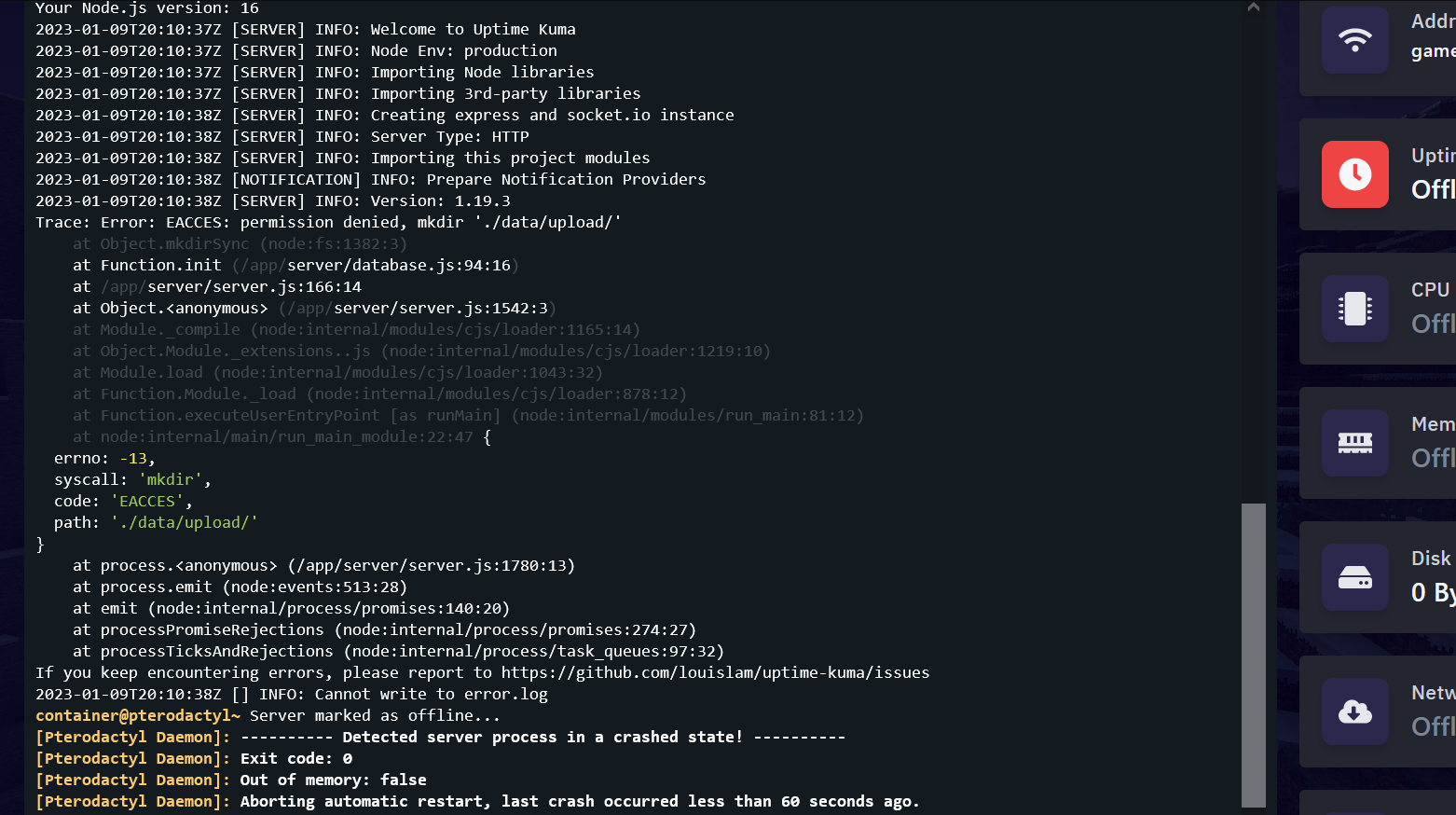

Hi there! Thank you for the Issue, however I think I need a bit more info to whats going on here.
i.e.:
- Which Container image are you using?
- What is your container runtime and orchestrator?
- which version of the chart and kuma we talking about?
- ...


Im trying to use latest kuma version from quay.io website, where you have it and trying to run it in a pterodacty server
Also, i dont have nothing in the "Startup script" of the Pterodacty egg, i mean, its empty
Im trying to use latest kuma version from quay.io website, where you have it and trying to run it in a pterodacty server
Hmmm, had not heard of pterodacty server before this NGL. Regardless, I assume it requires you to use a rootless container image, hence why you are here.
Just to be sure, you mounted a volume to /app/data within the container?
Because it looks like the kuma startup errors out due to a permission issue. So either there is no volume mounted or (if pterodacty uses bind mounts) the permissions are not set up right.
Getting the same error on EKS 1.26.2 - fresh deployment
Welcome to Uptime Kuma
Your Node.js version: 16
2023-05-12T18:13:46Z [SERVER] INFO: Welcome to Uptime Kuma
2023-05-12T18:13:46Z [SERVER] INFO: Node Env: production
2023-05-12T18:13:46Z [SERVER] INFO: Importing Node libraries
2023-05-12T18:13:46Z [SERVER] INFO: Importing 3rd-party libraries
2023-05-12T18:13:49Z [SERVER] INFO: Creating express and socket.io instance
2023-05-12T18:13:49Z [SERVER] INFO: Server Type: HTTP
2023-05-12T18:13:49Z [SERVER] INFO: Importing this project modules
2023-05-12T18:13:49Z [NOTIFICATION] INFO: Prepare Notification Providers
2023-05-12T18:13:49Z [SERVER] INFO: Version: 1.21.3
Trace: Error: EACCES: permission denied, mkdir './data/upload/'
    at Object.mkdirSync (node:fs:1382:3)
    at Function.init (/app/server/database.js:104:16)
    at /app/server/server.js:172:14
    at Object.<anonymous> (/app/server/server.js:1565:3)
    at Module._compile (node:internal/modules/cjs/loader:1196:14)
    at Object.Module._extensions..js (node:internal/modules/cjs/loader:1250:10)
    at Module.load (node:internal/modules/cjs/loader:1074:32)
    at Function.Module._load (node:internal/modules/cjs/loader:909:12)
    at Function.executeUserEntryPoint [as runMain] (node:internal/modules/run_main:81:12)
    at node:internal/main/run_main_module:22:47 {
  errno: -13,
  syscall: 'mkdir',
  code: 'EACCES',
  path: './data/upload/'
}
    at process.<anonymous> (/app/server/server.js:1804:13)
    at process.emit (node:events:513:28)
    at emit (node:internal/process/promises:140:20)
    at processPromiseRejections (node:internal/process/promises:274:27)
    at processTicksAndRejections (node:internal/process/task_queues:97:32)
If you keep encountering errors, please report to https://github.com/louislam/uptime-kuma/issues
2023-05-12T18:13:50Z [] INFO: Cannot write to error.log
Stream closed EOF for kuma/kuma-0 (uptime-kuma)
EDIT: using the "official" image works without issues
Hmm, especially if the official image works fine, then this might be related to the environments where this happens relies on the entrypoint script fixing file permissions at boot.
However, this very script will not work in OpenShift due to it relying on the container running as the user root within itself, which you cannot do if you intent to use the default Security Context Constraint of OpenShift (resrticted or. restricted-v2).
This chart and image originated out of the need that I wanted to host Kuma on our OpenShift cluster without needing to escalate privileges nor allow another SCCs.
If I find a way and more importantly the time to evaluate why other container environments can run into this issue (not all seem to do so) then I will fix this, but unless someone beats me to it, while keeping restricted-v2 SCC compatibility, I will recommend just overwriting the image tag in the chart to the official Kuma image.
well, since there has been no real activity on this issue and that you can easily replace the image used in the chart with the official uptime-kuma image (in cases where you need the entrypoit script to fix permission) I will be closing this report in one weeks time.
Thank you for reporting this regardless and hope you have found a path to make it work for you in the end!
Wouldn't it be more common to use the official image as the default in the chart and only add a pointer to the custom image?
I guess if nothing has changed the issue is still present (didn't check for it lately though).
Wouldn't it be more common to use the official image as the default in the chart and only add a pointer to the custom image?
I guess if nothing has changed the issue is still present (didn't check for it lately though).
The issue may still persist, I have no environment to reproduce this behaviour though.
For your suggestion changing the default image, I could do that, but only with a major version bump as it is a breaking change to swap from a rootless image to a rootfull image.
Additionally, this helm chart and the rootless image originated from my need to deploy uptime-kuma on OpenShift without touching any SCCs (Security Context Constraints) and running in Restricted/Restricted-v2 mode.
So, the only thing I can offer is either introduce the breaking change and screw over all (including myself) who expect to run a rootless image by default, or I include a second values file that default targets the "official" rootfull image.
I am all ears if you have any suggestion for alternative solutions.
For your suggestion changing the default image, I could do that, but only with a major version bump as it is a breaking change to swap from a rootless image to a rootfull image. Additionally, this helm chart and the rootless image originated from my need to deploy uptime-kuma on OpenShift without touching any SCCs (Security Context Constraints) and running in Restricted/Restricted-v2 mode.
The question is (and only you can answer it) if this chart should be more a "general" chart for uptime-kuma (then I'd argue the image should be changed to upstream) or a personal/private chart of yours (then it should probably stay as is).
On "normal" k8s clusters the official image works fine and I think people should only be forced to a custom image by default if they are on a "custom" runtime 🙂
If you'd do so, then yes, a major release would be the way to go to indicate the breaking change.
You have to set securityContext options, and specifically fsGroup to get past this error.
Running the image rootless won't work if default permissions on the volume is "root ownership".

I have thought about this a bit, and I may work on a v2 of the chart that will have an OpenShift flag in the values.
That way it should be as easy as to toggle that flag and recive either the upstream rootfull image or the rootless one.
Alternatively, it could also just toggle the SecurityContext, but I prefer that to be an "advanced user" option, as most ppl don't bother to understand it.
Regardless, that would also be the point where I will try and switch the Chart packaging to target GH Pages as well as OCI (on Quay.io).
*also sorry for the long silence, been busy with IRL responsibilities.
I had the same issue as OP in a plain k3s Cluster.
You have to set securityContext options, and specifically
fsGroupto get past this error. Running the image rootless won't work if default permissions on the volume is "root ownership".
Thanks epleterte! With your comment I could solve it like this:
podSecurityContext:
          runAsNonRoot: true
          runAsUser: 3310
          runAsGroup: 3310
          fsGroup: 3310
          fsGroupChangePolicy: "OnRootMismatch"

Thanks @illnr for your suggestion. We had the same issue and with this it works as expected.

I have the same issue when trying to enabling persistence
and setting parameters recommended above does not worked for me a well
