jupyter-scheduler
 jupyter-scheduler copied to clipboard
 jupyter-server
Update file snapshot in job definitions via right click menu from file browser
Problem
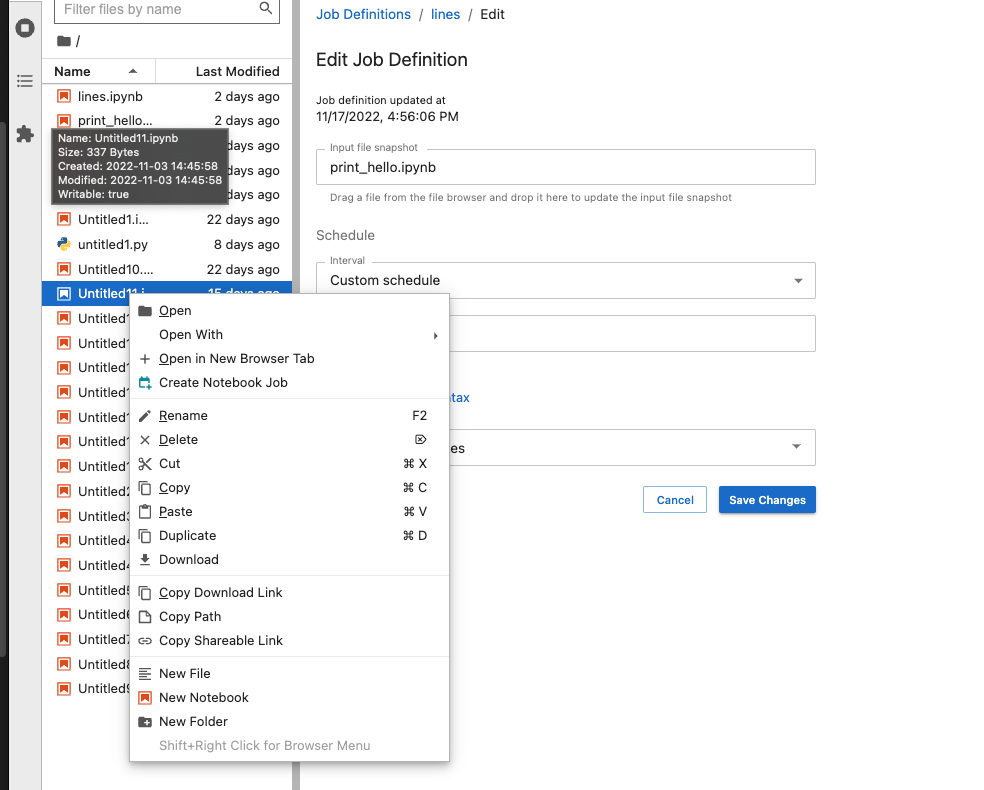
One of the ways you can create a new job is right-clicking on a notebook in a file browser and choosing "Create a job" from the menu. PR #285 (fixes #256 ) introduced ability to update the immutable snapshot of the input file when editing a job definition by dragging notebook from file browser and dropping it into Input file snapshot input field. This two ways of interacting with file browser are inconsistent and might be confusing for people using the extension.
Proposed Solution
Provide an option to update file snapshot in job definitions via right click menu in file browser consistent with a way new job can be created from file browser.
Option should only be available when the action makes sense / when all of the below are true:
- Notebook Jobs widget is active
- Edit Job Definition view is current
- (TBC) File clicked is of appropriate format for the environment. To do this, we need to first let environments declare which file types they can run (see related issues #316 and #317 ). As mentioned by @jweill-aws , we get environments as a result of an asynchronous call in the scheduler, so the file browser might not know about environment details. Alternatively we can have a right click menu action available on files of any format and
Input file snapshotfield showing errors if file is not of an appropriate format for the environment.
References
File browser right click menu with "Create Notebook Job" option: