
XPopup

XPopup copied to clipboard
 junixapp
BubbleAttachPopupView 内 ImageView 使用 coil 加载图片不显示
XPopup版本 XPopup 2.7.5
手机系统和型号 华为 HONOR 9X HarmonyOS 2.0.0
问题描述 我在使用自定义 BubbleAttachPopupView 时,布局内有 ImageView,使用 coil 加载网络图片,无法显示,但是加载本地图片资源是正常的;
通过 coil 设置各种占位图和加载回调,感觉不是加载失败,应该是加载成功了但是图片没有显示
如下图是 BubbleAttachPopupView 和 AttachPopupView 的对比,可以看到 AttachPopupView 是正常的,使用其他弹窗类型也是正常的,唯独是使用 BubbleAttachPopupView 时会无法显示图片
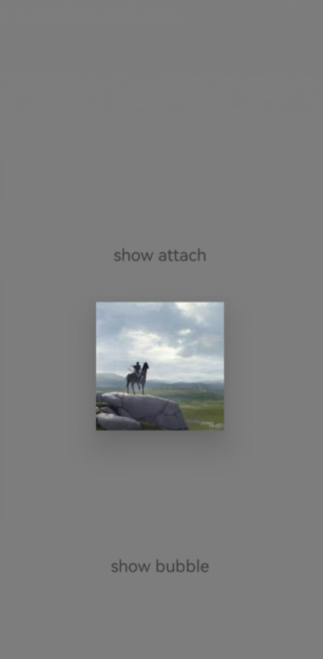
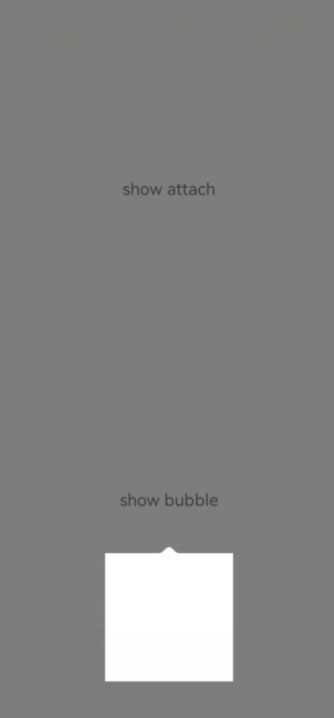
下面是我的 Demo 的代码,应该是没有什么问题的
// 展示 Popup 相关的代码
binding.tvShowAttach.setOnClickListener {
    XPopup.Builder(context)
        .isDestroyOnDismiss(true) // 对于只使用一次的弹窗,推荐设置这个
        .isViewMode(true)
        .atView(it)
        .popupAnimation(PopupAnimation.ScrollAlphaFromTop)
        .offsetY(10.dp) // 增加一个垂直方向的距离
        .isCenterHorizontal(true)
        .asCustom(BugFeedbackAttachPopup(context))
        .show()
}
binding.tvShowBubble.setOnClickListener {
    XPopup.Builder(context)
        .isDestroyOnDismiss(true) // 对于只使用一次的弹窗,推荐设置这个
        .isViewMode(true)
        .atView(it)
        .popupAnimation(PopupAnimation.ScrollAlphaFromTop)
        .offsetY(10.dp) // 增加一个垂直方向的距离
        .isCenterHorizontal(true)
        .asCustom(
            BugFeedbackPopup(context)
                .setArrowRadius(3.dp)
                .setArrowHeight(5.dp)
                .setBubbleBgColor(ContextCompat.getColor(context, R.color.common_white))
        ).show()
}

// 两个 Popup 的实现
/**
 * AttachPopup
 */
class BugFeedbackAttachPopup(context: Context) : AttachPopupView(context) {

    private val binding by lazy { PartBugFeedbackAttachPopupBinding.bind(popupImplView) }

    override fun getImplLayoutId() = R.layout.part_bug_feedback_attach_popup

    override fun onCreate() {
        super.onCreate()

        binding.ivTest.load("https://avatars.githubusercontent.com/u/21210457?v=4")
    }

}

/**
 * 气泡 Popup
 */
class BugFeedbackPopup(context: Context) : BubbleAttachPopupView(context) {

    private val binding by lazy { PartBugFeedbackPopupBinding.bind(popupImplView) }

    override fun getImplLayoutId() = R.layout.part_bug_feedback_popup

    override fun onCreate() {
        super.onCreate()
        binding.ivTest.load("https://avatars.githubusercontent.com/u/21210457?v=4")
    }
}
以下是我的自定义 PopupView 的布局,很简单就一个 ImageView,两个 Popup 都是这样的
<?xml version="1.0" encoding="utf-8"?>
<androidx.constraintlayout.widget.ConstraintLayout xmlns:android="http://schemas.android.com/apk/res/android"
    xmlns:app="http://schemas.android.com/apk/res-auto"
    xmlns:tools="http://schemas.android.com/tools"
    android:layout_width="wrap_content"
    android:layout_height="wrap_content"
    android:background="@color/common_white"
    tools:ignore="ContentDescription">

    <ImageView
        android:id="@+id/iv_test"
        android:layout_width="wrap_content"
        android:layout_height="wrap_content"
        android:adjustViewBounds="true"
        android:scaleType="centerCrop"
        app:layout_constraintBottom_toBottomOf="parent"
        app:layout_constraintLeft_toLeftOf="parent"
        app:layout_constraintRight_toRightOf="parent"
        app:layout_constraintTop_toTopOf="parent" />

</androidx.constraintlayout.widget.ConstraintLayout>
