
ShellCrash
 ShellCrash copied to clipboard
 juewuy
Run sing-box/mihomo as client in shell
更新/卸载 报错

grep: HTML>': No such file or directory /etc/clash/clash.sh: line 1171: can't create HTML>': Read-only file system 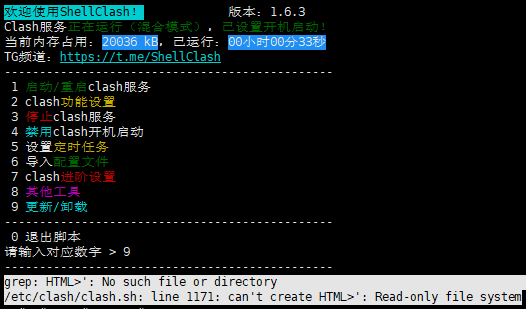


用的是netgear改梅林固件路由器,开启ssh,使用admin用户进行安装,断开会话后,再次ssh连接(过一段时间吧,不是马上连接),执行clash提示Command not found,不知是否与使用admin安装有关?不知到如何root连接,请问如何解决? 不稳定,似乎是一天断一次服务,无法访问相关网站,无法连接到设置的UI界面,有时软启动可以恢复,有时需要重新硬启动路由器。

因为是家庭路由器里,而且节点是小水管。 配置文件选的 “Acl4SSR极简版(适合自建节点)”,想做黑名单(只代理部分内容),所以漏网之鱼选的 "Direct"。 twitter,tg 这些都可以访问,但是google 搜索打不开。浏览器显示 “已重置连接。”

能否直接跳过所有的ipv6地址呢?一旦开启clash,设备的ipv6就不可用了。但是设备还是需要ipv4的clash的。所以能否让所有的ipv6地址不经过clash呢?谢谢。

路由器是AX6, shellclash 1.6.1正式版  如图所示,已开启黑名单过滤模式,但是黑名单的三台设备,均可以访问外网。 (PS:开启黑名单的原因是:家人手机使用小红书和京东APP,经常打不开)


Hi Juewuy, Our company have provide a Mac mini to do our test server, I want to konw that who to install a ShellClash on the Mac? Thanks, Regards!

