

 jtroo
jtroo
[Windows] japanese keyboard keycodes
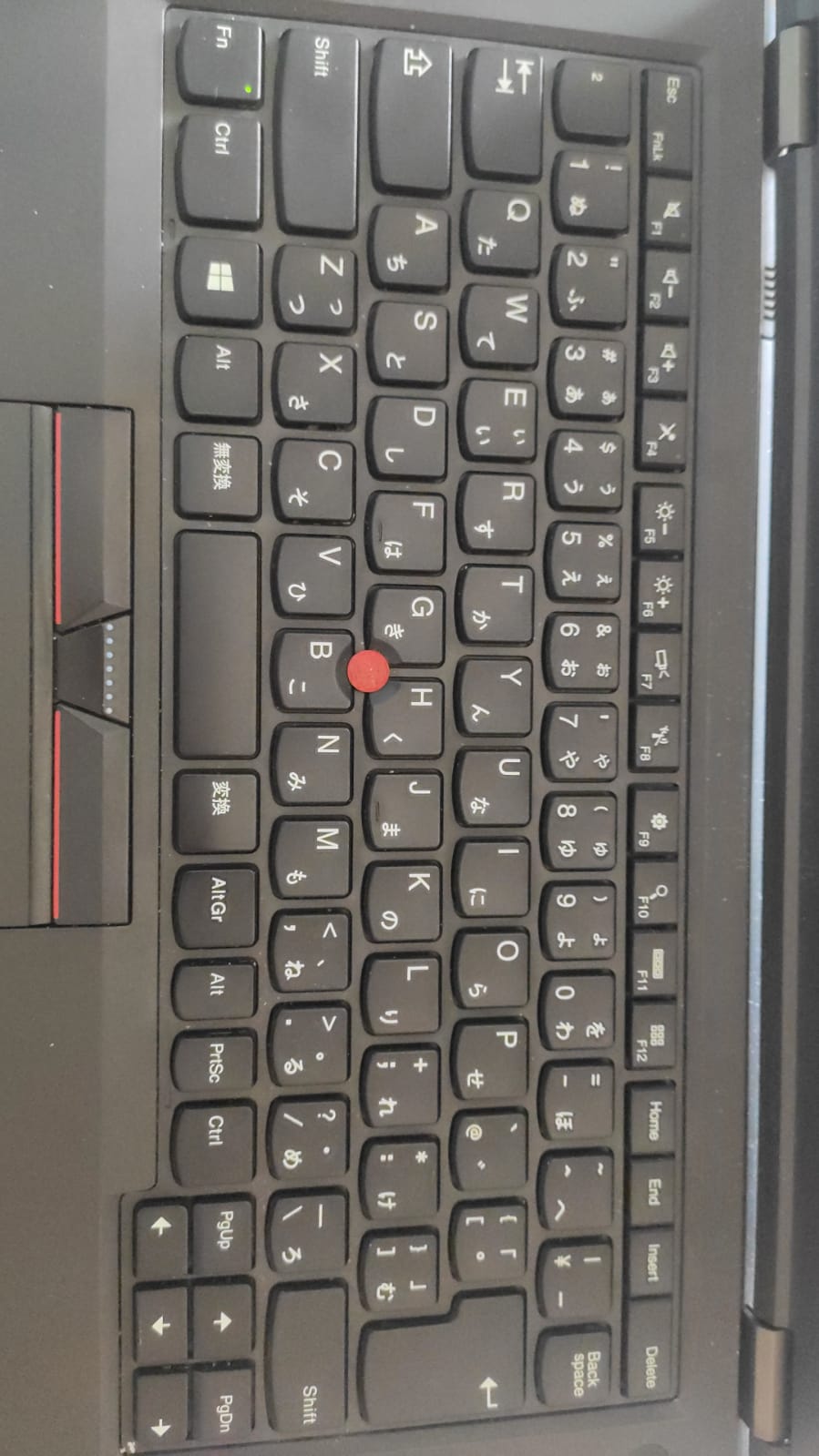
I'm trying to configure on my japanese keyboard laptop. Only key that gets recognized is "ro" (the one on "/" right), which I have inserted in the cfg file as is, because KEY_RO wouldn't get recognized either. I'm missing KEY_MUHENKAN, KEY_HENKAN and KEY_YEN. Thanks in advance


Some notes for adding keymaps
- kmonad's Windows key maps:
  , (KeyKatakana, 0x15)
  -- , (KeyHiragana, ???)
  , (KeyHenkan, 0x1C)
  , (KeyKatakanaHiragana, 0x15)
  , (KeyMuhenkan, 0x1D)
- I believe the yen key is the US backslash; just need to add an alias for that. Linux appears to have a separate yen key, but I can't find anything about that mapping on Windows
- can use
KeyCode::Lang[3-9]keys in keyberon. May not be technically correct, but doesn't really matter as long as the OsCode<->KeyCode mapping is consistent.
Hi @kuapi0, if you're able to test the branch in PR #145, that would be great. The key names in the configuration are:
        "\\" | "bksl" | "yen" => OsCode::KEY_BACKSLASH,
        "cnv" | "conv" | "henk" | "hnk" | "henkan" => OsCode::KEY_HENKAN,
        "ncnv" | "mhnk" | "muhenkan" => OsCode::KEY_MUHENKAN,
Hey @jtroo, sorry for not replying sooner, been busy. Let me start by admitting I don't have the slightest idea how this all works haha Despite that, I managed to build the .exe and test with the .cfg I've attached. The exe now launches properly without throwing errors as before, however the keys still don't work. Let me know what testing I could do on my part, like if there's a tool for reading key events similar to xev in windows I could send you the logs. kanata.zip
I've also noticed something very strange: as you can see from the picture I attached, my keyboard presents a second small Left Alt between Ralt and print screen. In the previously attached .cfg file, I had to comment it out because I was getting a repeat declaration error. With that cfg Ralt gets ignored and the small Alt key sends the bksp I had intended for Ralt. I've been using kanata on my work laptop (italian ISO keyboard, US input) for a while and have never had any problem with Ralt getting ignored.
All good, thanks for the feedback! You can test kanata with the --trace flag to show more output. If you could test that and send me the logs alongside what key sequence you pressed, that would be helpful. Please send the output with both the alt issue as well as the japanese keys.
It should be noted though that some keys just may not work properly because Windows does the wrong thing. E.g. #127