

 jtpereyda
Static Console Screen
It would be cool to display stats/general info on the console while running a test. Would be more helpful than spitting out the entire log on the console. Items to display:
- URL to fuzz control
- Summary stats (total test cases, portion done, etc.)
- Info on current node?

I've started playing around with some code for this and I'm looking for an opinion. I'm thinking the static part of the console could be the bottom row and the rest of the screen can be the current log to console behavior. Unfortunately I can't seem to get this to work with curses but I can get it working using raw vt100 escape codes. Before I go too far down the rabbit hole, does this seem like an acceptable behavior/approach?
#!/usr/bin/python

import time
import sys
import readchar

def getWidth():
    sys.stdout.write("\033[999C\033[6n\033[999D")
    yx = ''
    c = readchar.readchar()
    while c != 'R':
        yx += c
        c = readchar.readchar()
    yx = yx[2:]
    y,x = yx.split(';')
    return int(x)

def test():
    w = getWidth()
    for i in range(120):
        # Print something and delete remaining chars on current line
        # This would be the exisitng logs printed to the console
        print "test\033[K"
        draw_progress(i, 119, w)
        time.sleep(0.03)

def draw_progress(complete, total, w):
    progress = 100*complete / total

    status = " %d/%d %d%%" % (complete, total, progress)

    numChars = (w-len(status)-2) * progress / 100
    blankChars = w - numChars - len(status) - 2
    if numChars != 0:
        sys.stdout.write('[' + '='*numChars + ' '*blankChars + ']')
        sys.stdout.write(status + '\r')
        sys.stdout.flush()

test()
print ''

I took a look at this a little while ago and thought about adding an extra class using curses.
Currently I only have a non functional example of how it could look like. (I was too lazy to color the rest)
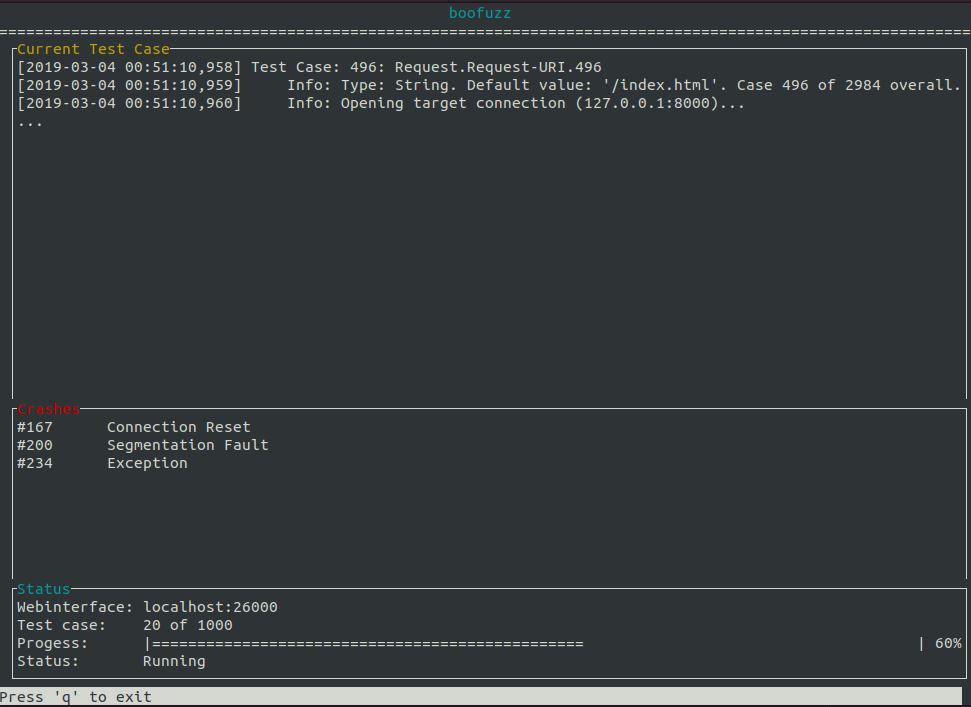
import curses


def draw_menu(stdscr):
    k = 0

    # Clear and refresh the screen for a blank canvas
    curses.curs_set(0)
    stdscr.clear()
    stdscr.refresh()

    # Start colors in curses
    curses.start_color()
    curses.init_pair(1, curses.COLOR_CYAN, curses.COLOR_BLACK)
    curses.init_pair(2, curses.COLOR_RED, curses.COLOR_BLACK)
    curses.init_pair(3, curses.COLOR_BLACK, curses.COLOR_WHITE)
    curses.init_pair(4, curses.COLOR_YELLOW, curses.COLOR_BLACK)

    # Loop where k is the last character pressed
    while (k != ord('q')):

        # Initialization
        stdscr.clear()
        height, width = stdscr.getmaxyx()

        # Declaration of strings
        title = "boofuzz"[:width-1]
        statusbarstr = "Press 'q' to exit"

        # Centering calculations
        start_x_title = int((width // 2) - (len(title) // 2) - len(title) % 2)
        stdscr.addstr(0, start_x_title, title, curses.color_pair(1))
        stdscr.addstr(1, 0, '=' * width)

        # Render status bar
        stdscr.attron(curses.color_pair(3))
        stdscr.addstr(height-1, 0, statusbarstr)
        stdscr.addstr(height-1, len(statusbarstr), " " * (width - len(statusbarstr) - 1))
        stdscr.attroff(curses.color_pair(3))

        # Refresh the screens
        stdscr.refresh()

        # Test Case Screen
        casescr = curses.newwin(height - 18, width - 1, 2, 1)
        casescr.border()
        casescr.addstr(0, 1, "Current Test Case", curses.color_pair(4))
        casescr.addstr(1, 1, "[2019-03-04 00:51:10,958] Test Case: 496: Request.Request-URI.496")
        casescr.addstr(2, 1, "[2019-03-04 00:51:10,959]     Info: Type: String. Default value: '/index.html'. Case 496 of 2984 overall.")
        casescr.addstr(3, 1, "[2019-03-04 00:51:10,960]     Info: Opening target connection (127.0.0.1:8000)...")
        casescr.addstr(4, 1, "...")
        casescr.refresh()

        # Crashes Screen
        crashescr = curses.newwin(11, width - 1, height - 17, 1)
        crashescr.border()
        crashescr.addstr(0, 1, "Crashes", curses.color_pair(2))
        crashescr.addstr(1, 1, "#167      Connection Reset")
        crashescr.addstr(2, 1, "#200      Segmentation Fault")
        crashescr.addstr(3, 1, "#234      Exception")
        crashescr.refresh()

        # Status Screen
        statscr = curses.newwin(6, width - 1, height - 7, 1)
        statscr.border()
        statscr.addstr(0, 1, "Status", curses.color_pair(1))
        statscr.addstr(1, 1, "Webinterface: localhost:26000")
        statscr.addstr(2, 1, "Test case:    20 of 1000")
        statscr.addstr(3, 1, "Progess:      |================================================                                     | 60%")
        statscr.addstr(4, 1, "Status:       Running")
        statscr.refresh()

        # Wait for next input
        k = statscr.getch()


def main():
    curses.wrapper(draw_menu)


if __name__ == "__main__":
    main()
It would even be able to make this interactive just like the webinterface, so you could jump to test cases or pause the run.
I don't know how well this works under Windows but I read there is a pip package called windows-curses available. If we decide to use curses, this needs to be tested first. Or maybe just implement it for Linux and leave Windows aside? :D

@driechers Yes I like where your demo is going. It works for me on Linux but not Windows. That's a major downside of the raw approach IIRC.
If you're having a hard time with curses, you might check out https://github.com/peterbrittain/asciimatics . It seems popular, active, and has nifty video demos.
There's also https://github.com/jquast/blessed which seems popular though less active.
@SR4ven I like the mockup. The windowed views is sort of what I had in mind.
The interface doesn't have to be super slick on the first iteration, though some extensibility would be nice (hence the value in finding an easy-ish library). As far as I'm concerned, almost anything would be an improvement on the status quo (full dump to stdout makes sense for debugging but not for long-running tests).
Implementation note: We'll likely want to make a new class similar to FuzzLoggerText. It'll be nice to keep the old one around for users who prefer a non-UI text dump.
I like the windowed approach. Honestly I was having trouble filling up enough of the screen and thought I would just start with the bottom row. I like the logs still being shown in a window. Perhaps a scrolling feature.