
wslexe
 wslexe copied to clipboard
 jswh
jswh
Include file paths aren't converted from WSL
Per https://github.com/Microsoft/vscode-python/issues/67#issuecomment-415736240. When using wslexe, the correct interpreter is being used but when trying to open an include, WSL tries to open original unix path. Ideally, VSCode should detect that Python inside WSL is being used and use a Windows-friendly path to the resource.

According to this blog, the file path is located in C:\Users\YOUR_USER_NAME\.vscode\extensions\ms-python.python-201x.x.x\pythonFiles\completion.py.
You can just add this function to this file:
def wsl_to_winpath(path):
    ret = path
    start_path = 'C:\\PATH\\TO\\YOUR\\WSL\\rootfs'
    try:
        if path.startswith('/mnt/'):
            ret = path[5] + ':' + path[6:]
            ret = ret.replace('/', '\\')
        elif path.startswith('/'):
            ret = start_path + path.replace('/', '\\')
    except Exception:
        pass
    return ret
And change every dict with the key 'filename': something into 'fileName': wsl_to_winpath(something).
There are 4 places in this file need to be edited:
'fileName': completion.module_path
'fileName': module_path
'fileName': definition.module_path
'fileName': usage.module_path
Simply, you can use this gist with only editing the wsl path. Special thanks to the author of that blog @plusls.

I just found a mistake in this completion.py i have given. In the line 554 it should be your wsl path, and it is the path by default. I (and the author plusls)mistakenly put the his path. If use the whole file instead of edit it yourself, please fix this problem.
This program just translate an argument like X:\\path\file to /mnt/x/path/file , and vise versa in the output.
I tried to import the logging module, and it worked fine.
Could you please describe how to reproduce the error .
@mrlifetime

抱歉我不是很明白你的意思,什么叫做重现错误
曹维杰 [email protected] 于 2018年9月20日周四 下午5:13写道:
This program just translate an argument like X:\path\file to /mnt/x/path/file , and vise versa in the output.
I tried to import the logging module, and it worked fine. Could you please describe how to reproduce the error .
— You are receiving this because you commented. Reply to this email directly, view it on GitHub https://github.com/jswh/wslexe/issues/1#issuecomment-423106104, or mute the thread https://github.com/notifications/unsubscribe-auth/APHJ0L7Uv_2pTrkxasdCYkPwIzJGmj2Sks5uc1xHgaJpZM4Whr3N .
我是写给 mrlifetime 的 ,我不是很清楚那个错误是怎么出来的,也重现不出来。如果能在程序内部解决问题就最好了。 The comment is for @mrlifetime . I can not reproduce the error per https://github.com/Microsoft/vscode-python/issues/67#issuecomment-415736240 . It would be greate to treate the problem in the wslexe program it self.
没记错的话 wslgit也有这个问题 wsl的路径转换也是糊的,并没有提供/usr/bin/xxx to C:\wslpath\rootfs\usr\bin\xxx的转换 而且我个人并不喜欢在stdout中做路径转换,这个转换应该在vscode的插件中完成

是的,只匹配X:\\和/mnt/两种格式的字符串。我好奇的是/usr/bin/xxx,如果是在脚本内部的话,应该本身就是在wsl环境中执行的,不会存在找不到的问题呀。所以我很想能够复现一下问题看看。
是的,只匹配
X:\\和/mnt/两种格式的字符串。我好奇的是/usr/bin/xxx,如果是在脚本内部的话,应该本身就是在wsl环境中执行的,不会存在找不到的问题呀。所以我很想能够复现一下问题看看。
I downloaded wslexe for python in VS code and got the same issue. @mrlifetime @jswh Just give a simple way to reproduce this error:
-
Create a new python file such a example.py. And write a class and its instance.
-
Click go to definition
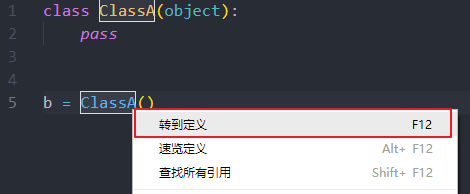
- It seems that vs code is try to find current file but the path was translated to WSL style instead of Windows style:


I have made some test and find that the string file:///FILE_PATH could be produced by the language server .So this text will not be translated by wslexe process. I could do nothing about the problem in this project. It should be fix in language plugins.