

 jsplumb
jsPlumb connectors on SCROLLING BOX do not redraw to the new position of the box (Codepen demo included)
Hi Friends,
Thanks for the helping on this forum. I have been struggling to get the jsPlumb connectors to 'remain connected and redraw' to the new position of the scrolling boxes inside another container (overflow-y=auto). There is a lot of discussion about issues similar to this one and I have followed them all, but still have this issue.
Below is a demo of how we need the html elements layed out. Everything works except the connections do not redraw to the new location of the box after scrolling.
Surely I am missing something, but even after pulling my hair for a few days, I am not able to figure it out. I have a feeling that its something to do with the interaction between flexbox/jsPlumb/z-index. Flexbox is used in its very basic use case, and I would prefer to keep using flexbox, so hopefully the problem is not caused by using flexbox.
In the js, I am trying to listen to the 'scroll' event (which is listened because the console.log is logging), and then repaintingEverything().
Just FYI: my constraints are that I can not use jQuery and must use only plain javascript. Also, my html elements hierarchy/layout here may seem unusual, but that is how it needs to be for us. I have just simplified our use case here to the basic problem around scrolling and connectors.
Could you please FORK the Codepin below for any corrections and respond with the link to your Codepin? Thanks a lot in advance.
Codepin demo of the problem: https://codepen.io/Badhumvee/pen/YEwYWE
Fig1: Normal setup of boxes in two layers. Here, the .previous boxes are not overflowing because of enough width of the container, and the arrows are connected correctly.

Fig2: When the container is shrinked, the .previous boxes overflow and the arrows are drawn correctly when the page is loaded. ... but...
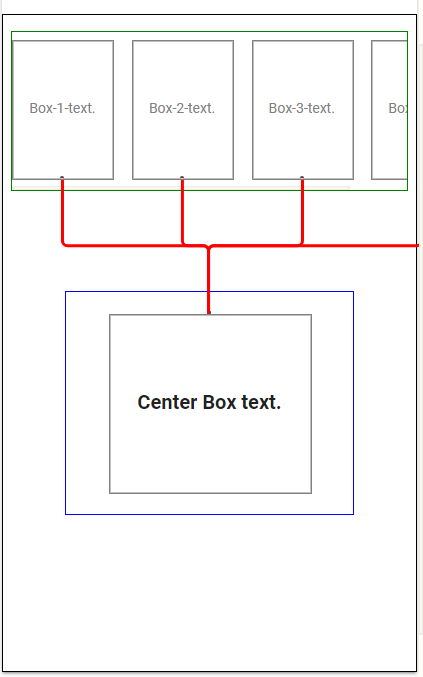
Fig3: ... when the .previous boxes are scrolled left, the arrows are still drawn at the original position.

HTML:
<div  class="all-layers">

    <div  class="previous-layer">

        <div  class="prev-container">


            <div  class="previous last-center  box "  >

                <div class="text-box">

                  <p>Box-1-text.</p>

                </div>

                <img class="box-shape-image"  >

            </div>

            <div  class="previous bookmarklink-source  box "  >

                <div class="text-box">

                  <p>Box-2-text.</p>

                </div>

                <img class="box-shape-image"  >

            </div>

            <div  class="previous bookmarklink-source  box " >

                <div class="text-box">

                  <p>Box-3-text.</p>

                </div>

                <img class="box-shape-image"  >

            </div>


            <div  class="previous bookmarklink-source  box " >

              <div class="text-box">

                <p>Box-4-text.</p>

              </div>

              <img class="box-shape-image"  >

            </div>


        </div>

    </div>


    <div class="center-layer">

        <div class="center-container" fxLayout="row" fxLayoutAlign="space-around center ">


              <div fxflex class="center box ">

                      <div class="text-box" >

                            <p>Center Box text.</p>

                      </div>

                      <img class="box-shape-image">

              </div>

        </div>

    </div>

</div>
CSS:
.all-layers{

    display:flex;

    flex-direction: column;

    flex-wrap: nowrap;

    align-items: stretch;

    position:relative;

    height:100%;

    padding-top:16px;

    width:500px;

    border:1px solid black;

  }


.previous{

    position:relative;

    min-width: 150px;

    font-size:14px;

    color:gray;

    height:100px;

    margin: 0 10px;

  }


  .prev-container{

    display: flex;

    flex-direction: row;

    justify-content: space-between;

    align-items: center;

    overflow-x:auto;

    overflow-y: hidden;

    height:120px;

    margin:0 auto;

    width:96%;

    border:1px solid green;

  }

  .center{

    position:relative;

    z-index: 9;

    width:70%;

    margin:20px auto;

    font-size: 20px;

    font-weight: bold;

    height:150px;

   }


.center-container{

    display: flex;

    flex-direction: row;

    justify-content: space-around;

    align-items: center;

    position:relative;

    width:70%;

    margin:100px auto;

    height:100%;

    border:1px solid blue;

   }


.text-box{

    display:table;

    position:relative;

    z-index: 10;

    width: 90%;

    height:100%;

    margin:0 auto;

  }


  .text-box p {

    display: table-cell;

    vertical-align: middle;

    text-align: center;

  }


  .box .box-shape-image {

    position: absolute;

    z-index: 1;

    top:0;

    left:0;

    height:100%;

    width:100%;

    border: 1px solid gray;

  }
JS:
      jsPlumb.ready(function() {

      jsPlumb.setContainer("#all-layers");


      var i;

      var fromboxarray = document.querySelectorAll(".previous");

      var thecenterbox = document.querySelectorAll(".center");


      for (i = 0; i < fromboxarray.length; i++) {

        makeConnection(fromboxarray[i], "Bottom", thecenterbox[0], "Top");

      }


      function makeConnection(firstbox, firstanchor, secondbox, secondanchor) {

        jsPlumb.connect({

          source: firstbox,

          target: secondbox,

          anchors: [firstanchor, secondanchor],

          connector: [

            "Flowchart",

            {

              cornerRadius: 5,

              midpoint: 0.5,

              stub: 10,

              alwaysRespectStubs: false

            }

          ],

          paintStyle: { stroke: "red", strokeWidth: 3 },

          detachable: true,

          deleteEndpointsOnDetach: false,

          endpoint: ["Dot", { radius: 2 }]

        });

      }

    });

    // Listening to Scrolling of the top boxes and then repainting arrows to new location.

    window.addEventListener(

      "scroll",

      function() {

        console.log("scrolling");

        jsPlumb.repaintEverything();

      },

      true

    );
