Iconize
 Iconize copied to clipboard
 jsmarcus
Set IconColor for IconTabbedPage
How can I set the color for the icons on TabbedPage? In the previous version, I had white icons, now the icons on TabbedPag are black.

I have been experiencing this issue also (on Android, not iOS). The most recent version that works for me is 3.2.0.74 I have been unable to update since this version.

This can be done on Android using the following:
tabbedPage.On<Xamarin.Forms.PlatformConfiguration.Android>().SetBarItemColor(Xamarin.Forms.Color.Yellow);
tabbedPage.On<Xamarin.Forms.PlatformConfiguration.Android>().SetBarSelectedItemColor(Xamarin.Forms.Color.Black);

Thanks jsmarcus. Is there a way to do this in XAML? I am using an IconTabbedPage inside a MasterDetailPage and don't instantiate the IconTabbedPage in the code behind.
Yes, you can do it in xaml. See the documentation here: https://docs.microsoft.com/en-us/xamarin/xamarin-forms/platform/platform-specifics/consuming/android#tabbedpage-toolbar
The documentation link in the previous post is broken but this link might have similar content: https://docs.microsoft.com/en-us/xamarin/xamarin-forms/platform/platform-specifics/#consuming-the-platform-specific

Thanks jsmarcus. I managed to set the colour of the icons on an IconTabbedPage inside a MasterDetailPage throught XAML. (android:TabbedPage.BarItemColor="White" and android:TabbedPage.BarSelectedItemColor="White").
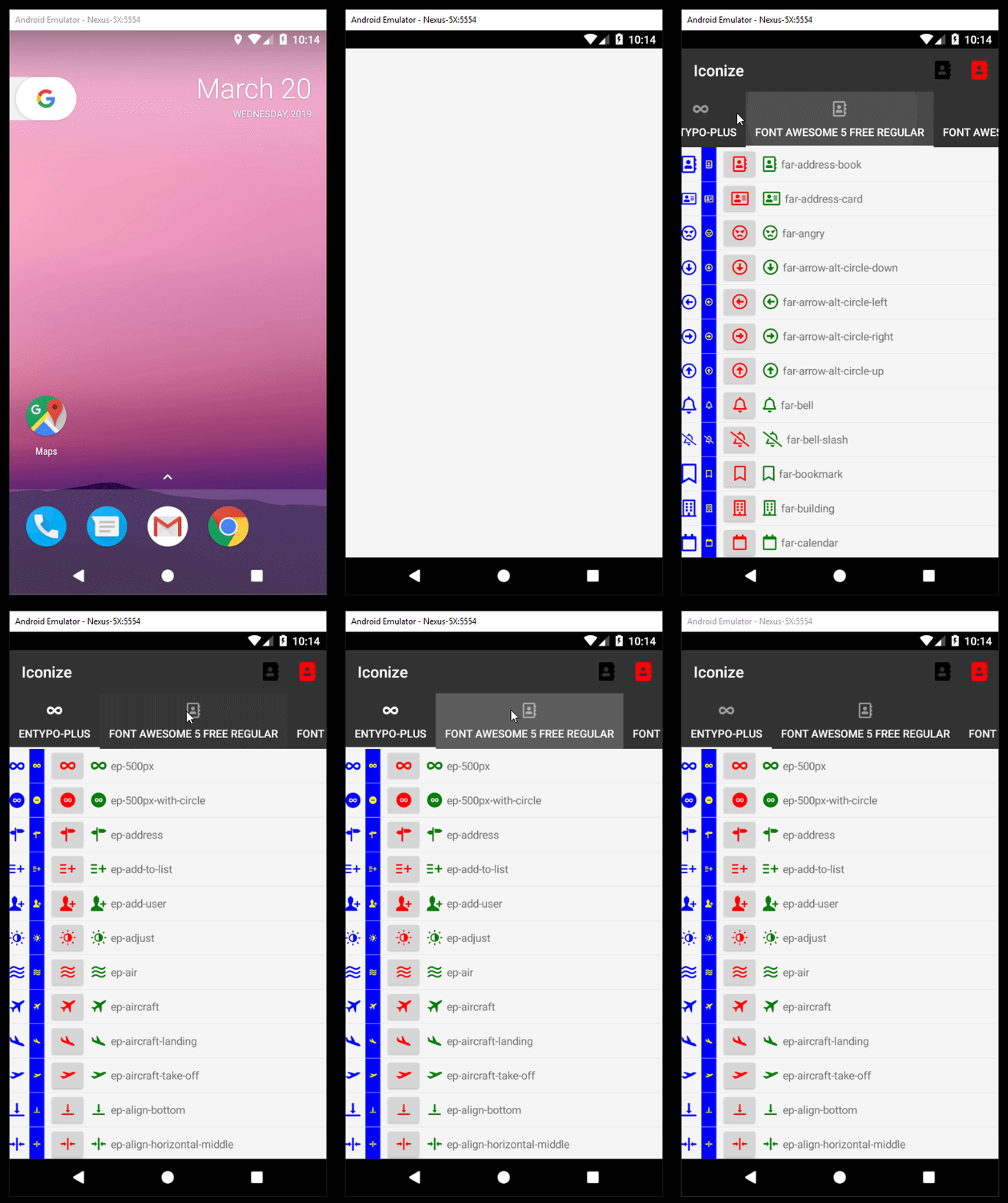
I am experiencing a related issue now. It occurs when using light icons on a dark background. If the user long presses on the tabs, the active tab's icon colour is set to android:TabbedPage.BarSelectedItemColor as expected. The non active tab's icon colour seems to be a slightly transparent version of this colour. This may or may not be as expected. However if the user short presses on the tabs, the active tab's icon colour is not set to android:TabbedPage.BarSelectedItemColor and remains the slightly transparent version of this colour.
I can live with the slightly transparent version of the specified colour, although I would prefer not to. It is the inconsistency between the short and long press that I think will confuse users.
I have attached a screen capture to demonstrate the issue.
Is there a workaround that you know of, or maybe I am doing something wrong? Hopefully you can help.