

 jscastro76
How to cast shadows with custom shadowmap settings?
Threebox version: 2.2.6
Question
Hi! Thank you for this lovely plugin. My question is rather simple but I cannot not find information on it anywhere. Perhaps I'm missing something or my code is not correct. I've combed through the examples and the docs but no avail.
I am trying to render my object's casted shadows without using the realSunlight method. The reason for this is I want to edit the shadow map type to THREE.PCFSoftShadowMap, and I don't really need dynamic lighting based on a date. Currently nothing happens and no shadows appear. Here is how I am loading Threebox window and adding the lights
window.tb = new Threebox(
	map,
	map.getCanvas().getContext('webgl'),
		{	},
);
map.on('style.load', function () {
				// stats
				stats = new Stats();
				map.getContainer().appendChild(stats.dom);
				animate();

				map.addLayer({
					id: 'custom_layer',
					type: 'custom',
					renderingMode: '3d',
					onAdd: function (map, mbxContext) {

					    let modelDragun = {
						type: 'gltf',
						obj: 'https://cdn.jsdelivr.net/gh/voyageur-studio/karto@main/Karto_Models/mount_dragun.glb', //model url
						units: 'meters', //units in the default values are always in meters
						scale: scaleMountain,
						rotation: { x: 90, y: 185, z: 0 }, //default rotation
						anchor: 'center'
					    }
					    tb.loadObj(modelDragun, function (model) {
						model.setCoords(originDragun);
						model.castShadow = true;
						model.receiveShadow = true;
						tb.add(model);
					});
let dilight = new THREE.DirectionalLight(new THREE.Color('hsl(0, 0%, 100%)'), 1);
	dilight.position.set(70, -70, 200).normalize();
	dilight.castShadow = true; // default false
	//Set up shadow properties for the light
	dilight.shadow.camera.near =0.1;
	dilight.shadow.camera.far = 500;
	tb.scene.add(dilight);


	let hemLight = new THREE.HemisphereLight(0xffffbb, 0x080820, .75);
	hemLight.position.set(0, 0, 200).normalize();
	tb.scene.add(hemLight);
	},

render: function (gl, matrix) {
tb.update();
}
And here is what the model looks like on my map:
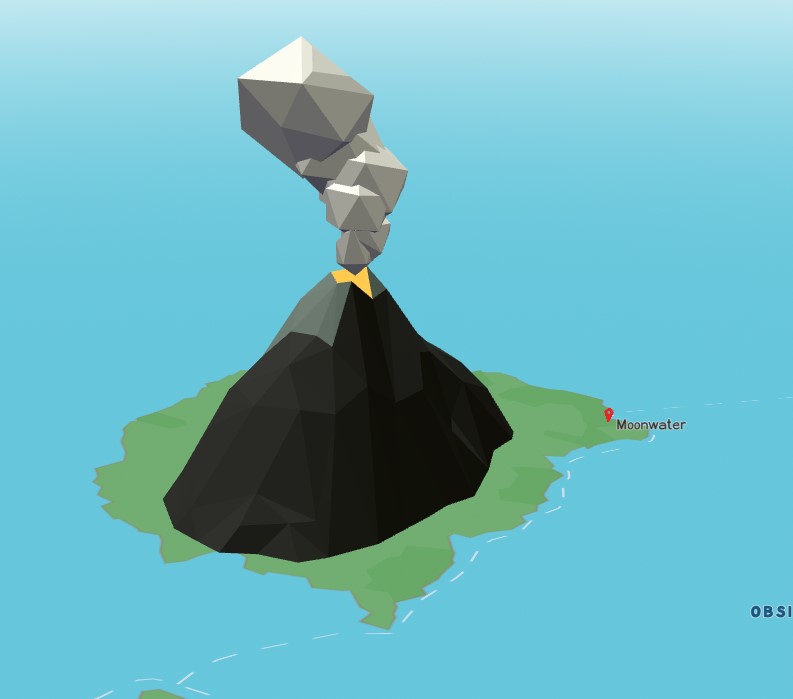
So my question is: Is there a way to cast shadows onto the map without using the realSunlight method or is that the only way? If so, what can I do to implement that?
If using realSunlight is the only way, is there a way to change the shadow map and other settings once it has been invoked?
I am a graphic designer by trade so I am not the most knowledgeable at javascript/code as I'd like to be. Thank you and please let me know if there is anything else I can add.

