

 jrowen
"insert row above" is displayed and is also functional when 'hot_context_menu(allowRowEdit = FALSE, allowColEdit = FALSE)'
When right clicked on the rhandsontable row , "insert row above" is displayed and is also functional even when hot_context_menu(allowRowEdit = FALSE, allowColEdit = FALSE).
Please let me know how to disable displaying "insert row above" option when right clicked on the table.
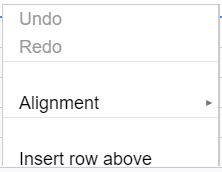


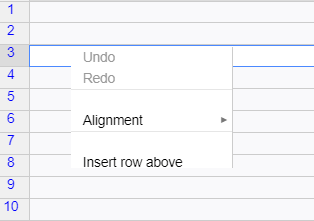
Even when hot_context_menu(allowRowEdit = FALSE, allowColEdit = FALSE') I see the Insert row above as an option
The following minimal example does NOT reproduce the issue.
rhandsontable(data = head(mtcars)) %>%
  hot_context_menu(allowRowEdit = FALSE, allowColEdit = FALSE)
 @RajBalakrishnan , could you please share your example, which reproduces the issue?

Hi, I have the same issue. I believe it happens when you add comments to cells, then it somehow breaks the hot_context_menu. I have a reproducible example:
library(rhandsontable)
library(shiny)

ui = fluidPage(rHandsontableOutput("data"))

server = function(input,output) {
  df = data.frame(x = factor(letters[1:3], levels = letters))
  values = reactiveValues(data = df)

  observe({
    req(input$data)
    values$data = hot_to_r(input$data)
  })

  output$data = renderRHandsontable({
    rhandsontable(values$data, height=500) %>%
      hot_context_menu(allowRowEdit = FALSE, allowColEdit = FALSE)  %>%
      hot_cell(1,1, comment = 'test')
  })
}
shinyApp(ui = ui, server = server)
With the hot_cell setting, the table allows editing rows and columns. Without it, the editing becomes disabled, as it should.

I have a related issue: I would like to use passive comments but disable the contextMenu. I can't find any way to do this?
library(rhandsontable)

vt <- mtcars
modrows <- c(3,6,9)
modtext <- LETTERS[1:3]
vttooltips <- matrix(ncol = ncol(vt), nrow = nrow(vt))
vttooltips[modrows, 2] <- modtext

rhandsontable(vt,
              comments = vttooltips) %>%
  hot_context_menu(allowRowEdit = FALSE, allowColEdit = FALSE,
                   allowReadOnly = FALSE, allowComments = TRUE,
                   allowCustomBorders = FALSE, customOpts = list())

@woodwards , you can disable the context menu afterward
library(rhandsontable)

vt <- mtcars
modrows <- c(3,6,9)
modtext <- LETTERS[1:3]
vttooltips <- matrix(ncol = ncol(vt), nrow = nrow(vt))
vttooltips[modrows, 2] <- modtext

t <- rhandsontable(vt,
                   comments = vttooltips) %>%
  hot_context_menu(allowRowEdit = FALSE, allowColEdit = FALSE,
                   allowReadOnly = FALSE, allowComments = TRUE,
                   allowCustomBorders = FALSE, customOpts = list())
t$x$contextMenu <- list()
t
@AlexandraCirstoc , changing the order of the commands does the trick. At first, add comments; at second, provide the anti-context menu instructions. It helps to avoid reenabling of the editing context menu items
df = data.frame(x = factor(letters[1:3], levels = letters))
rhandsontable(df, height=500) %>%
  hot_cell(1,1, comment = 'test') %>%
  hot_context_menu(allowRowEdit = FALSE, allowColEdit = FALSE)