

 jprochazka
Bug Fix for installation of ver 3.7.1 of dump1090-fa and piaware
THE SCRIPT FAILS TO INSTALL dump1090-fa.
Reason: the script builds package of dump1090-fa ver 3.6.3, then tries to install ver 3.7.1, which does not exist, and installation command fails.
cd ${RECEIVER_BUILD_DIRECTORY}/dump1090-fa 2>&1
git clone https://github.com/flightaware/dump1090.git
cd ${RECEIVER_BUILD_DIRECTORY}/dump1090-fa/dump1090 2>&1
dpkg-buildpackage -b
dpkg-deb --build debian/dump1090-fa ..
dpkg-deb: building package 'dump1090-fa' in '../dump1090-fa_3.6.3_armhf.deb'.
... ... ...
  Entering the dump1090-fa build directory...
  Installing the dump1090-fa package...
dpkg: error: cannot access archive 'dump1090-fa_3.7.1_*.deb': No such file or directory
  Checking that the dump1090-fa package was installed properly...
  INSTALLATION HALTED!
  UNABLE TO INSTALL A REQUIRED PACKAGE.
  SETUP HAS BEEN TERMINATED!
The package "dump1090-fa" could not be installed.
  ------------------------------------------------------------------------------
  Dump1090-fa setup halted.
. .
WORKAROUND
(1) First execute following 3 commands:
sudo apt-get update
sudo apt-get install git
git clone https://github.com/jprochazka/adsb-receiver.git ~/adsb-receiver
.
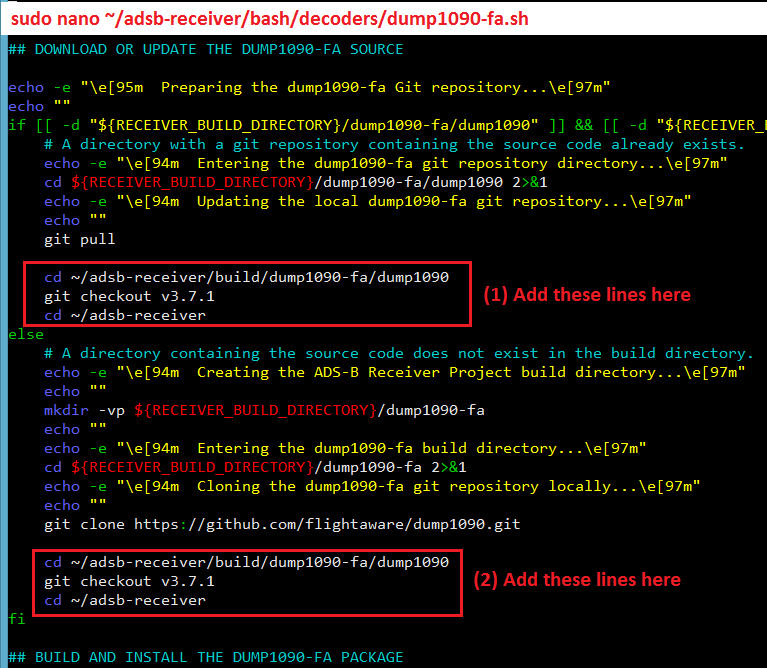
(2) Next carry out following workaround for dump1090-fa
sudo nano ~/adsb-receiver/bash/decoders/dump1090-fa.sh
-
Ctrl+w, type
git pull, press Enter key. Cursor will jump to:git pullBelow this line, add following lines: cd ~/adsb-receiver/build/dump1090-fa/dump1090git checkout v3.7.1cd ~/adsb-receiver -
Ctrl+w, type
git clone, press Enter key. Cursor will jump to:git clone https://github.com/flightaware/dump1090.gitBelow this line, add following 3 lines:cd ~/adsb-receiver/build/dump1090-fa/dump1090git checkout v3.7.1cd ~/adsb-receiver
Save (Ctrl+o) and close (Ctrl+x)
.
.
(3) Next carry out following workaround for Piaware
sudo nano ~/adsb-receiver/bash/feeders/piaware.sh
-
Ctrl+w, type
git pull, press Enter key. Cursor will jump to:git pullBelow this line, add following lines:cd ~/adsb-receiver/build/piaware_buildergit checkout v3.7.1cd ~/adsb-receiver -
Ctrl+w, type
git clone, press Enter key. Cursor will jump to:git clone https://github.com/flightaware/piaware_builder.gitBelow this line, add following 3 lines:cd ~/adsb-receiver/build/piaware_buildergit checkout v3.7.1cd ~/adsb-receiver
Save (Ctrl+o) and close (Ctrl+x)

.
(4) Last execute the following commands:
cd ~/adsb-receiver
chmod +x install.sh
./install.sh
.
RESULTS
pi@raspberrypi:~ $ apt-cache policy dump1090-fa
dump1090-fa:
  Installed: 3.7.1
  Candidate: 3.7.1
  Version table:
 *** 3.7.1 100
        100 /var/lib/dpkg/status
pi@raspberrypi:~ $ apt-cache policy piaware
piaware:
  Installed: 3.7.1
  Candidate: 3.7.1
  Version table:
 *** 3.7.1 100
        100 /var/lib/dpkg/status
.
.
