
obsidian-clipper
 obsidian-clipper copied to clipboard
 jplattel
Inconsistent
I love this extension.....when it works.
I cannot count the number of times that I've set it up, tested it successfully, clipped a a few items, and then I come back at another time and it doesn't work at all. I truly don't understand it.
The only factor I can imagine causes the problem is that I put my Obsidian files on a synced OneDrive. I had set it up successfully on iCloud, but that was tricky because the folder structure on MacOS is kinda odd for iCloud. But OneDrive places its folder in the normal file structure.
I recently got a Windows machine with Windows 11, and I set up my Obsidian there addressing the same files in OneDrive. Windows has a direct file structure as well, so it should address properly. Last night, I did some testing. It worked wonderfully on both machines simultaneously and separately. This morning,........nothing. I just don't get it.

have you had a chance to review this?
to give more clarity, the reference to the file in the terminal would be /Users/[username]/Library/Mobile\ Documents/[doc location]. I have had that work in the past. It's not quite working now for some reason. I'm curious your thoughts.
Yeah, I'll look into it shortly!
I've seen other people experience the same problems with iCloud. But it might have to do with other factors as well.. Using a direct path might work, but just the vault title should work too...

the problem being that there is a Documents folder on the hard drive and also one in the iCloud drive hidden folder.
Let me test whether I can sync to iCloud from the native drive folder in a manner I had not yet checked and let you know. This is important because it allows me to use the Obsidian App on the iPhone effectively.
Update. Now that I'm back looking at this, the way Obsidian iPhone works is it goes directly to the iCloud area and not to documents.
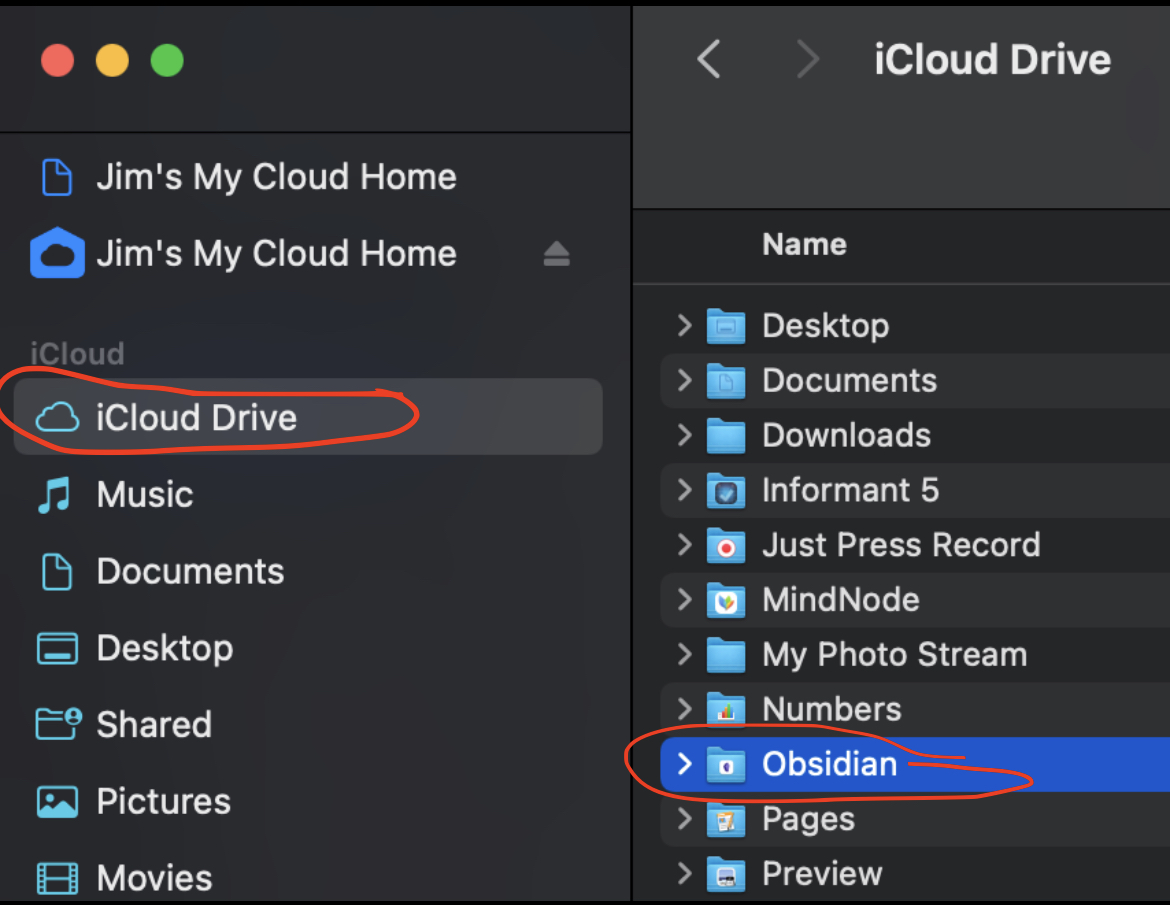
I just tried clipping a note to a vault configured to be in iCloud and that worked for me. Maybe something is up with the page you're clipping from. Do you have an example which doesn't work for you? We'll get to the bottom of this! :)
Oh sorry about that, didn't read correctly!
I've just tested this on my mac with a vault in iCloud. Saving the configuration and then testing results in a successful clipping being shown in Obsidian for me. What did you configure as a vault name?
"Obsidian". I had attempted in the past (once successfully) to use the proper iCloud folder structure as one would use for a cd in the terminal. But that stopped working for some reason.
Alright! I've just released 0.5.0. it's a reworked quite a lot. Could you test it? It seemed to work with a vault of mine in iCloud and both the test function and other clippings!
Ok....working on that now. I see v 0.4.1 in the Chrome store still. I'll work on it manually from the code
it doesn't see the downloaded .crx file when I attempt to load in developer mode. Maybe a header issue?
You'll need to drag the .crx file into the chrome window which is open with chrome://extensions 😄
This is Brave mind you.........here's the notification I get. I had already done that.
In Brave it's "brave://extensions/". but that shouldn't make a difference.

Oh.. that's strange. Does it work with previous versions? I recently switched to manifest version 3.0, which might be a cause for problems. I'll try out Brave too and see if I run into an error like this.
Just tried it with Brave and it works for me.... this is getting strange..
it's also possible to load an unpacked extensions so you if you download the repository and then click on the load unpacked button and select the src folder of this repo it should install the plugin too.
thanks....I need to see what's going on here on my end. This is very odd. I'll let you know what I find out.
Still in process here. I feel a bit foolish. on my Windows Machine, I needed to use the Zip file to drag over. It installed there. the Zip file is in an "unsupported format" on my Mac, so it won't install there. And the .crx file still has the same error as before as well. The Zip doesn't normally unzip from the folder in MacOS either. Still working
Also, when I get to it, did you use the path I shared above in the setup to create the connection to the iCloud folder.
Ok....did a quick test with Firefox. It doesn't address the iCloud folder either addresses at /Users/[username]/Library/Mobile\ Documents/[doc location]
Same problem here, in some pages it just won't clip example: The buzz on energy drinks - Mayo Clinic Health System, attempting to clip from "PEACH ICED TEA" until the end of the article just won't work Test clip works fine My clipping format looks like this:
{clip}

---
#clippings

Clipped from [{title}]({url}) at {date}.
