

 jpd002
Building Play!
Quick summary
I can't build play!
System Details
Describe the ambient being used to run Play! Information needed:
- Windows 10
- i3 7100 GTX 1050TI
Issue Details
When building Play! an error appears which says that it can't find some qt5 libraries,how can I fix this? This issue appear with cmake gui,visual studio(2022) and with cmd.
"CMake Error at Source/ui_qt/CMakeLists.txt:249 (find_package): By not providing "FindQt5.cmake" in CMAKE_MODULE_PATH this project has asked CMake to find a package configuration file provided by "Qt5", but CMake did not find one.
Could not find a package configuration file provided by "Qt5" with any of the following names:
Qt5Config.cmake
qt5-config.cmake
Add the installation prefix of "Qt5" to CMAKE_PREFIX_PATH or set "Qt5_DIR" to a directory containing one of the above files. If "Qt5" provides a separate development package or SDK, be sure it has been installed."

i fixed this by setting the qt directory in CMakeLists.txt
(view screenshot)
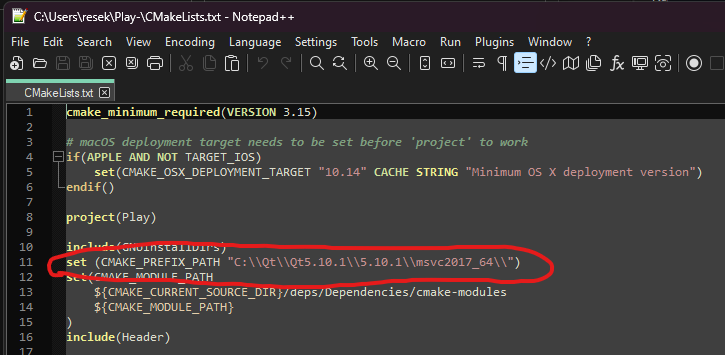 simply add this line to the file and it should work. it worked for me. make sure to replace
 Qt5.10.1 and 5.10.1 with the version of qt that you have
