
ComplexHeatmap
 ComplexHeatmap copied to clipboard
 jokergoo
Possible to align main body of multiple Heatmaps with dynamic width and variable row-wise components?
I want to align multiple Heatmaps (different underlying matrices) using plot_grid, grid.arrange (or another solution?) such that the Heatmap bodies are aligned as well as having dynamically resized width upon changing the plotting window width. Right-align would work since the variation between my other Heatmap components (dendrogram, row text, row labels) among plots is all on the left side.
I was accomplishing this with some success by changing left padding for each of the Heatmaps based on how wide the rest of the horizontal components of the plot are, but this is cumbersome because of the differences in having a left-side dendrogram/not having a left-side dendrogram, differrent widths of left-side row text, different widths of left-side row labels, etc..
Do you have any suggestions as to how I can accomplish this?
Thanks so much. Your package is really useful to me.
Matt

Here is an example of what the plots look like in a Shiny app running locally through RStudio (top) and remotely using shiny-server (bottom). I want to understand why the alignment is different. Seems that it is likely a shiny problem, but if I understand how to adjust the relevant Heatmap components properly maybe I can mitigate it. Note the widths of the plot are different, but even after adjusting the widths the shiny-server version is still wrong (overlapping, misaligned).
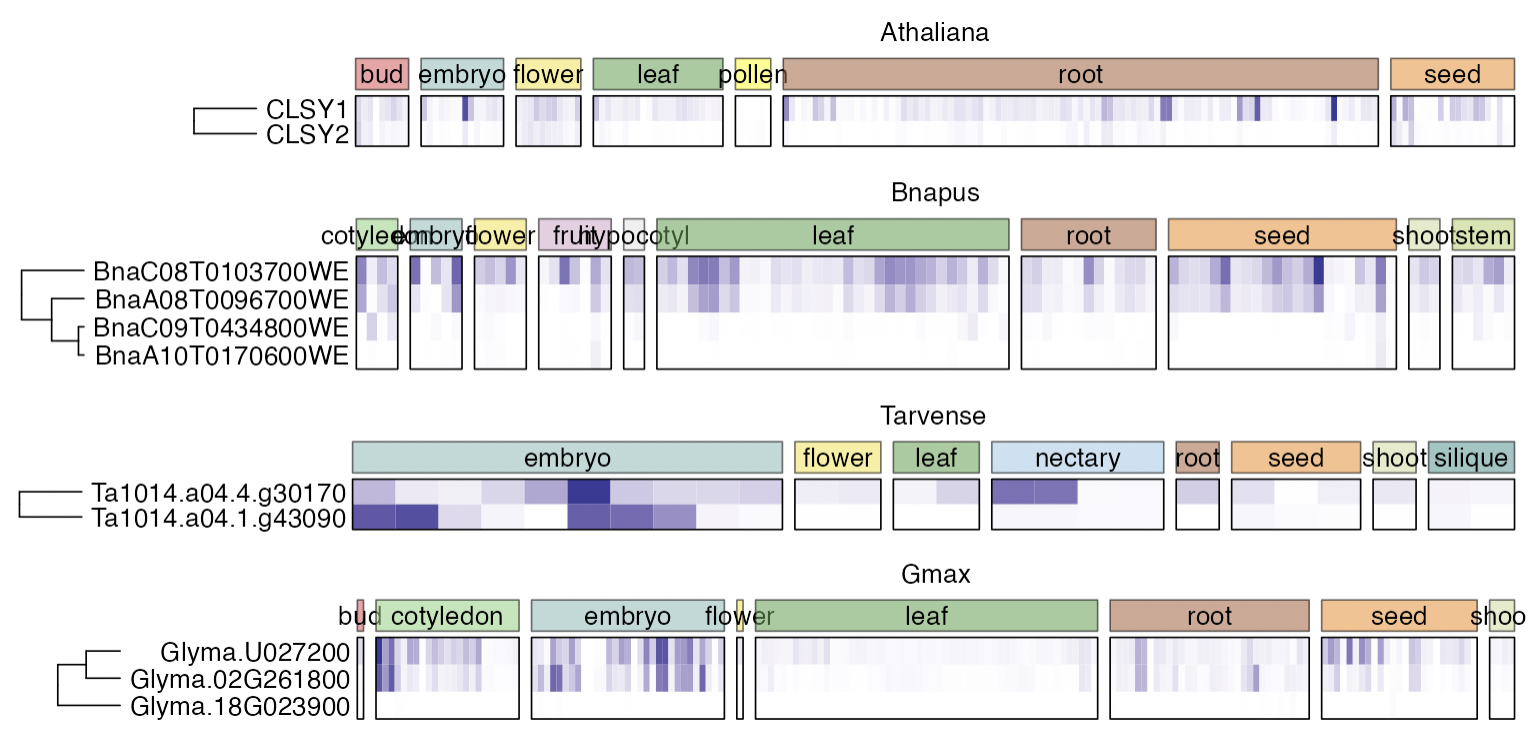
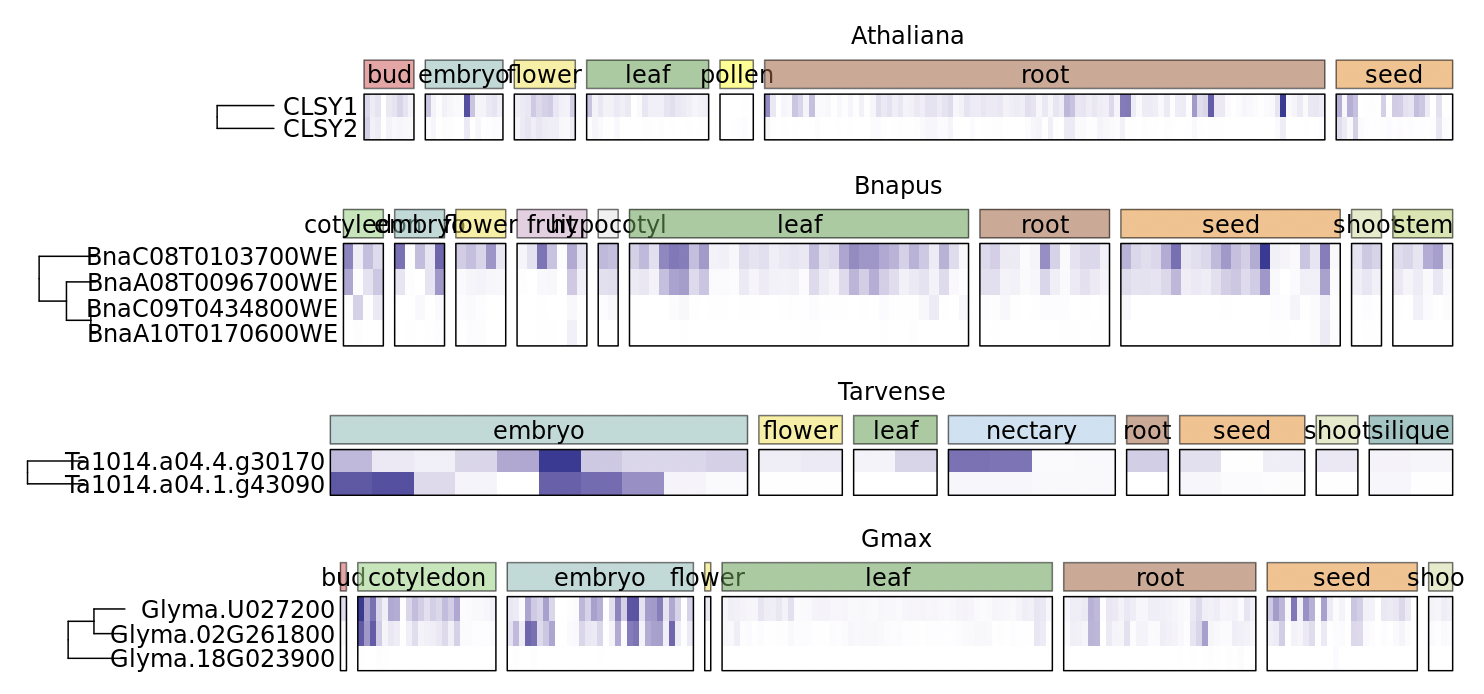
First, this is a very interesting use case!
I have to say, this is not a ComplexHeatmap-related thing. It is about how to combine multiple figure panels into a big figure. But I have a complicated solution for you :)
Here the key thing is to calculate the total width of all heatmap components on the left side of all heatmaps, then later when drawing each individual heatmap, we can have a proper "offset" on the most left.
I first generate two heatmaps, with different number of columns and with different widths of row dendrograms:
m1 = matrix(rnorm(20*5), nrow = 5)
ht1 = Heatmap(m1, column_km = 2, show_column_dend = FALSE, show_heatmap_legend = FALSE, row_dend_width = unit(2, "cm"))

m2 = matrix(rnorm(30*4), nrow = 4)
ht2 = Heatmap(m2, column_km = 3, show_column_dend = FALSE, show_heatmap_legend = FALSE, row_dend_width = unit(3, "cm"))
If simply use cowplot or patchwork packages, the two heatmap will not be aligned, just like what you have done.
First step, calculate the total size of all left components of the heatmap body:
ht1 = prepare(ht1)
ht2 = prepare(ht2)

left1 = sum(component_width(ht1, 1:4))
left2 = sum(component_width(ht2, 1:4))
max_left = max(left1, left2)
prepare() initialize the layout and process the heatmap object (e.g. calculating the size of every heatmap components). component_width() calculates the width of all heatmap components (left title, left dendrogram, left annotation, left row labels, heatmap body, right ...). The first four elements correspond to all left heatmap components.
max_left contains maximal left heatmap componets width of all heatmaps.
Next, we capture the output of two heatmaps as grid objects.
p1 = grid.grabExpr(draw(ht1))
p2 = grid.grabExpr(draw(ht2))
Now we can create viewports, and put p1 and p2 in. For each one, we calculate the offset (or margin) on the most left side:
The first heatmap:
grid.newpage()

pushViewport(viewport(y = 0, height = unit(0.5, "npc"), just = "bottom"))
offset = max_left - left1
pushViewport(viewport(x = offset, width = unit(1, "npc") - offset, just = "left"))
grid.draw(p1)
popViewport()
popViewport()
The second heatmap:
pushViewport(viewport(y = 0.5, height = unit(0.5, "npc"), just = "bottom"))
offset = max_left - left2
pushViewport(viewport(x = offset, width = unit(1, "npc") - offset, just = "left"))
grid.draw(p2)
popViewport()
popViewport()
And the final plot:
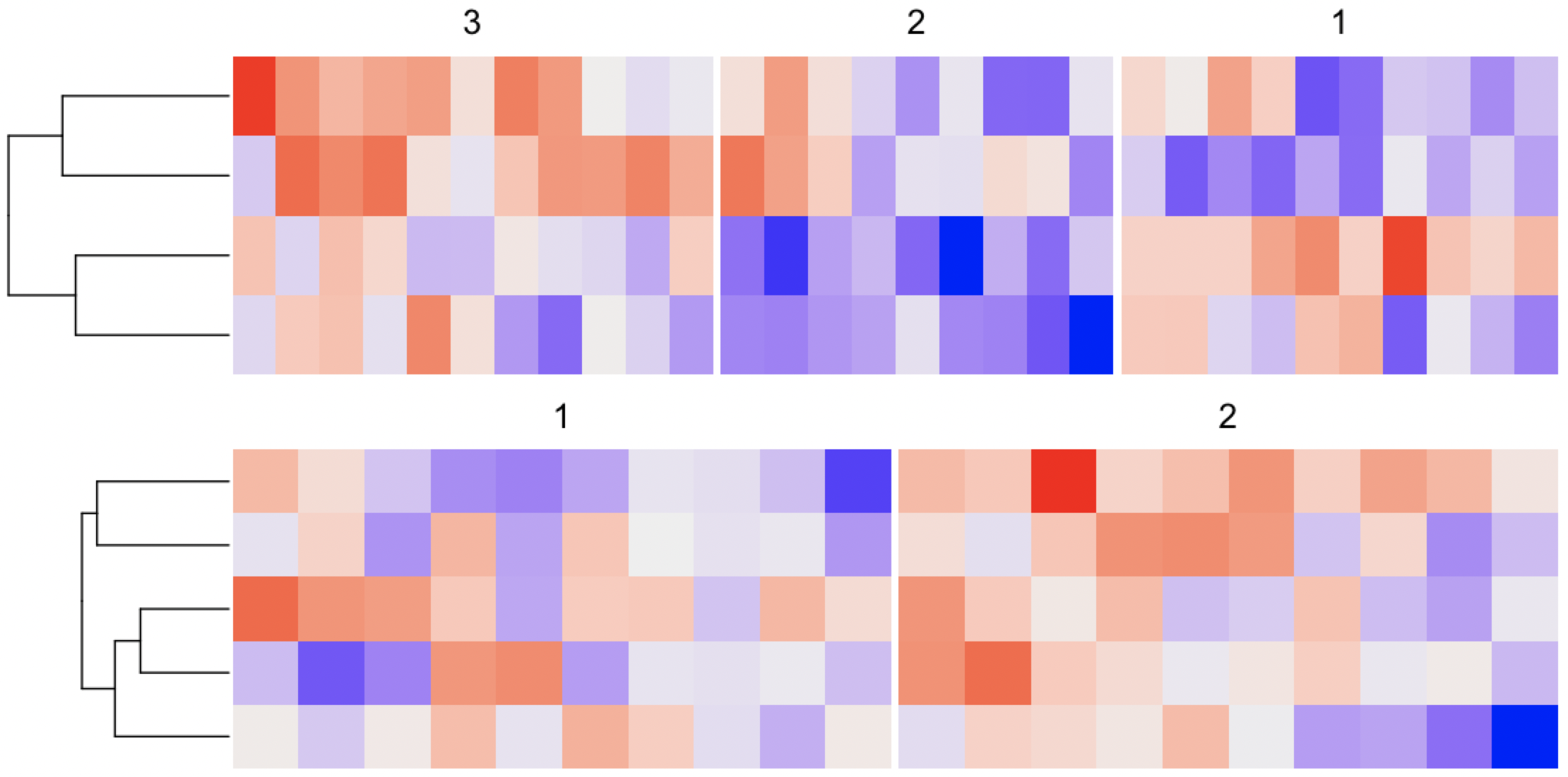

Thank you so much for finding and sharing your solution! I have not been able to try it out yet but as soon as I have time to I will and then report my results.