

 johnlindquist
Windows: Dragging kit window has some "lag"
I perceived that every time I intend to drag the kit Window it "lags" and when is out of focus it disappears.
Is this intentional?
Edition: Windows 10 Pro Version: 22H2 OS build: 19045.2486 Experience: Windows Feature Experience Pack 120.2212.4190.0

Lag isn't intentional. Any chance you could make a video of it?
Also, could you check the ~/.kit/logs/kit.log and see if there are a lot of "Resized" calls firing or anything suspicious?
If you want to keep a prompt open when losing focus, you need to "ignoreBlur":
await arg({
    placeholder: "This should stay open",
    ignoreBlur: true
}, ["Yay", "Huzzah!"])

Logs: https://pastebin.com/KYzyz1AW Video: https://streamable.com/pu7c4x
Brand new first-time installation

Does dragging lag after the install is complete?
Yes, after a PC restart it still behaves like shown
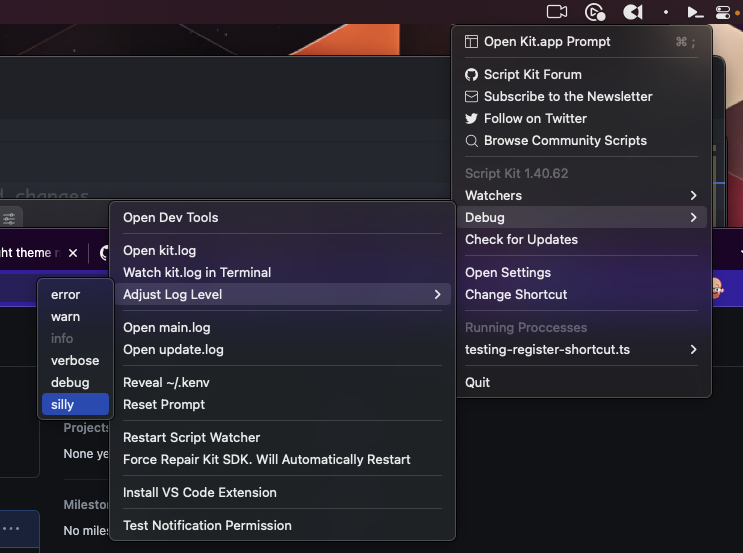
@FlareFlo Can you adjust the log level to "silly", drag the window around, then check the logs again?
(On windows, right-click on the tray icon)
Hi guys, I had exactly the same issue on the same Windows version. To solve it I had to execute the program in Windows 7 compatibility mode (right click on the program icon > properties > compatibility tab). Hope that this workaround can help to fix/reproduce the issue. Here is a short video: https://streamable.com/liqgwh (My windows interface is in french, but it should be ok)

@Evyweb any idea why that would only be required on certain machines? Really curious if that's something I can fix on our end.
I don't really know what happens but if I remove the option "Display the content of windows when moving" (may not be the exact translation) in the Windows performance settings, I can run Kit without changing the compatibility mode. Maybe something related to the blur effect in the background of the program that Windows 10 doesn't like? Do we have an option to remove this blur effect that I can eventually test quickly?
@Evyweb No options yet.
It uses the https://www.npmjs.com/package/glasstron-clarity lib for the window background effect. I'll put an option in the next build to be able to turn it off.
