

 johnlindquist
Failed to change activation shortcut on windows 11 on Brazilian Portuguese Keyboard Layout
When I change the activation shortcut via "Change activation shortcut" option in windows the file reflect the change but it continues to use the default one.
File "C:\Users[username].kit\db\shortcuts.json" after chage
{
  "shortcuts": {
    "C:\\Users\\[username]\\.kit\\main\\index.js": "control /"
  }
}
Here is kit.log with the change in the shortcut being the last item in the file: kit.log

@fcrespo82
I just tried it on my windows laptop and it worked. 🤔
- Any chance there's another app that's already using
control /? - Does changing it to another shortcut work?

I found that some work and some don't. I don't know why...
But certainly I do not have any app using ctrl /
@fcrespo82
Interesting, your logs show
[2023-01-26 14:09:40.784] [info] 🔑 Converted key: NumpadDivide -> /
My logs show
[2023-01-26 14:09:40.784] [info] 🔑 Converted key: Slash -> /
Also, your logs show your keymap is detected like so:
{
  "keymap": [
    "Sleep -> null",
    "WakeUp -> null",
    "KeyA -> a",
    "KeyB -> b",
    "KeyC -> c",
    "KeyD -> d",
    "KeyE -> e",
    "KeyF -> f",
    "KeyG -> g",
    "KeyH -> h",
    "KeyI -> i",
    "KeyJ -> j",
    "KeyK -> k",
    "KeyL -> l",
    "KeyM -> m",
    "KeyN -> n",
    "KeyO -> o",
    "KeyP -> p",
    "KeyQ -> q",
    "KeyR -> r",
    "KeyS -> s",
    "KeyT -> t",
    "KeyU -> u",
    "KeyV -> v",
    "KeyW -> w",
    "KeyX -> x",
    "KeyY -> y",
    "KeyZ -> z",
    "Digit1 -> 1",
    "Digit2 -> 2",
    "Digit3 -> 3",
    "Digit4 -> 4",
    "Digit5 -> 5",
    "Digit6 -> 6",
    "Digit7 -> 7",
    "Digit8 -> 8",
    "Digit9 -> 9",
    "Digit0 -> 0",
    "Enter -> null",
    "Escape -> null",
    "Backspace -> null",
    "Tab -> null",
    "Space ->  ",
    "Minus -> -",
    "Equal -> =",
    "BracketLeft -> ´",
    "BracketRight -> [",
    "Backslash -> ]",
    "Semicolon -> ç",
    "Quote -> ~",
    "Backquote -> '",
    "Comma -> ,",
    "Period -> .",
    "Slash -> ;",
    "CapsLock -> null",
    "F1 -> null",
    "F2 -> null",
    "F3 -> null",
    "F4 -> null",
    "F5 -> null",
    "F6 -> null",
    "F7 -> null",
    "F8 -> null",
    "F9 -> null",
    "F10 -> null",
    "F11 -> null",
    "F12 -> null",
    "PrintScreen -> null",
    "ScrollLock -> null",
    "Pause -> null",
    "Insert -> null",
    "Home -> null",
    "PageUp -> null",
    "Delete -> null",
    "End -> null",
    "PageDown -> null",
    "ArrowRight -> null",
    "ArrowLeft -> null",
    "ArrowDown -> null",
    "ArrowUp -> null",
    "NumLock -> null",
    "NumpadDivide -> /",
    "NumpadMultiply -> *",
    "NumpadSubtract -> -",
    "NumpadAdd -> +",
    "NumpadEnter -> null",
    "Numpad1 -> null",
    "Numpad2 -> null",
    "Numpad3 -> null",
    "Numpad4 -> null",
    "Numpad5 -> null",
    "Numpad6 -> null",
    "Numpad7 -> null",
    "Numpad8 -> null",
    "Numpad9 -> null",
    "Numpad0 -> null",
    "NumpadDecimal -> null",
    "IntlBackslash -> \\",
    "ContextMenu -> null",
    "Power -> null",
    "NumpadEqual -> null",
    "F13 -> null",
    "F14 -> null",
    "F15 -> null",
    "F16 -> null",
    "F17 -> null",
    "F18 -> null",
    "F19 -> null",
    "F20 -> null",
    "F21 -> null",
    "F22 -> null",
    "F23 -> null",
    "F24 -> null",
    "Help -> null",
    "Undo -> null",
    "Cut -> null",
    "Copy -> null",
    "Paste -> null",
    "AudioVolumeMute -> null",
    "AudioVolumeUp -> null",
    "AudioVolumeDown -> null",
    "NumpadComma -> .",
    "IntlRo -> /",
    "KanaMode -> null",
    "IntlYen -> null",
    "Convert -> null",
    "NonConvert -> null",
    "Lang1 -> null",
    "Lang2 -> null",
    "Lang3 -> null",
    "Lang4 -> null",
    "ControlLeft -> null",
    "ShiftLeft -> null",
    "AltLeft -> null",
    "MetaLeft -> null",
    "ControlRight -> null",
    "ShiftRight -> null",
    "AltRight -> null",
    "MetaRight -> null",
    "MediaTrackNext -> null",
    "MediaTrackPrevious -> null",
    "MediaStop -> null",
    "Eject -> null",
    "MediaPlayPause -> null",
    "MediaSelect -> null",
    "LaunchMail -> null",
    "LaunchApp2 -> null",
    "LaunchApp1 -> null",
    "BrowserSearch -> null",
    "BrowserHome -> null",
    "BrowserBack -> null",
    "BrowserForward -> null",
    "BrowserStop -> null",
    "BrowserRefresh -> null",
    "BrowserFavorites -> null"
  ]
}
Can you think of any reason why some of the keys appear to be mapped "incorrectly"?
For example:
"Semicolon -> ç",
"Slash -> ;"
Is this what your layout looks like?
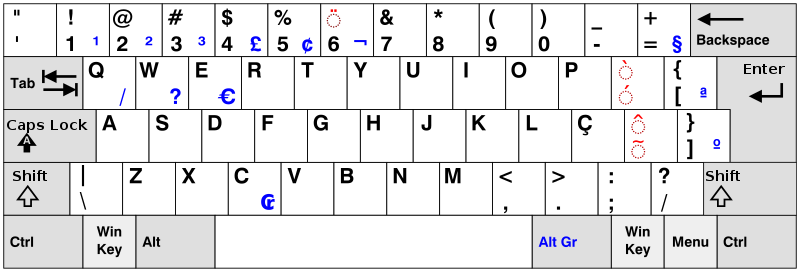
The app accounts for various layouts (Dvorak, Chinese, etc), so I'm not exactly sure why the conversion Brazilian Portuguese would be failing...
What does your shortcuts.json look like with the default shortcut?
Apologies ahead of time if I'm unable to figure this out. This is nightmarishly difficult to test.
It's similar, but I think this will suffice.
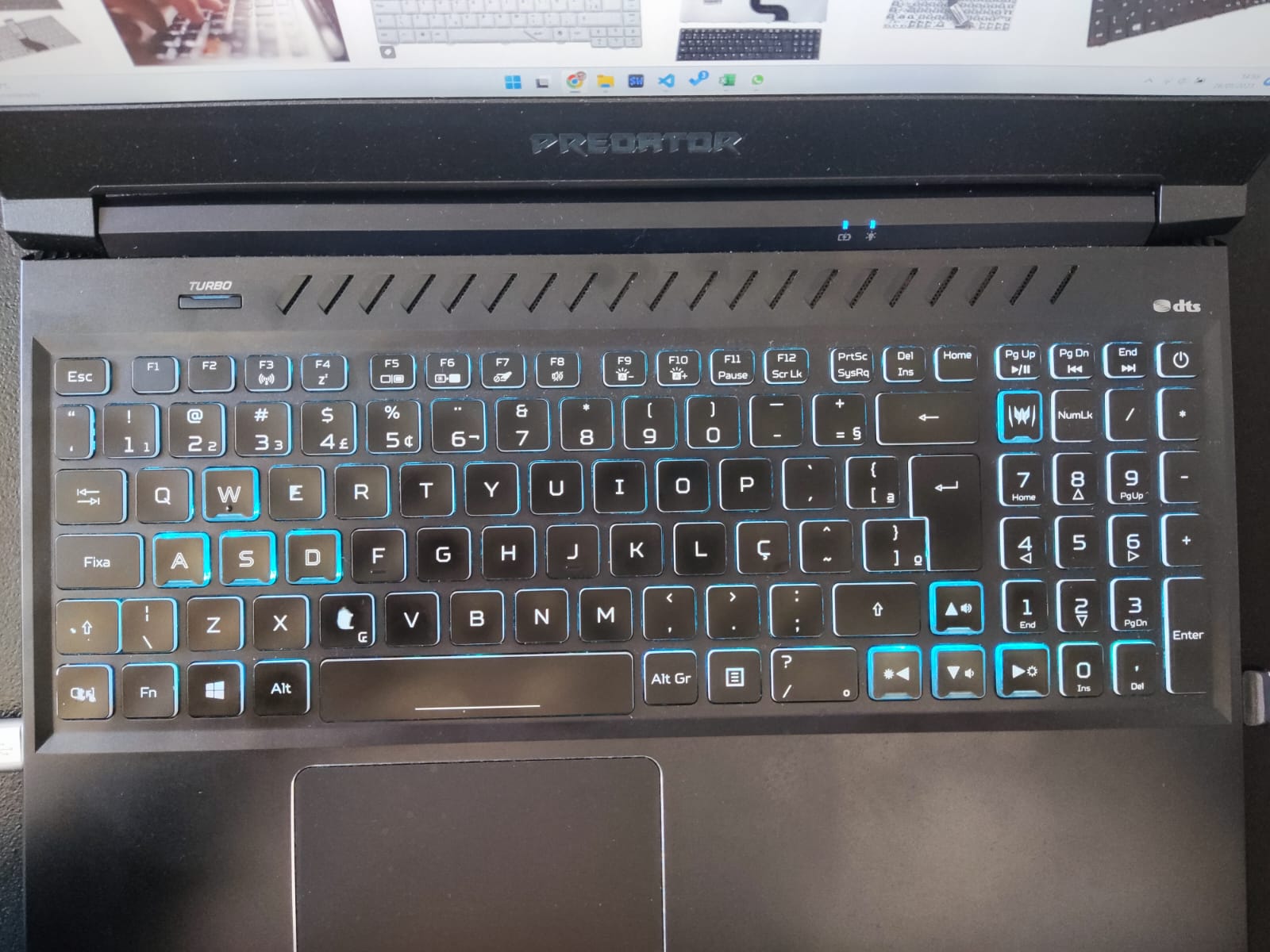
My default shortcuts.json looks like this
{
  "shortcuts": {
    "C:\\Users\\fernando\\.kit\\main\\index.js": "control ;"
  }
}
Apologies ahead of time if I'm unable to figure this out. This is nightmarishly difficult to test.
No worries... if you can point me where in the code this is treated. I'll be happy to help identify.
Just for note, I needed to change the shortcut "control ç" in my Ubuntu with a Brazilian keyboard, with the semicolon did not work.
